980 User Guide Rev. B29
Page 81 August 5, 2011
5 Real Time Mode
This chapter describes how to view the incoming HDMI metadata in real time using the Real Time mode. The Real
Time mode is only available through the built-in front panel display. It is not supported through the external 980
Manager. The Real Time mode enables you can view the following data in real time:
Video – View the incoming video even when encrypted with HDCP.
Infoframes – View the AVI, Audio, Vendor Specific infoframes.
Data Islands – View various other data islands such as General Control Packet and Source Product
Descriptor.
Video Timing Data – View the format, resolution, color depth, video type and specific pixel values.
DDC Data – View the DDC transactions such as the EDID and HDCP transactions and CEC messaging.
5.1 Accessing the Real Time mode
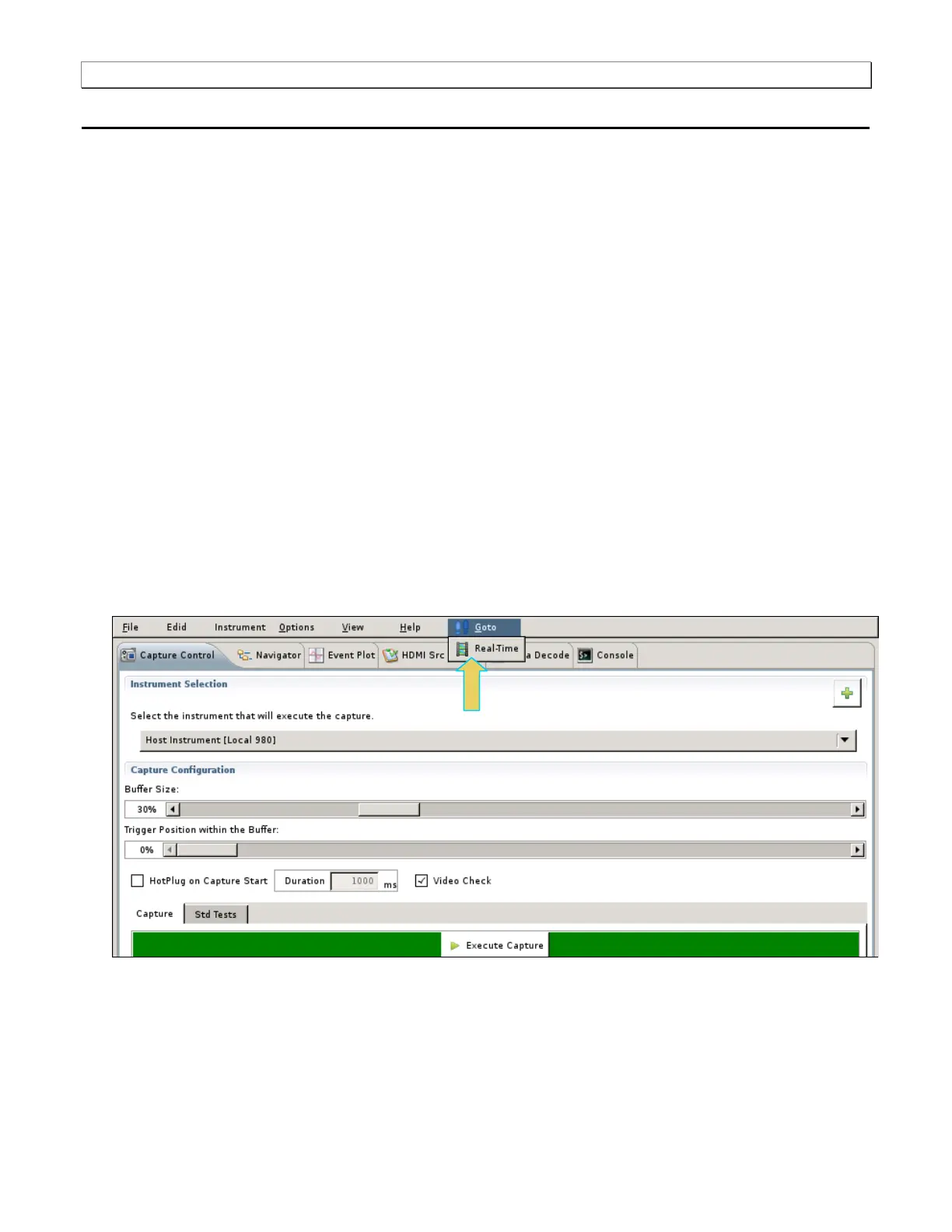
When you boot up the 980, the Real Time mode will be displayed by default. However once you have selected to
view the Capture mode, you can navigate back to the Real Time using the procedure below. It assumes that you
have an HDMI cable connected from your HDMI source device and the 980 Protocol Analyzer and that your source
device is outputting HDMI video.
To enable the Real Time mode:
1. Select the Real Time mode on the built-in front panel by touch selecting the GoTo pull-down menu and
selecting the Real Time item.
5.2 Real Time Mode Overview
This section describes the Real Time mode user interface.
5.2.1 Real Time Mode - Interface Description



 To Next Page