980 User Guide Rev. B29
Page 18 August 5, 2011
To make the physical connections using Ethernet Point-to-Point connection with the external GUI
Manager:
This procedure is used when using the external 980 GUI Manager and connecting to the 980 directly with an
Ethernet cable. If you are connecting through your corporate LAN, use the previous procedure. This procedure is
required to establish an IP session between the 980 GUI Manager running on the 980 Protocol Analyzer. This
procedure assumes that you have assembled the 980 Protocol Analyzer, host PC and source device under test
and applied power to all these devices. Refer to the procedure and diagrams below.
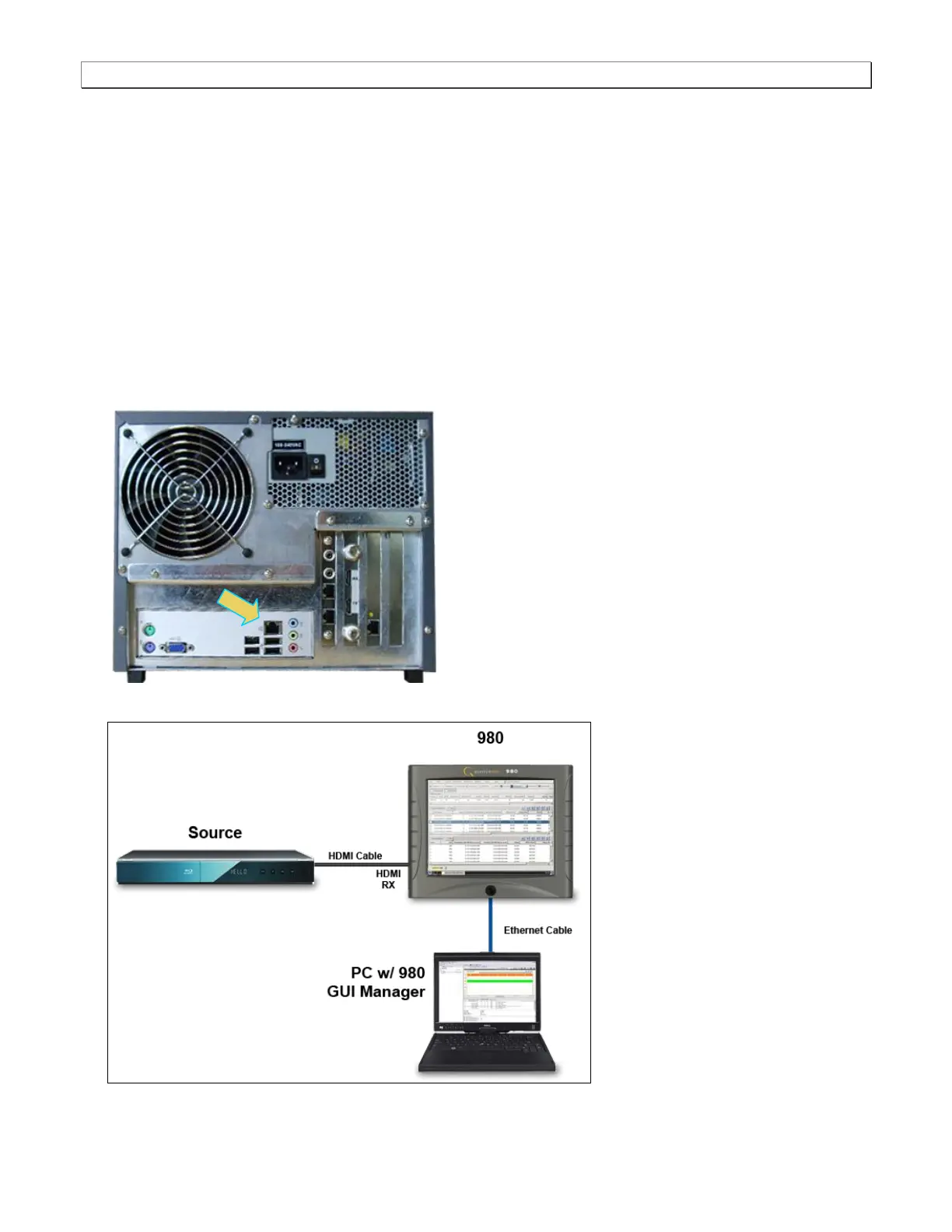
1. Connect an Ethernet cable from the 980 Ethernet jack on the lower left half of the back panel of the 980
Protocol Analyzer frame to your PC hosting the 980 GUI Manager. The IP address on this 980 port is
configurable using the procedures that follow.
Refer to the diagrams below. The first diagram shows the connection port on the back of the 980. The second
illustrations shows a direct Ethernet connection when testing an HDMI source.



 To Next Page