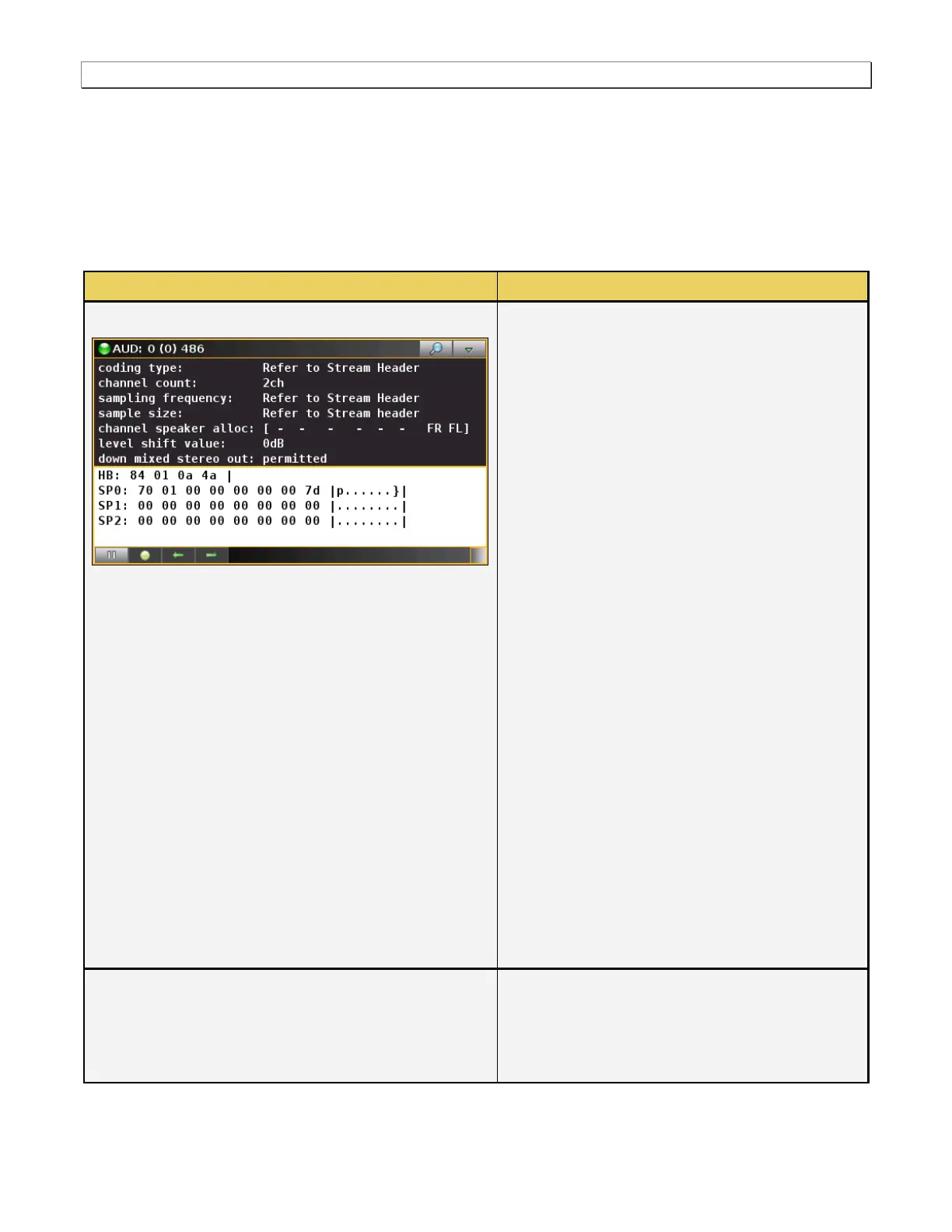
The following information is provided in the Audio
Infoframe data dialog box:
[Audio] Coding type – Indicates the audio
format such as AC-3, DTS, One Bit Audio,
Dolby Digital, etc. ―Refer to Stream Header‖
indicates that this information is carried in the
audio stream.
Channel Count – Indicates the number of audio
channels.
Sampling frequency – Indicates the sampling
frequency which can be 32, 44.1, 48, 88.2, 96,
176.4 or 192kHz. ―Refer to Stream Header‖
indicates that this information is carried in the
audio stream.
Sample size – Indicates the sampling size
which is 16, 20 or 24 bit. ―Refer to Stream
Header‖ indicates that this information is
carried in the audio stream.
Channel speaker allocation – Applies only to
multichannel LPCM audio. Describes how
various speaker locations are allocated to
transmission channels.
Level shift value – Indicates how much
attenuation is applied. Range of values are:
0dB to 15dB.
Down mixed stereo out - Applies only to
multichannel LPCM audio. Indicates how much
the source had attenuated the audio during the
down-mixing operation.
There is a pulldown menu associated with the
audio infoframe panel. You can access either from
the main control panel or from the audio infoframe
panel via the icon on the upper right of the panel.
The audio infoframe pulldown menu provides the



 To Next Page