Quicksilver 805PH — System & Component Overview and Operaon
41
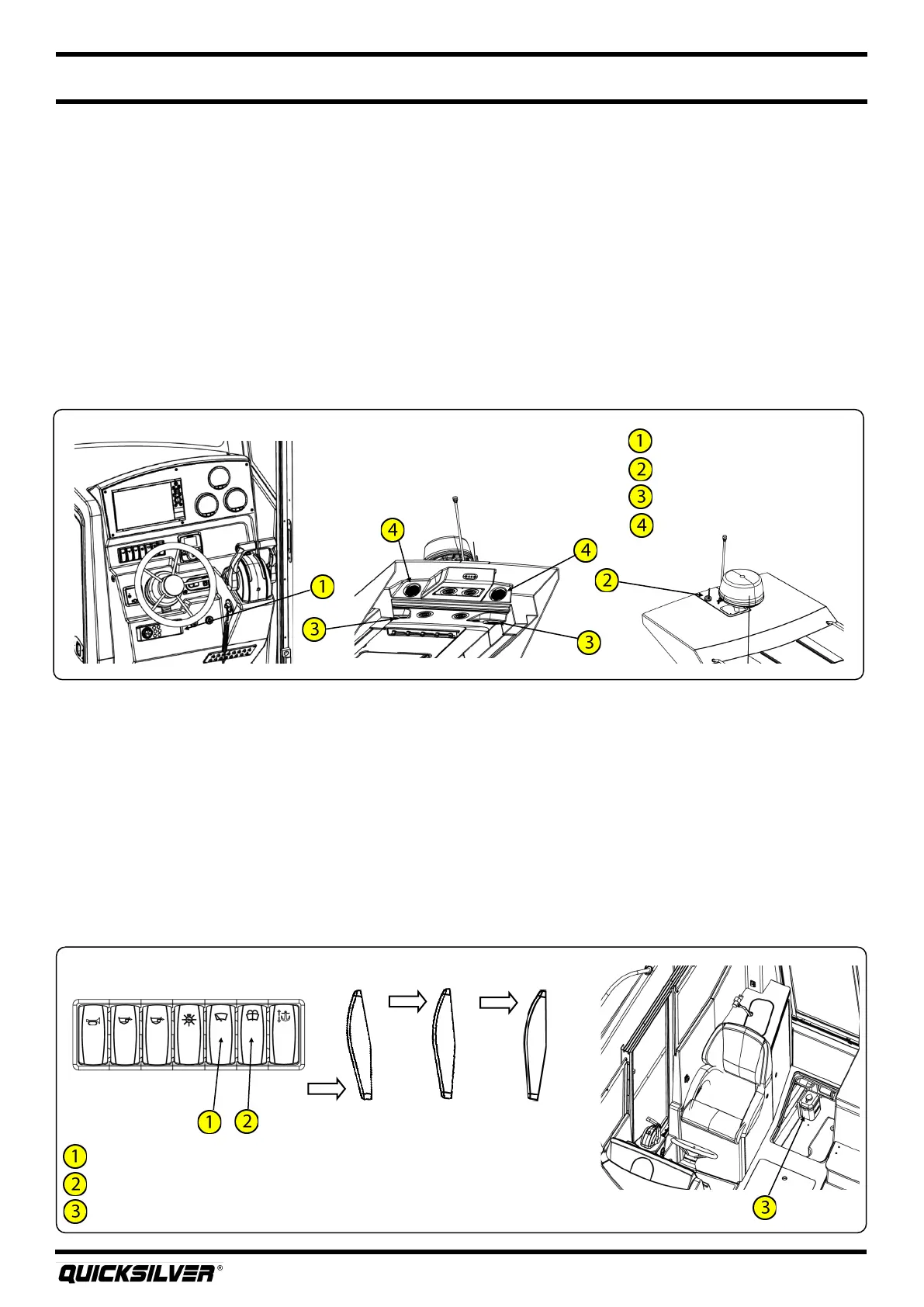
Windshield wiper switch
Windshield washer switch
Windshield washer reservoir
Windshield Wiper
Stereo
DAB antenna
Interior speakers
Exterior speakers
Stereo
Park Slow Fast
Wiper motor switch posions
21. Windshield Wipers
Your boat is equipped a dual speed windshield wiper system for use in inclement weather. To use,
simply press the windshield wiper switch located at the helm. Pressing the switch once to the center
posion of the switch will run the wiper in the slow mode. Pressing the switch again to the upper
posion will run the wiper in the fast mode. Pushing the switch at anyme to the full down posion
will return the wiper to the park posion.
Your vessel may be equipped with an oponal windshield washer system. A 1.5L reservoir is located in
the lower liner bilge. To ll, simply remove the cap on the reservoir and ll with uid approved in your
country of use. For colder climates, Quicksilver® recommends using a uid with anfreeze. To
operate, simply press and hold the windshield washer switch located at the helm.
20. Stereo (oponal)
Your boat may come equipped with an AM/FM stereo with Bluetooth®. The stereo unit is located on
the dash, and you can connect an external player for music playback through the boat’s stereo via the
Bluetooth® sengs. If equipped with a factory installed GPS, the stereo can be controlled via screens
on the GPS unit. Refer to the GPS manual for complete instrucons.
In certain countries, radio signals are broadcasted digitally. Quicksilver® oers a DAB antenna, where
required, for recepon of digital broadcast signals.
There are four speakers on the boat, located on the hardtop.
REFER TO THE MANUFACTURER’S MANUAL FOR COMPLETE INSTRUCTIONS AND WARRANTY.



 To Next Page