18 Chapter 2
Main windowMain window
Main windowMain window
Main window
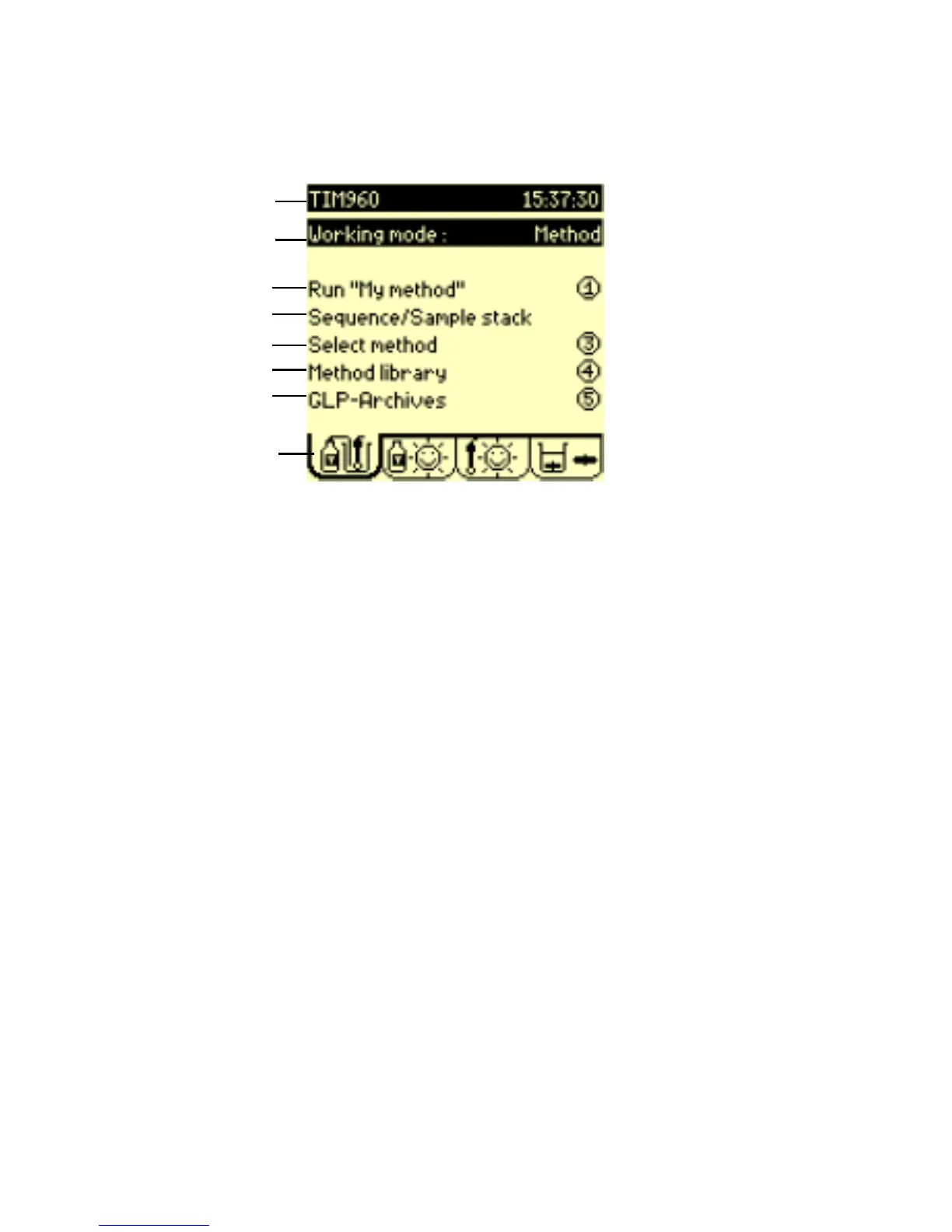
When the instrument is switched on the Main window is displayed.
1. Title bar: indicates the instruments name and the current time.
2. Working mode: Select the way in which you want to work. Choose
from Method, SAC Method, Sequence, SAC Sequence,
Reprocessing; refer to previous page.
3. Check or Run: check or run the selected method /sequence. The
method can be run when 2 sunny icons are displayed in the
Reagents and Electrodes tabs.
If 2 cloudy/stormy icons are
displayed, activate the "Check" command. The Titration
Manager will automatically guide you through the necessary
operations required to solve the problem(s)
.
4. Sequence/sample stack: if SAC Sequence or Sac Method
has been selected in step 2 above. Program the sample stack.
Select or edit the method sequence.
5. Select method: select method to be used for the analyses.
6. Method library: supervisor use only: create, edit, reset and delete
methods to correspond to your specific needs.
Or Display methods - routine use only : display the main
parameters of the selected method.
7. GLP-Archives: access GLP tables and visualise the stored method
sample results and global variables.
8. Method tab: Animated icon indicates when a method/sequence is
running.
8
1
2
3
4
5
6
7


 To Next Page