ESP-2WIRE Controller
5
NOTICE
• Always place 2-Wire decoders and
connections inside a valve box.
• Assure that wires are not exposed
after installation.
Connect Field Wiring to the Controller
a
Route all field wires through the opening at the
bottom or back of the unit.
WARNING
Do not route valve wires through the
same opening as power wires.
b
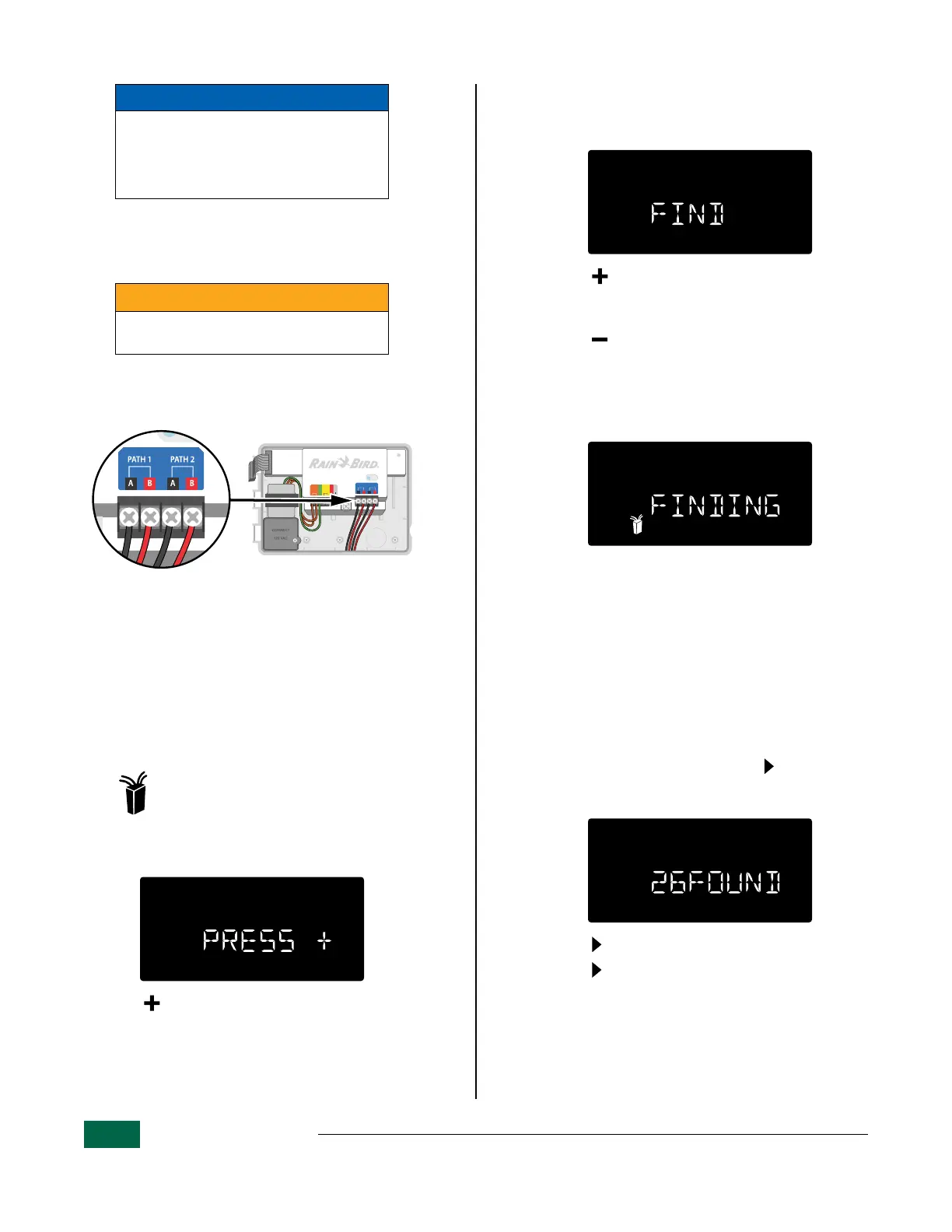
Using a screwdriver, connect the two wire ends
of the field wiring to a set of terminals on the
ESP-2WIRE Controller.
STATUS
FLOW
FLOW
GND
24VAC
ONLY
SENSOR
PATH 1PATH 2
AB AB
Connect Field Wiring.
B
NOTE: The controller includes a grounding
lug for system grounding at the controller.
Station/Decoder Auto Address
Function
Use the Auto Address feature to search for decoders
on your system and assign them to station numbers
automatically.
Turn the dial to: 2-Wire Settings
a
The display message will scroll:
PRESS + TO PGM FIELD DEVICES TO ZONE
• Press to continue.
b
The display message will scroll:
FIND FIELD DEVICES_PRESS
+
IF MV USED_
PRESS
-
IF MV NOT USED
• Press if your system has a master valve. The
lowest decoder address will be assigned to the
master valve.
• Press if your system does not have a master
valve and the lowest decoder address will be
assigned to station #1.
c
The display message will scroll:
FINDING FIELD DEVICES
During this sequence, the LED on the back plane
of the controller and all decoders connected to the
2-wire path will blink blue.
d
When the search is completed, the display
message will scroll:
XX FOUND PRESS NEXT
Where “XX” is the number of field decoders found
connected to the 2-Wire path.
B
NOTE: If your controller did not find the prop-
er number of decoders, press to proceed
and see a list of station and decoder address
assignments.
• Press to continue.
• Press to scroll through station numbers to
review the assigned addresses for each station.
B
NOTE: If the decoders were installed in
sequential order, the Decoder Auto-Address
feature will add them to the lowest station
number without a previously assigned de-
coder address.


 To Next Page