ESP-2WIRE Controller
6
Gaps in Station Numbering
Clearing a station’s address creates a gap in the
station numbering.
For example:
Table 3.1 shows that:
• Station 3 has been cleared, creating a gap in the
numbering.
Before Change
Station
Decoder
Address
1 20145
2 20146
3
4 20148
5 20149
6 20150
Table 3.1
If new decoders are added to the system later on,
then running Auto Address again will cause station
3 to populate first, then stations 7, 8 and so on.
Change a Station’s Decoder Address
a
With the station number flashing, press or
to select the station/address that you want to
change.
b
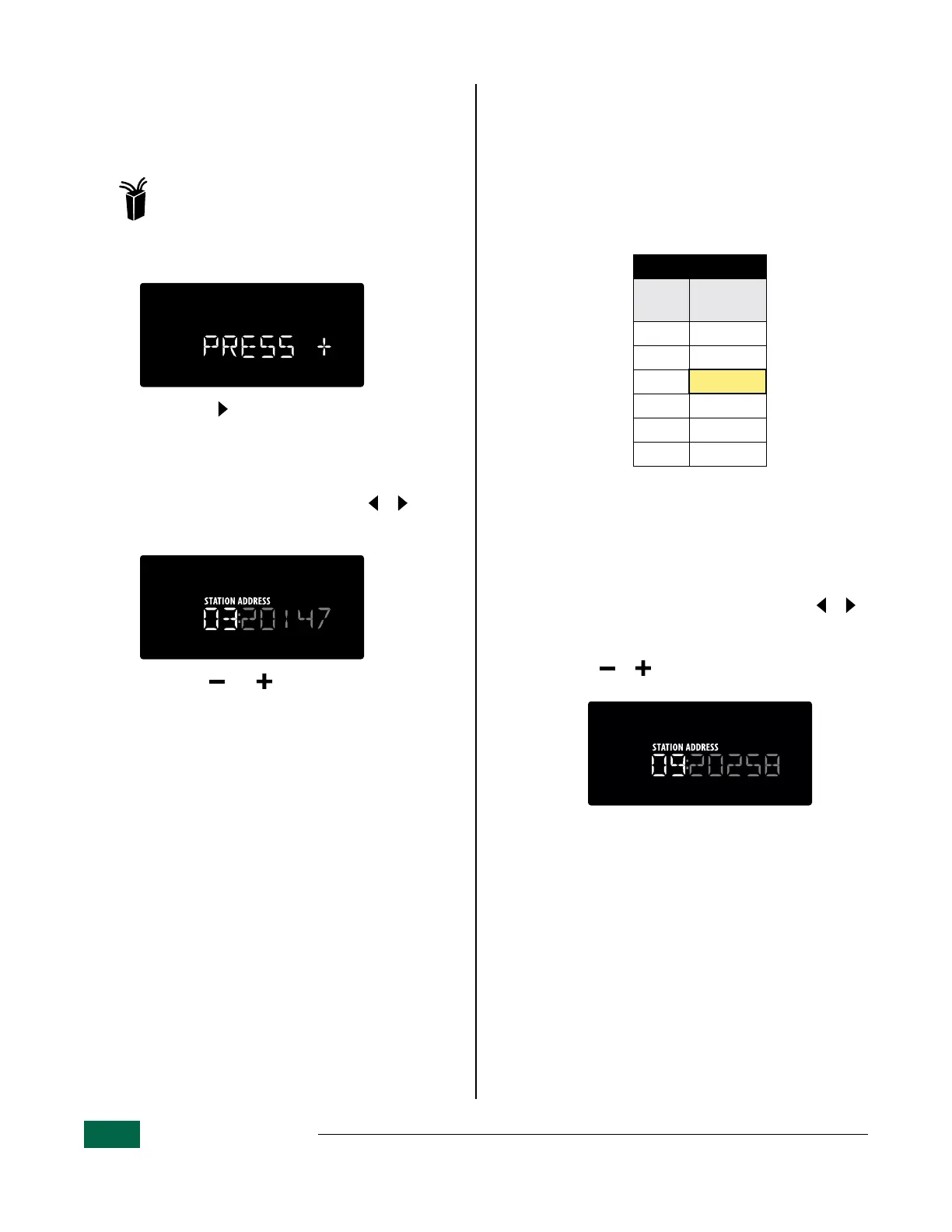
Press or to change the station number
for the selected address.
Clear or Change a Station’s Decoder
Address
Follow these steps to clear or change station/
decoder address assignments.
Turn the dial to: 2-Wire Settings
a
The display message will scroll:
PRESS + TO PGM FIELD DEVICES TO ZONE
b
Press and HOLD to bypass the FIND process
and show the list of currently programmed
decoder addresses.
Clear a Station Decoder Address
a
With the station number flashing, press or
to select the station/address that you want to
clear.
b
Press and hold and simultaneously
to erase the station’s address from the
configuration.
• Repeat for all stations as desired.


 To Next Page