ESP-2WIRE Controller
7
Swapping Decoder Addresses In The Existing
2-Wire Configuration
If an existing address was already paired to
another station number, then the two stations will
“swap” addresses.
For example:
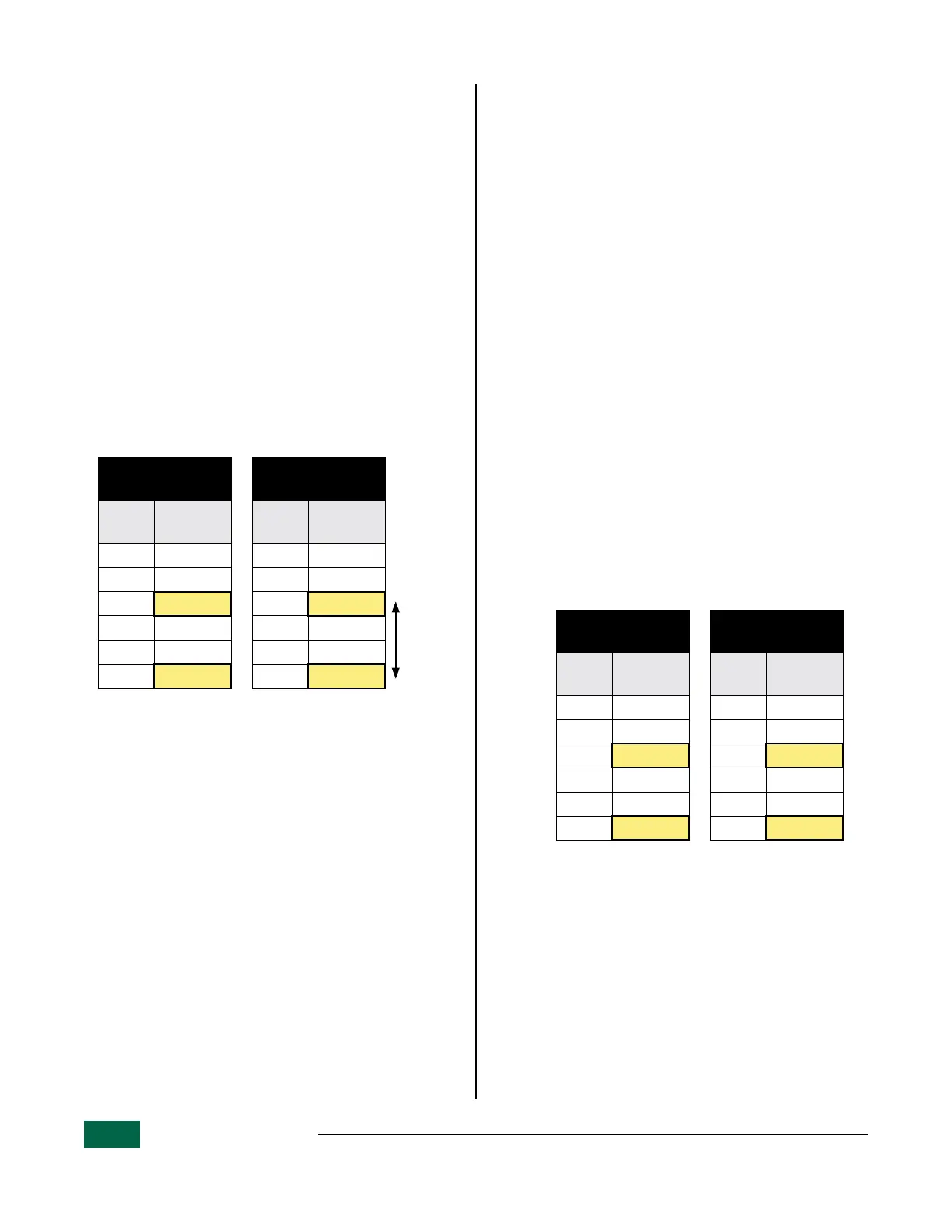
Table 4.1 shows that:
• Station 9 has address 20258.
• Station 12 has address 20834.
Moving address 20834 to station number 9 will
also cause address 20258 to move to station 12.
• Station 9 will then have address 20834 as shown
in Table 4.2.
• Station 12 will then have address 20258.
• No other stations decoder addresses have
moved as a result of this “swap”.
Before Changing
Decoder Address
After Changing
Decoder Address
Station
Decoder
Address
Station
Decoder
Address
7 20256 7 20256
8 20257 8 20257
9 20258 9 20834
10 20832 10 20832
11 20833 11 20833
12 20834 12 20258
Table 4.1 Table 4.2
Replacing Existing Decoders
Replacing Decoders Within The Existing
2-Wire Configuration
Repeat Station/Decoder Auto Address Function as
shown on page 5.
For the station you would like to replace, first Clear
a Station Decoder Address as shown on page 6.
This will not move any other addresses in the se-
quence. Instead, it creates an empty slot for a new
decoder to populate.
• Running the Auto Address function again will
cause the lowest new decoder address to popu-
late first to the lowest station number that does
not currently have an address assigned.
• Existing station addresses remain unchanged.
For example:
Table 5.1 shows that:
• Station 16 and 19 are empty.
After running Auto Address again:
• The first new decoder, with an address of 10134
will populate station 16, as shown in Table 5.2
• The second new decoder, with an address of
21347 will populate station 19.
Before Replacing
Decoders
After Replacing
Decoders
Station
Decoder
Address
Station
Decoder
Address
14 20367 14 20367
15 20368 15 20368
16 16 10134
17 20370 17 20370
18 20371 18 20371
19 19 21347
Table 5.1 Table 5.2
B
NOTE: Even though address 10134 is the
lowest in the new sequence, the controller
assigned it to the lowest available station
number, in this case station 16. All addresses
that were previously programmed prior to
finding new decoder addresses will remain
unchanged.


 To Next Page