EAGLE™
User Manual
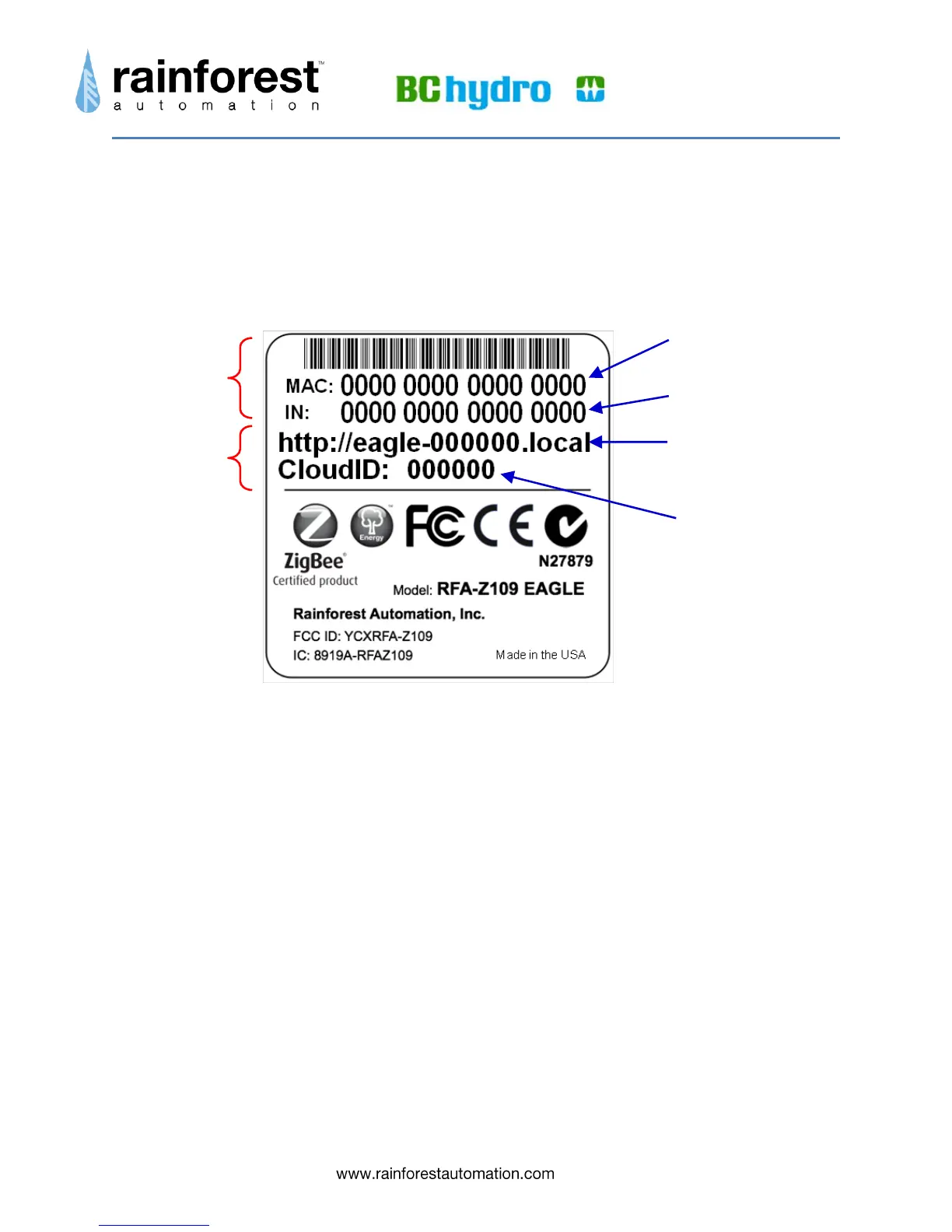
Understanding the Information Label
The information Label is located on the underside of your EAGLE™. It contains
important information that you will need to operate your device.
ZigBee Area – This area at the top of the label has two fields:
o MAC: the 802.15.4 ZigBee MACID.
o IN: the Install code for the device.
Both of these numbers are unique to your device, and are loaded into your meter
by your utility. Only when the meter is loaded with these numbers can it
communicate with your EAGLE™.
Ethernet Area – This area in the middle of the label has two fields:
o Local: the local URL, or Local Web Address of your EAGLE™, which is
used to find it on your Local Area Network (LAN) using your web browser.
o CloudID: the last 6 digits of the Ethernet MAC address of the device,
which is used when registering the device with a Cloud Service.
Both of these numbers uniquely identify your device on the Internet Protocol (IP)
network.
Install Code
MAC Address
Local Web
Address
Cloud ID
ZigBee
Area
Ethernet
Area


 To Next Page