
 Need help?
Do you have a question about the rainforest EAGLE and is the answer not in the manual?
Compliance statements and conditions for FCC regulations.
Information on radio frequency exposure limits and safety distances.
Compliance statement for Canadian digital apparatus.
Compliance with C-Tick labeling and radio transmitter requirements.
Required software, hardware, and network connection for setup.
Instructions on connecting the power adapter and booting the device.
Steps to connect the device to a web browser for initial access.
How to find and use the device's local URL for web access.
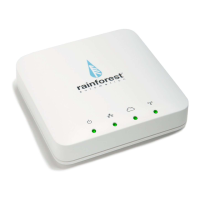
Overview of the device's LED indicators for status monitoring.
Identification of the device's physical connection ports.
Overview of the label containing essential device identification information.
General description of the EAGLE as a smart meter gateway and its benefits.
Information on using the Web Viewer, mobile apps, and cloud services.
Indicates the device is powered on.
Shows the status of the local Ethernet network connection.
Indicates the status of the connection to a cloud service.
Shows the status of the ZigBee link to the smart meter.
Socket for connecting the AC adapter to power the device.
Socket for connecting the Ethernet cable to the local network.
Socket for expanding device functions; nothing should be plugged in.
Information on MAC ID and Install Code for ZigBee communication.
Details on Local Web Address and Cloud ID for network identification.
Explains the Current Usage and Meter Reading display modes.
Details on pricing, cost per hour, and fast update feature.
Displays historical energy consumption in Demand and Consumption modes.
How to zoom, hover, and download historical data from graphs.
How to view and acknowledge text messages from the utility.
Configuration for Time, TimeZone, Language, and Price.
Information on the device's internet connection status.
Steps to configure streaming data to cloud services.
Information about the ZigBee link to the smart meter.
Access to hardware, firmware, and network configuration options.
Steps to set up the EAGLE upload server for Bidgely.
Guide to creating a user account on the Bidgely website.
Instructions on how to view energy data on the Bidgely dashboard.
Steps to set up the EAGLE upload server for Wattvision.
Steps to pair the EAGLE with a Wattvision account via Google.
How to view near real-time energy data on the Wattvision Live tab.
Solutions for web browser connectivity issues with the EAGLE.
Solutions for the Web Viewer showing "Loading" and unable to get data.
Provides the link for technical support and assistance.
 General
| Brand | rainforest |
|---|---|
| Model | EAGLE |
| Category | Gateway |
| Language | English |

 To Next Page