EAGLE™
User Manual
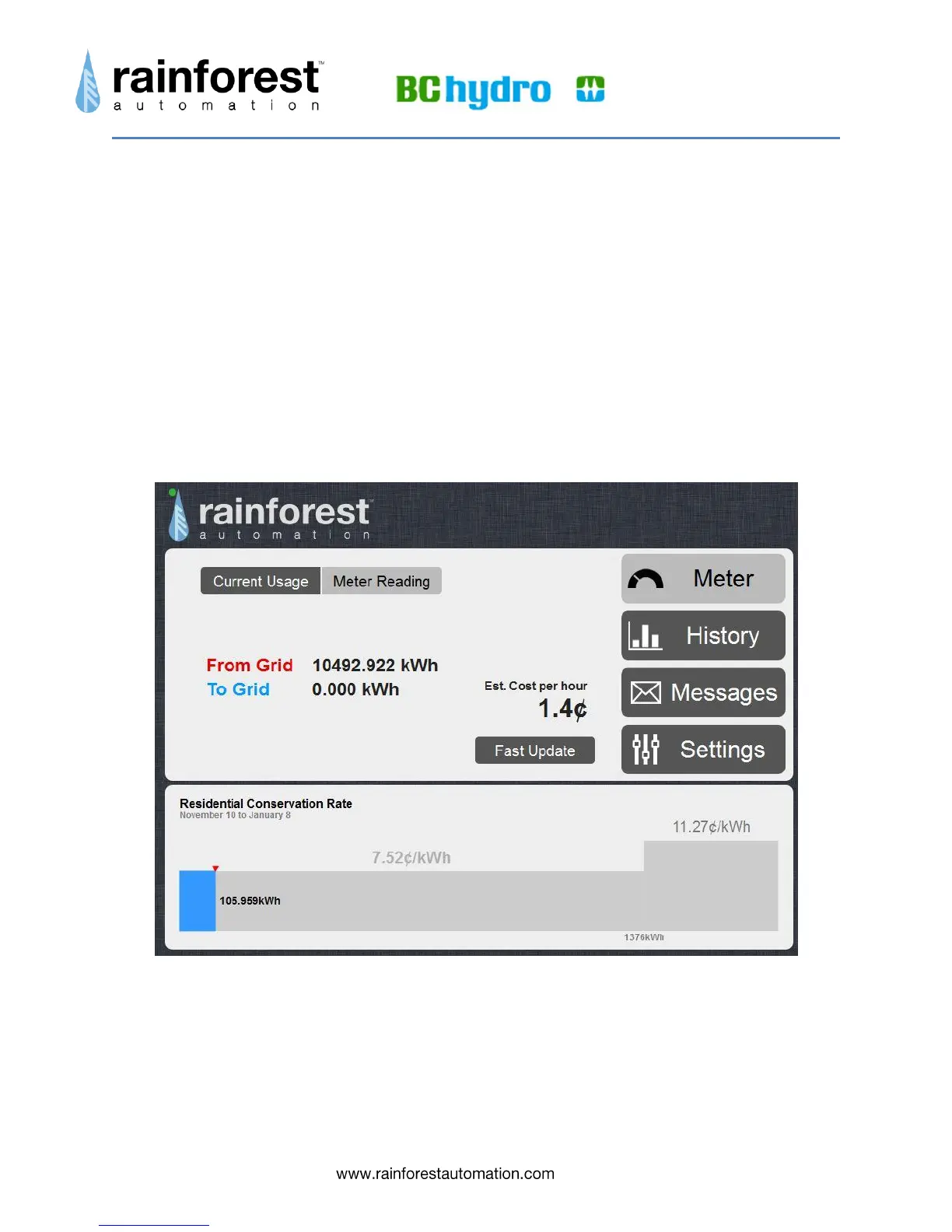
There are two display modes:
Current Usage, shown above, displays the rate at which you are consuming
energy in kilowatts. This is shown as a self-scaling meter graph with a number
below.
Meter Reading, shown below, displays the raw, total accumulated electricity
usage reading in kilowatt-hours from the smart meter. This usage is labeled,
“From Grid”. If you are generating your own electricity (for instance, with solar
panels), and have a Net Metering agreement with your utility, then there may be
times when you will be producing more energy than you are using, and electricity
will flow out to the grid. The total of this surplus electricity you have delivered out
to the grid is labeled “To Grid”.
You can switch between these two modes by clicking the “Current Usage” and “Meter
Reading” buttons above the usage display.
Below the usage display is a separate panel with pricing information that illustrates the
2- step residential pricing rate used by BC Hydro. The bar graph shows the total usage
in the current billing cycle, with the active price shown in bold above the current step.
The active price will flash briefly when then meter sends a pricing update.


 To Next Page