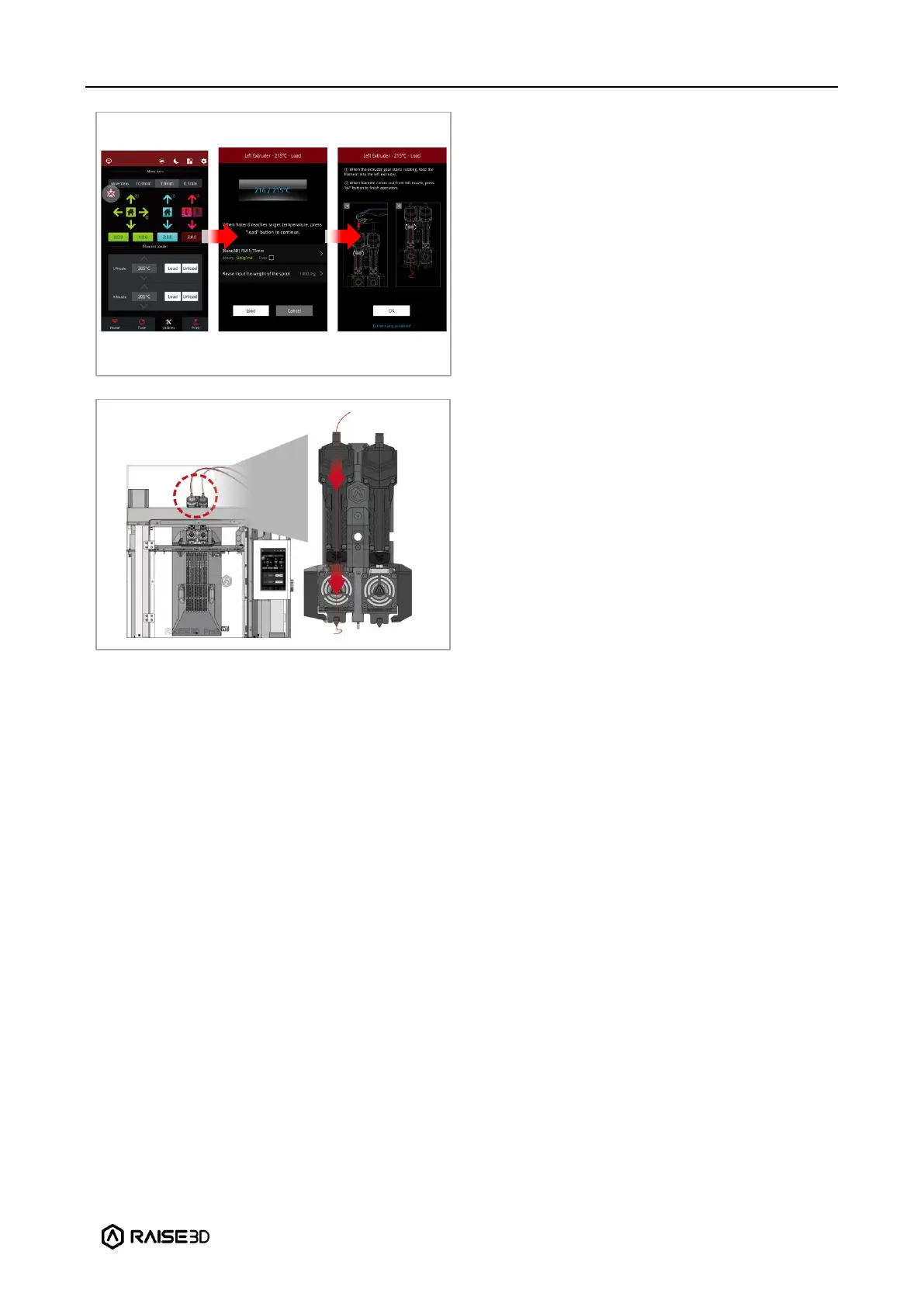
After loading filament onto the left
extruder, select “Utilities” at the bottom of
the screen, and set the left nozzle
temperature to the appropriate printing
temperature for the filament you are using.
For example, the default loading
temperature of Raise3D Hyper Speed PLA is
220°C. Here, the left nozzle temperature is
set to that default value.
Note: Generally, the recommended loading
and unloading temperature of the filament
should be 5-10°C higher than the printing
temperature.
Click “Load”, and the printer will start
heating. When the printer reaches the
target temperature, click “Load” button to
load the filament.
Important: These instructions are based on
the properties of Raise3D Hyper Speed PLA
filament. The Pro3 HS series printers come
with one roll of Raise3D Hyper Speed PLA
(Red) and one roll of Raise3D Hyper Core
ABS CF15 (Black). We recommend using
Raise3D Hyper Speed PLA for testing and
initial setup.
The extruder gear will start to rotate. Gently
push the filament into the extruder by hand.
When the filament is extruded out from the
nozzle, click “OK” to complete the loading.
Insert the guide tube back into the quick
connector.



 To Next Page