Raise3D Pro3 HS Series Printer User Manual Dual Extruder Printing
36
G. Dual Extruder Printing
G.1 Load Filament
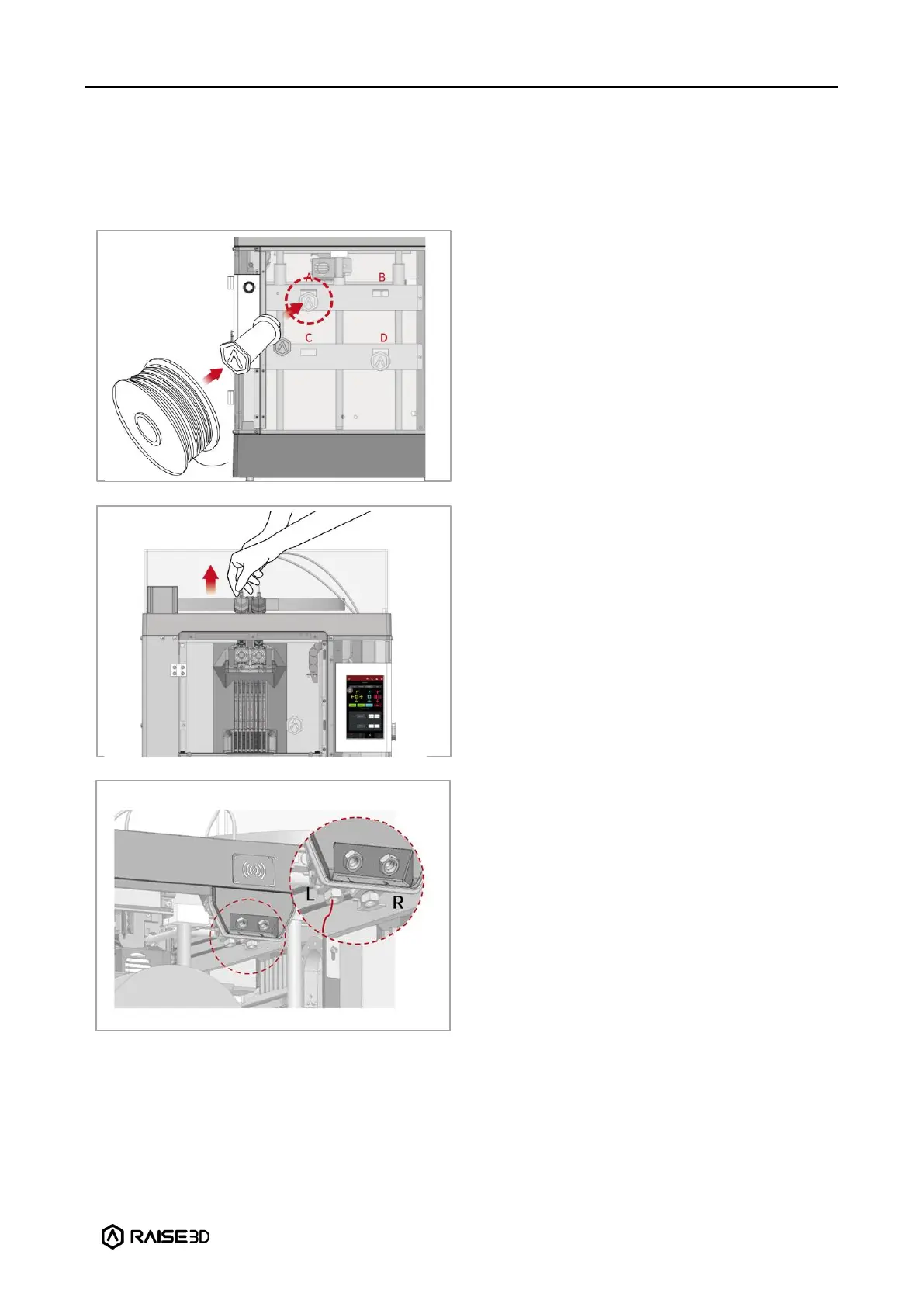
Open the side door of the printer and place
the filament holder on the installation point.
Place a spool of Raise3D Hyper Speed PLA
printing filament on the holder.
Note: If the filament is installed at points B
and D, it is recommended to place the
filament in a clockwise direction. If the
filament spool installed at points A and C, it
is recommended to place the filament spool
in a counterclockwise direction.
Press and hold the quick connector on the
extruder and pull out the filament guide
tube.
Pass the tip of the filament into the
left/right inlet and through the guide tube.
Note: Here we take the left extruder as an
example, because the operation of the left
extruder is the same as that of the right
extruder. The left and right inlets are as
shown in the figure, please do not mix them
up.
You can also feed the filament from an
external filament box through the external
left/right inlets located on the right side.



 To Next Page