GETTING TO KNOW YOUR INSTRUMENT PANEL 105
INSTRUMENT CLUSTER DISPLAY
C
ONTROLS
The instrument cluster display features a driver
interactive display that is located in the instrument
cluster.
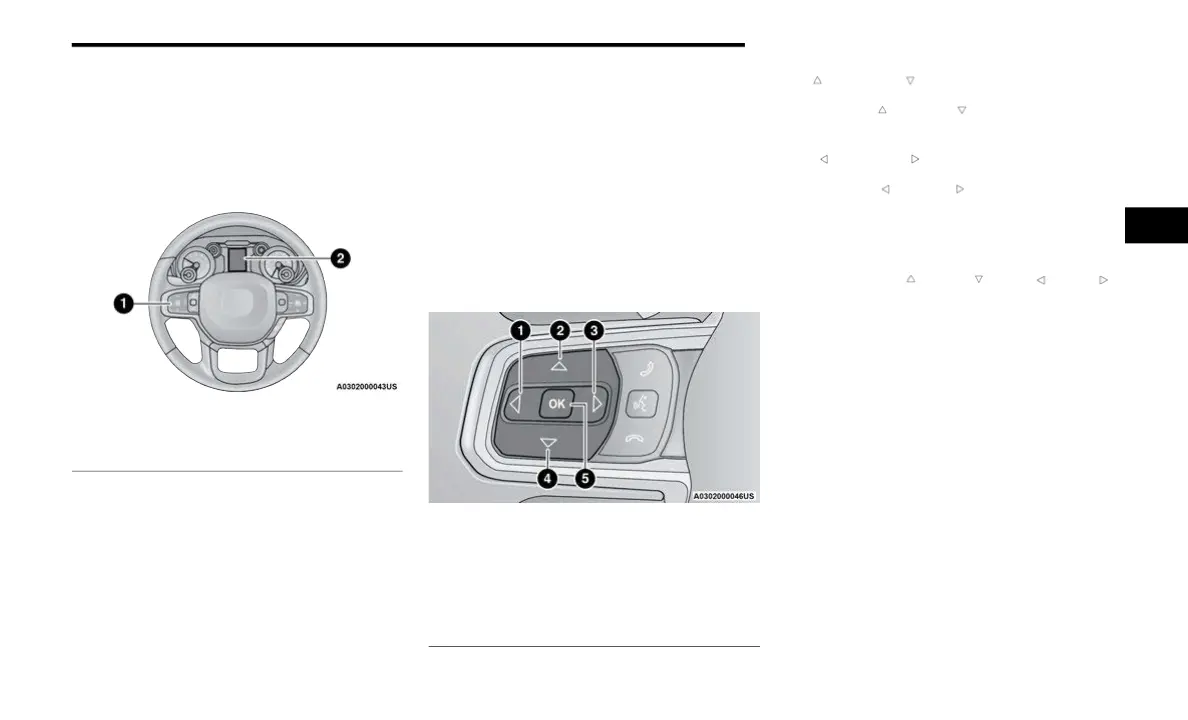
Instrument Cluster Display/Controls Location
The instrument cluster display menu items may
consi
st of the following:
Speedometer
Vehicle Info
Off Road — If Equipped
Driver Assist (show/hide) — If Equipped
Fuel Economy (show/hide)
Stop/Start — If Equipped
Trip Info (show/hide)
Trailer Tow (show/hide) — If Equipped
Audio (show/hide)
Messages
Screen Set Up
The system allows the driver to select information
b
y
p
ushing the following instrument cluster display
control buttons located on the left side of the
steering wheel.
Instrument Cluster Display Control Buttons
Up And Down Ar
row Buttons:
Using the up or d
own arrow button allows
you to cycle through the Main Menu Items.
Left And Right Ar
row Buttons:
Using the left or r
ight arrow button allows
you to cycle through the submenu items of the
M
a
i
n
menu item.
NOTE:
Holding the up / down or le ft / right
arrow buttons will loop the user through the
curr
ently selected menu or options presented
on the screen.
Main menu and submenus wrap for continuous
scrolling.
Upon returning to a main menu, the last
submenu screen viewed within that main menu
will be displayed.
OK Button:
For Digital Speedometer:
Pushing the OK button changes units (mph or
km/h).
1 — Instrument Cluster Display Controls
2 — Instrument Cluster Display Screen
1 — Left Arrow Button
2 — Up Arrow Button
3 — Right Arrow Button
4 — Down Arrow Button
5 — OK Button
3



 To Next Page