256 MULTIMEDIA
CALL CONTROLS
The touchscreen allows you to control the following
call features:
Uconnect 3 With 5-inch Display
Other phone call features include:
End Call
Hold/Unhold/Resume
Swap two active calls
KEY PAD NUMBER ENTRY
1. Press the Phone button.
2. Press the Dial/Keypad button on the
touc
hscreen.
3. The Touch-Tone screen will be displayed.
4. U
s
e the numbered buttons on the
t
ou
c
hscreens to enter the number and press
“Dial/Call”.
RECENT CALLS — IF EQUIPPED
You may browse a list of the most recent of each of
the following call types:
All Calls
Incoming Calls or Calls Received
Outgoing Calls or Calls Made
Missed Calls
These can be accessed by pressing the Recent
Call
s button on the phone main screen.
You can also push the VR button on your steering
whee
l and perform the above operation. For
example, say “Show my incoming calls”.
ANSWER OR IGNORE AN INCOMING CALL —
NO CALL CURRENTLY IN PROGRESS
When you receive a call on your mobile phone, the
Uconnect Phone will interrupt the vehicle audio
system. Push the Phone button on the steering
wheel, press the Answer button on the
touchscreen.
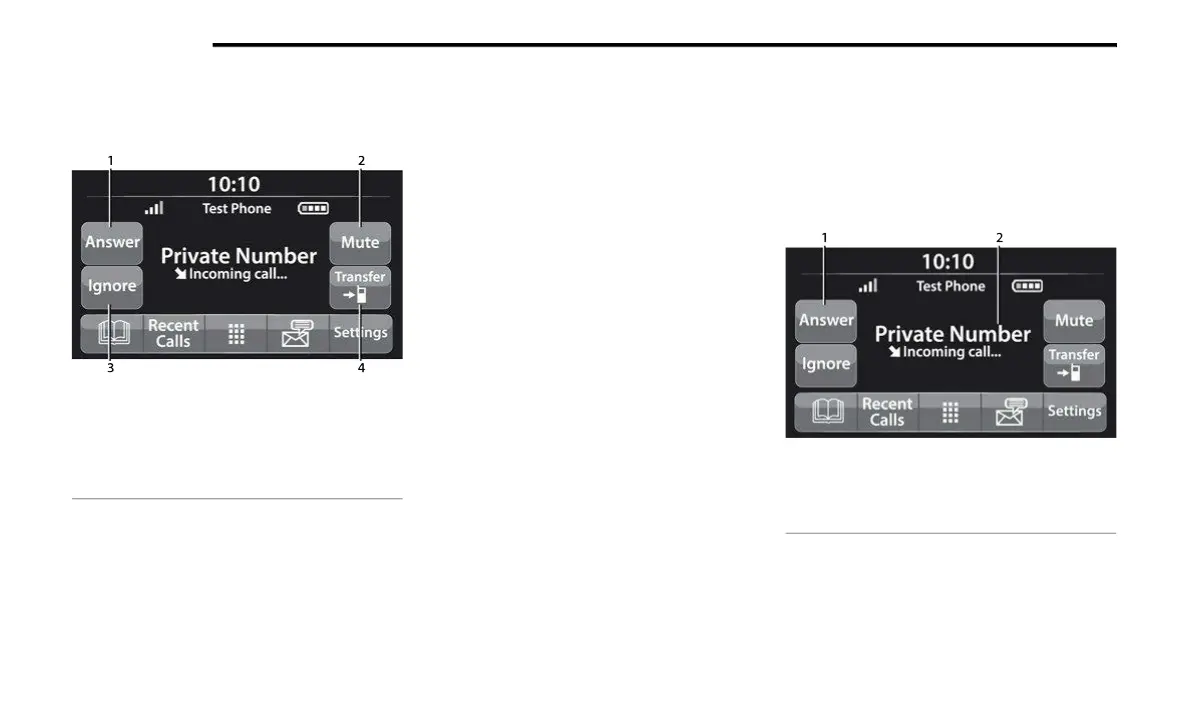
Uconnect 3 With 5-inch Display
1 — Answer
2 — Mute/Unmute
3 — Ignore
4 — Transfer
1 — Answer Button
2 — Caller ID Box



 To Next Page