Chapter 3
Input & Output Connections
RBH Access Technologies Inc. Integra32
™
Hardware Guide
33
Exit Reader Interface Connection Diagrams
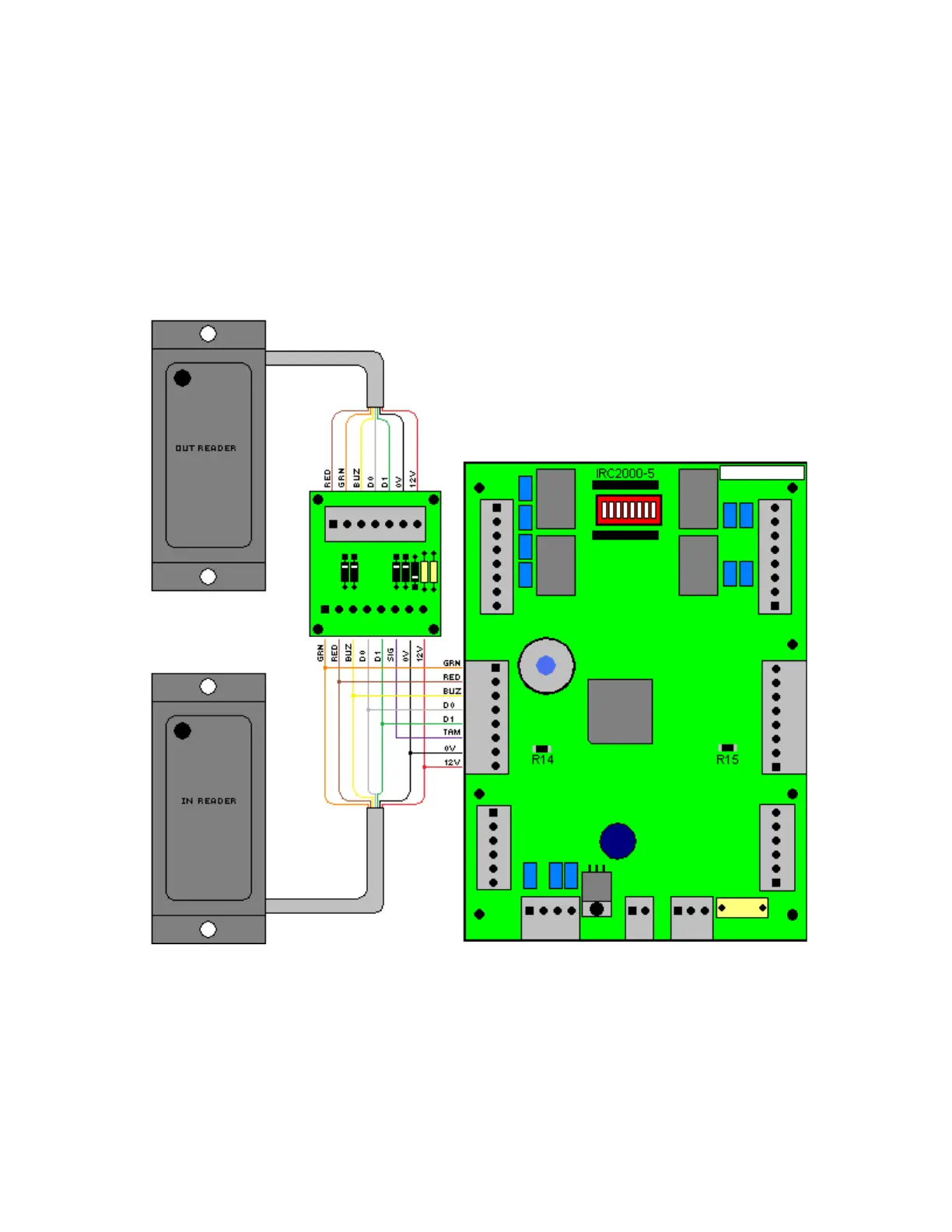
The Exit Reader Interface board enhances the IRC2000 and URC200 panels by allowing
the connection of two readers to a single reader port. A single reader port can now have
an „In‟ and an „Out‟ reader.
IRC-2000 Connection
Connect the „Out‟ reader to the seven-pin terminal and the „In‟ reader to the eight-pin
terminal. Also connect the eight-pin terminal to the panel‟s reader port. For the
IRC2000 connect the SIG terminal of the interface to the TAM terminal on the reader
port. If you are connecting to a URC2000 connect the SIG terminal to appropriate A or
B terminal as indicated by the diagram below.



 To Next Page