Troubleshooting 7
BAL_K21_EN_3V3_BLA_121-006423019 41 / 44
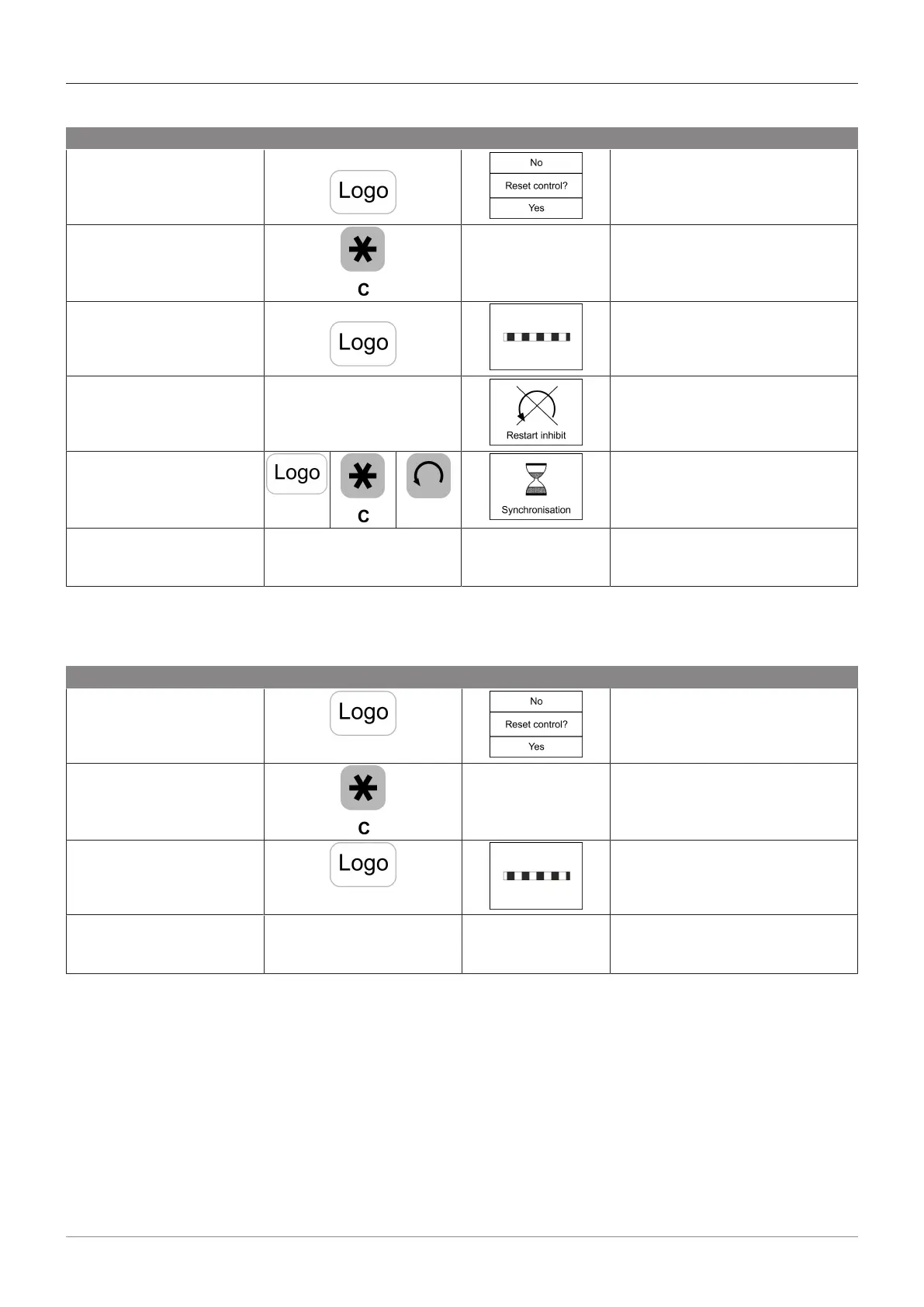
7.2.1 Restarting the revolving door control
Procedure Key BDE-D Display Function
Press until the BDE-D dis-
play appears.
Depending on the mode selected.
Press key briefly, if no re-
start (no) has to be per-
formed.
Previously set oper-
ating mode
There is no restart.
The system carries out the previ-
ous mode set.
Press key briefly, when a
restart (yes) has to be per-
formed.
Reset control is activated. Rotor
stops. When finised the restart lock
is activated.
Restart lock is activated Rotor stops.
Unlock restart lock:
Press the following key se-
quence
The rotary unit starts a synchroniz-
ing run and rotates max. 360° at
slow speed until it reaches the start
position.
* The restart process is
complete.
The previously set
operating mode is
displayed.
The revolving door operates in the
displayed mode.
* If the control unit reports a new error after restarting the control, please contact your service centre
and state the error message.
7.2.2 Restarting the sliding door control
Procedure Key BDE-D display Function
Press until the BDE-D dis-
play appears.
Depending on the mode selected.
Press briefly, if no restart
(no) has to be performed.
Previously set oper-
ating mode
There is no restart.
The system carries out in the pre-
vious mode.
Press key briefly, when a
restart (yes) has to be per-
formed.
Reset control is activated. Rotor
stops. When finished the restart
lock is activated.
* The restart process is
complete.
The previously set
operating mode is
displayed.
The sliding door operates in the
displayed mode.
* If the control unit reports a new error after restarting the control, please contact your service centre
and state the error message.







 To Next Page