Manual opening and closing in case of failure (RED)
6
BAL_SYS20_RED_EN_2V2_REC_102-020110693 18/ 27
Manual closing
Initial situation:
Electric power is supplied. The door remains blocked in open position.
NOTICE
ccording to the kind of failure, the procedure for a manual closing will be differ-
ent. Please follow the steps described below.
Step 1
Ke
Function Displa
Description
Locked
Night locking
▪ Slide the door by hand to the closed
position.
▪ Door is closed and locked (if locking
device is provided).
Inform service point
(Telephone number displayed on BDE-
D).
NOTICE
If the door still cannot be operated and locked by hand, please follow the steps
described below.
Step 2
If the attempts to close and lock the door manually described under "step 1" have remained unsuc-
cessful, it indicates severe failure. Please proceed as follows:
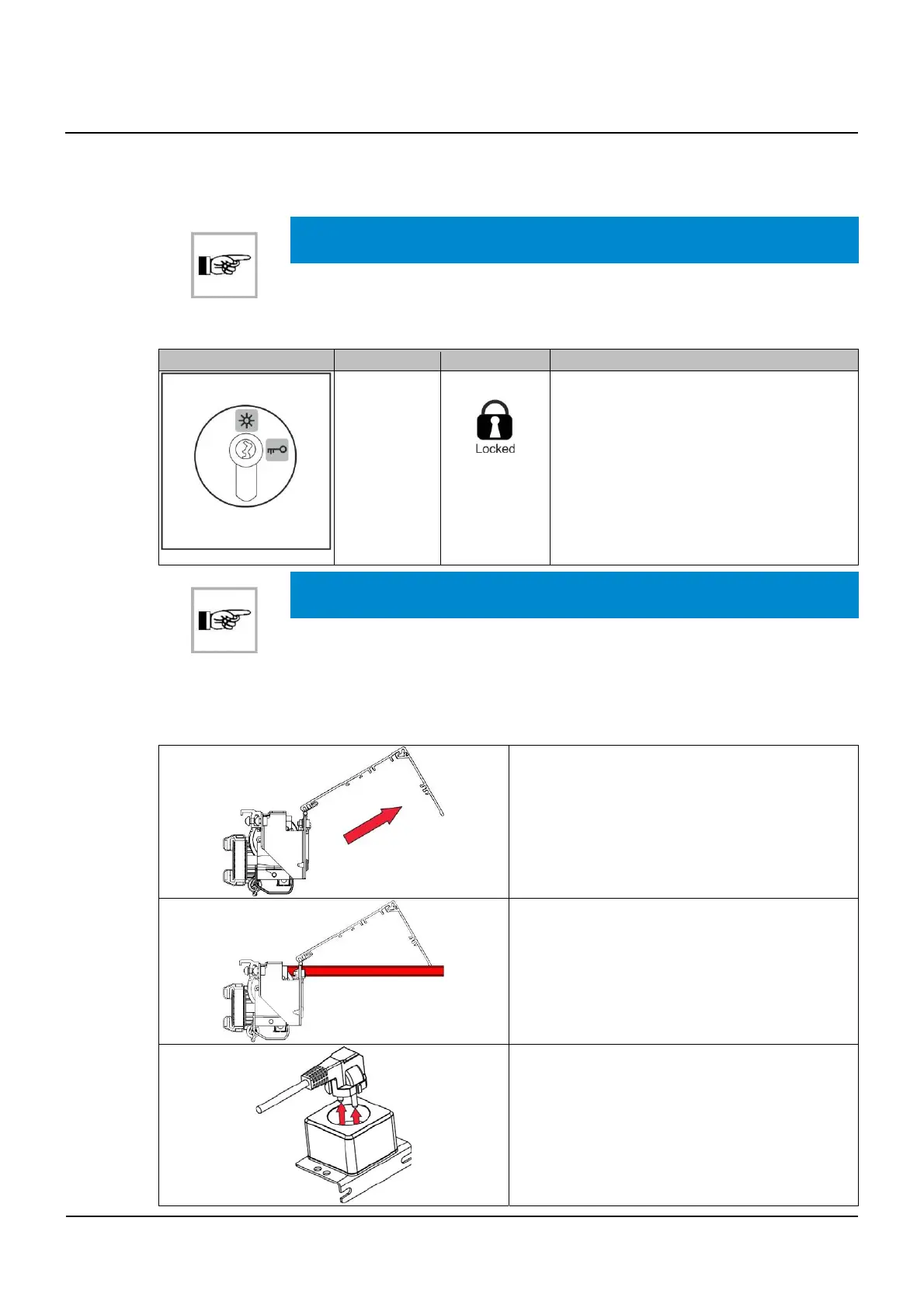
▪ Set the door on Continuously open with the
control unit.
▪ Open the operator casing (swing out).
Note:
If you pull near the hinges, it will assist the
opening of the casing.
▪ Swivel out the red holding bar in order to keep
the casing in open position.
▪ Cut off the installation from the mains supply.
▪ The socket is located under the casing.
6.2
6.2.1
6.2.2



 To Next Page