7.3 Covers
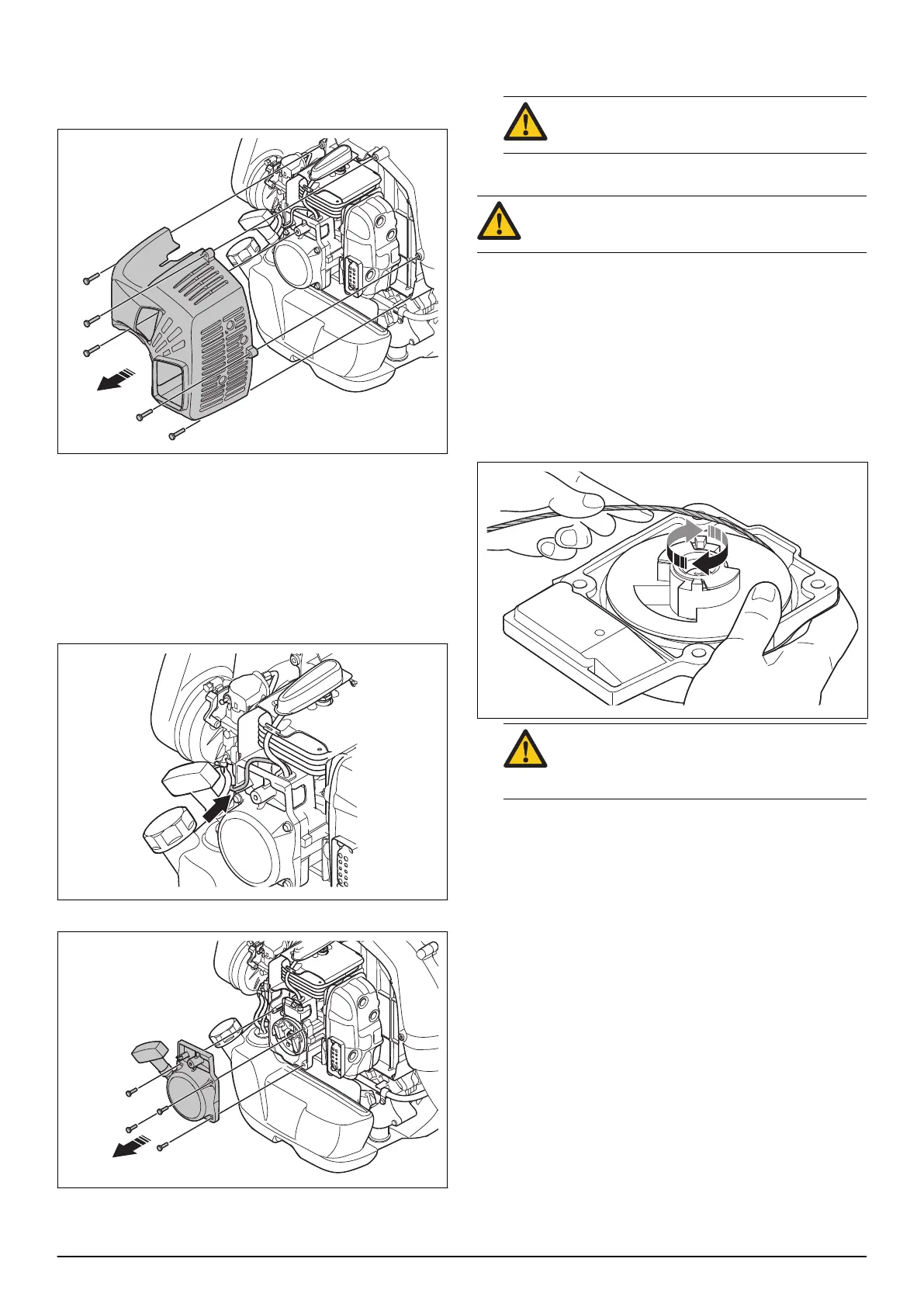
7.3.1 To remove and install the cylinder cover
1. Remove the 5 screws and the cylinder cover.
2. Install in the opposite sequence.
7.4 Starter
7.4.1 To remove and install the starter unit
1. Remove the cylinder cover. Refer to
To remove and
install the cylinder cover on page 13
.
2. Remove the stop switch cable from the starter cover.
3. Remove the 4 screws and the starter unit.
4. Discard the 4 old screws.
5. Install in the opposite sequence.
CAUTION: Use 4 new screws when you
install the starter.
7.4.2 To disassemble the starter
WARNING: Use protective glasses to prevent
injury to the eyes if the recoil spring ejects.
1. Remove the starter unit. Refer to
To remove and
install the starter unit on page 13
.
2. Pull out the starter rope approximately 30 cm.
3. Put your thumb on the starter pulley.
4. Put the starter rope in the groove in the starter
pulley.
5. Let the starter pulley rotate rearward until the spring
tension loosens.
WARNING: Be careful, the recoil spring can
cause injury to your thumb when the starter
pulley rotates rearward.
1662 - 003 - 04.11.2021 Repair instructions - 13


 To Next Page