0 — English Variomat 1 — 06.07.2016 – Rev. B
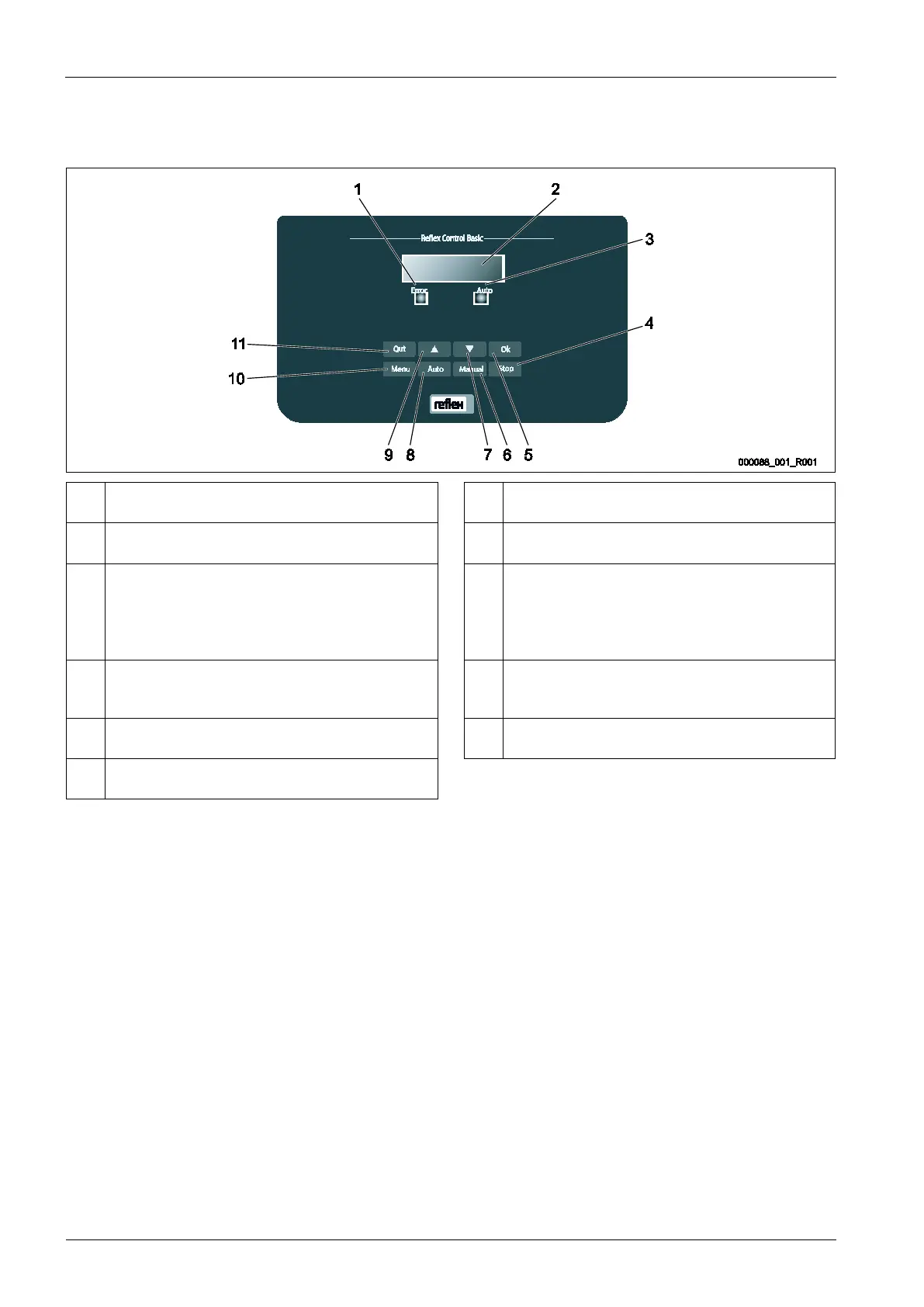
1 Error LED
• The Error LED illuminates in the event of a fault
7 "Back" to the previous menu
2 Display 8 Auto
• For continuous operation
3 Auto LED
• The Auto LED illuminates green in Automatic mode
• The Auto LED flashes green in Manual mode
• The Auto LED is not illuminated when the system is
stopped
9 "Forward" to the next menu
4 Stop
• For commissioning and entry of new values in the
controller
10 Menu
• Call up the Customer menu
5 OK
• Confirm actions
11 Quit
• Acknowledge messages
6 Manual
• For tests and maintenance tasks
Selecting and changing parameters
1. Use "OK" (5) to select the parameter.
2. Use the "▼" (7) or "▲" (9) arrow keys to change the parameter.
3. Use "OK" (5) to confirm the parameter.
4. Use the "▼" (7) or "▲" (9) arrow keys to switch to a different menu option.
5. Use "Quit" (11) to switch to a different menu level.
Configuring settings in the controller
You can configure the controller settings regardless of the currently selected and active operating mode.
This menu is protected with a password. It can be accessed only by the Reflex Customer Service.




 To Next Page