RENA XPS-80/90
User Guide
6-7
5) Type of barcode
To use these internal printer barcode choices your software appli-
cation must send a DLE command (10 in HEX) before and after
the data that you want converted into barcode form.
The following barcodes are available:
Option Barcode Option Barcode
Zip USA barcode co39 co39 barcode
Bpo4 United Kingdom barcode co93 co93 barcode
Kix Netherlands barcode c128 c128 barcode
Cana Canada barcode ean* EAN barcode
2/5i 2/5 interleaved barcode off No barcode
Coda Coda barcode
*ean for European printers or upc for US printers.
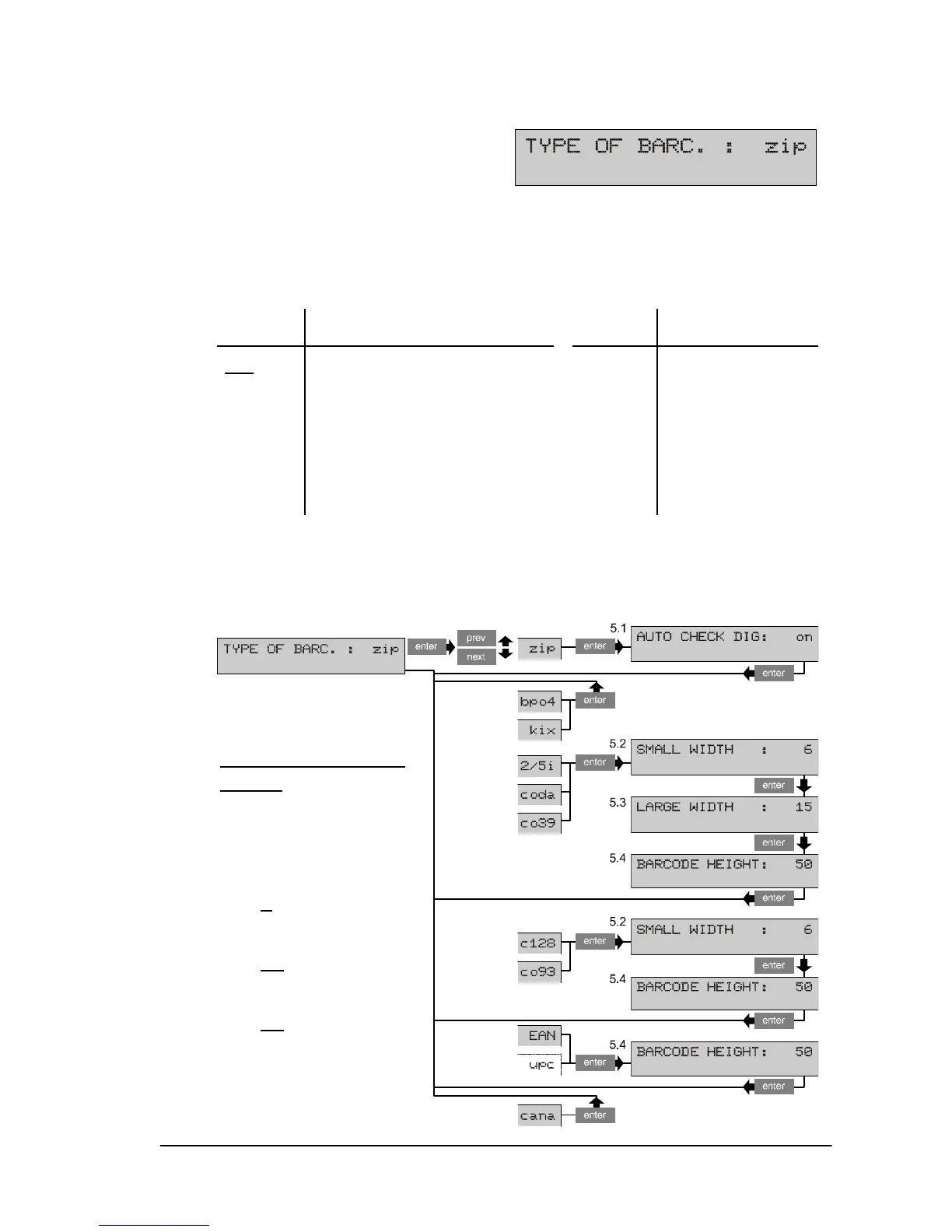
The following scheme shows the various submenus available for
the barcodes described above.
Settings for the sub-
menus
Auto check dig:
on, off
Small width:
1 ... 6
... 99 dots
Large width:
1 ... 15
... 99 dots
Barcode height
1 ... 50
...999 dots


 To Next Page
 Loading...

