29
Modes of operation
Switch-on Switch-off
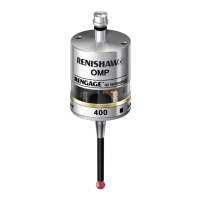
OMP40 Power On/Off
OMP40 optical on/off, only occurs when the
OMP40 is located within the switch on/off
envelope of the OMM/OMI. Three switch on
methods can be used, all of which are optical:
1. Manual start - MI 12 start button.
2. Machine start - optical switch-on via
software M code command
.
3. Auto start - causes the system to send an
optical start signal once every second and
does not require a machine control input.
Note: Auto start should not be selected when
the OMP40 is set to the optical-on/optical-off
option.
Switch-off options can be changed. See pages
32 and 35.
1. Optical-on and optical-off
factory set
Optical switch-off is commanded by a
software M code.
2. Optical-on and timer-off (time-out)
programmable option
A timer switch automatically returns the
probe to the stand-by mode after either 12,
33 or 134 seconds. The timer is reset on for
a further 12, 33 or 134 seconds, each time
the probe triggers during the operating mode.
Note: If the probe does not time out, check if it
is in the optical-on/optical-off mode.



 To Next Page