35
e) Software settings - Windows
®
Furthersettingscanbemadeoptionallyhere;however,thisshouldonlybedonebyadvancedusers.For
functions,seetheonlinehelpdocumentationofthesoftware.
Theuseofwrongsettingscanresultindamagetothe3Dprinterordefectiveprintouts.Beginnersshould
rstworkwiththebasicsettings.
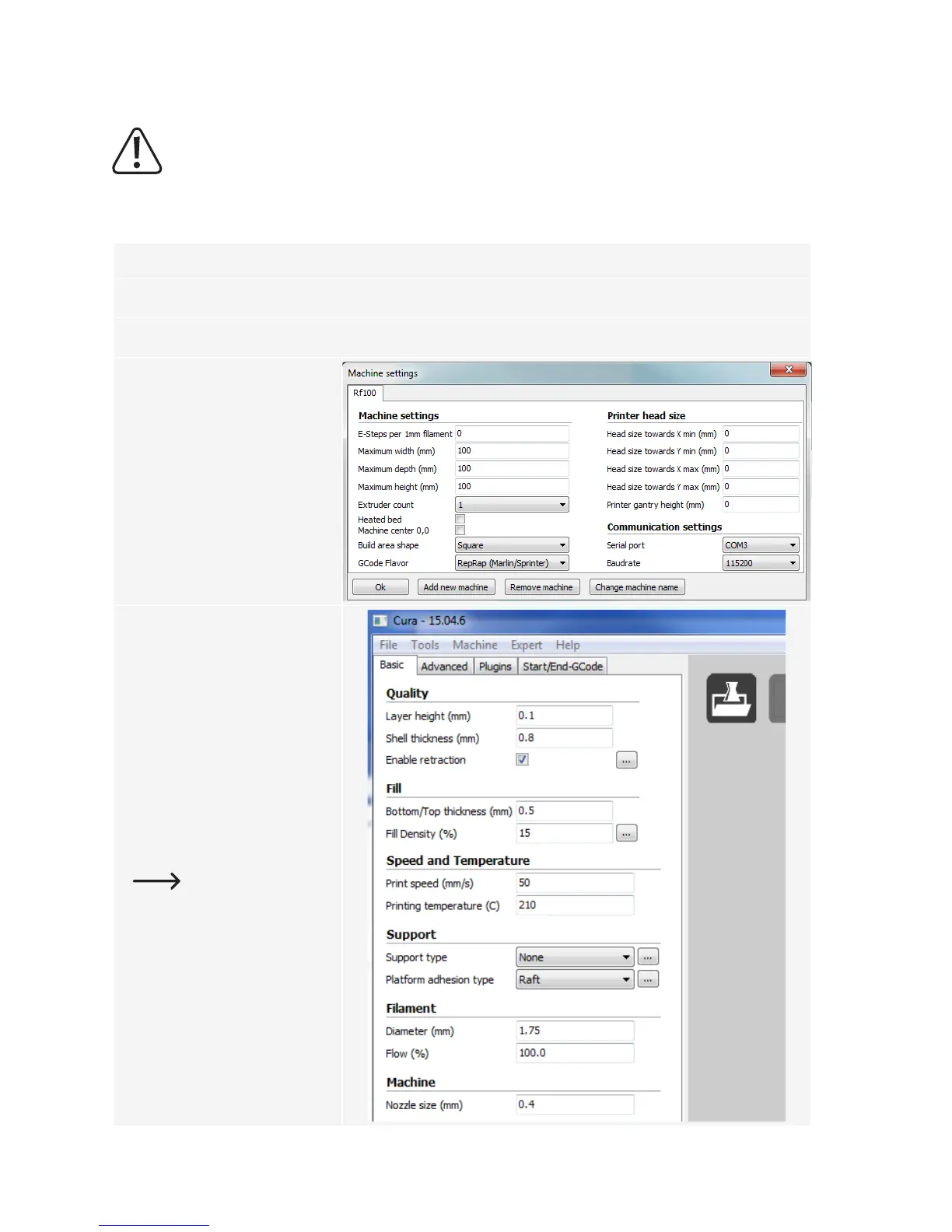
1 Startthesoftware.
2 Select“Machine“
3 Select“Machinesettings“
4 Selecttheserialporttowhichthe
3Dprinterisconnected.Theport
number is system-independent
(for details refer to the chapter
“Connect to the 3D printer“ on
page 28). Set “Baudrate” to
115200.
5 Click “Ok”. “Machine settings“
will be closed.
4
5
6 Setuptheparametersin“Basic“
Settings“ as shown. These are
possible parameters for a PLA
lament.
Atooltipappearswhen
you hover over the
parameter with the
mouse.
6



 To Next Page