10
User manual RF-KIT Power Amplifier RF2K-S
5.2 User menu
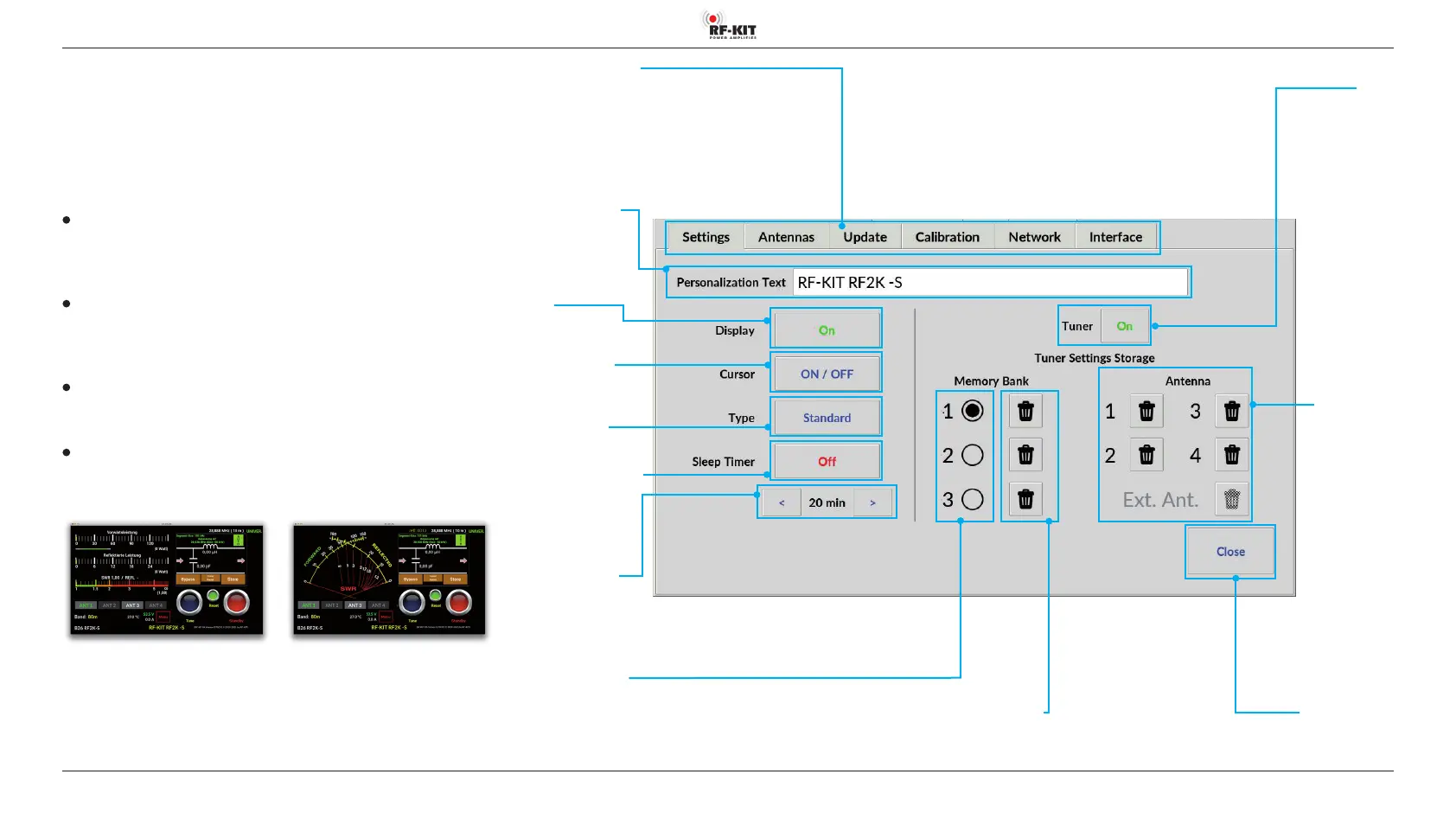
► Touch the switching area Menu.
The Touch screen (2) changes to the user menu and displays the screen
shown to the right. The following submenus can be selected:
5.2.1 Settings
Personalization Text
► Click the text boxand a touch screen keyboard will appear to allow
editing the personalisation text.
Display
► During remote operation, it makes sense to turn o the Touch screen
(2) (activated “On“ / deactivated “O“)
Cursor
► Selection cursor visible („ON“) / invisible („OFF“)
Type
► Choose your preferred Power display
(Standard / Cross Pointer):
Standard Cross Pointer
Switching areas Submenus
(Settings / Antennas / Update / Calibration / Network / Interface)
Switching area Close
Touching this switching area closes the user menu;
subsequently the main screen will be displayed
Switching area
Tuner
Activates (“On“) /
deactivates (“O“)
the antenna tuner
Switching area Cursor
(cursor visible („ON“) /
invisible („OFF“))
Input eld
Personalization Text
Editing via a PC connected
to the PA
Switching area
Display
(activated („On“) /
deactivated („O“) )
Switching areas
Memory Bank (1 / 2 / 3)
Touching one of these switching areas
selects one of three memory banks
together with the antenna sockets
assigned to them (max. 4)
Switching areas
Delete Antenna
(1 / 2 / 3 / 4 /
Ext. Ant)
Delete antenna
for selected
memory bank
Switching area Sleep Timer
(activated („On“) /
deactivated („O“) )
Switching areas
Sleep Timer Duration
(Time until Standby in minutes)
Switching areas
Erase Memory Bank
Touching one of these switching areas deletes
the contents of only the selected memory bank
Switching area Type
(Standard / Kreuzzeiger)



 To Next Page