24
User manual RF-KIT Power Amplifier RF2K-S
5.2.6 Interface
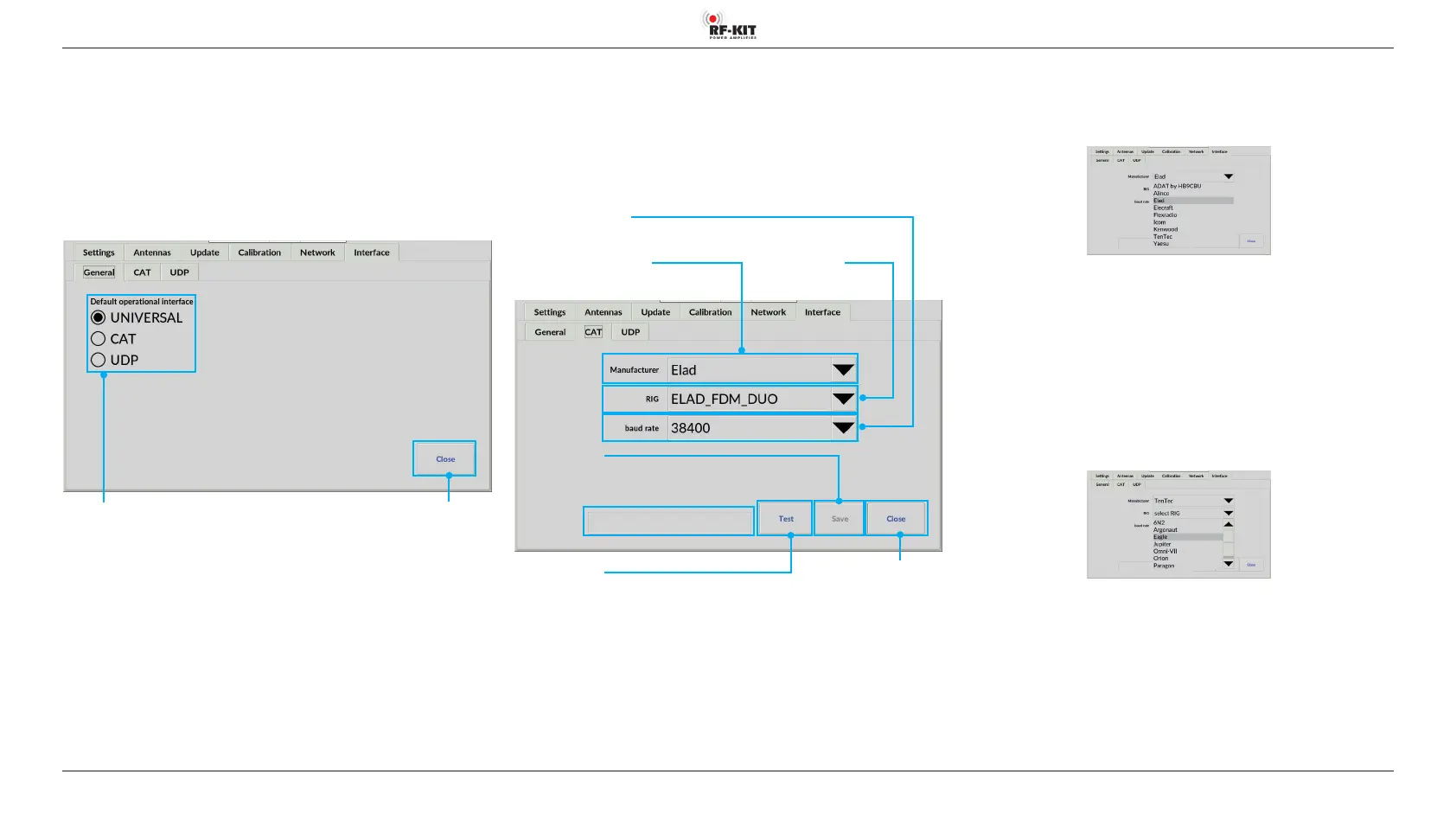
5.2.6.1 General
Select here the communication protocol between the PA and the exciter/
transceiver by clicking one of the buttons UNIVERSAL, CAT or UDP.
The selected interface will be used as default when the PA is restarted.
The communication protocols CAT and UDP require further settings to be
made in the corresponding submenus.
Switching area Close
Touching this switching area
closes the user menu; subsequently
the main screen will be displayed
Switching areas
Default operational Interface
(„UNIVERSAL“ / „CAT“ / „UDP“)
UNIVERSAL
No data connection of the PA with the exciter/transceiver: The PA mea-
sures the transmission frequency and configures itself accordingly.
Because there is no data exchange between PA and exciter/transceiver in
this configuration, no further settings are required.
Use this type of connection when the exciter/transceiver you are
using does not offer a CAT or UDP interface.
5.2.6.2 CAT
Select this type of data connection if you are using a exciter/transceiver
that offers this type of connection.
In the operating system of the PA, some manufacturers and devices are
already stored together with the necessary command lists.
Switching area Close
Touching this switching area
closes the user menu; subsequently
the main screen will be displayed
Selection menu Manufacturer
Selection menu RIG
Selection menu baud rate
Connection speed selection
Switching area Test
Touching this switching area
starts a test of the
CAT data connection
Schaltäche Save
Touching this switching area saves
CAT data connection conguration
Indication area CAT connection test
- Selection menu Manufacturer
► Tap on the black triangle of the selection menu Manufacturer.
A list of radio manufacturers appears:
► Tap on the corresponding manufacturer name.
► Tap the black triangle of the selection menu Manufacturer again.
The selection menu closes, the selected radio manufacturer is displayed.
- Selection menu RIG
► Tap on the black triangle of the selection menu RIG.
A list of radios appears:
► Tap on the corresponding radio name.
The selection menu closes, the selected radio is displayed.



 To Next Page