17
User manual RF-KIT Power Amplifier RF2K-S
Switching area Close
Touching this switching area closes the user menu;
subsequently the main screen will be displayed
5.2.5 Network
All necessary settings for a VNC remote operation of the PA are made
here. The network connection is possible via LAN or Wi-Fi.
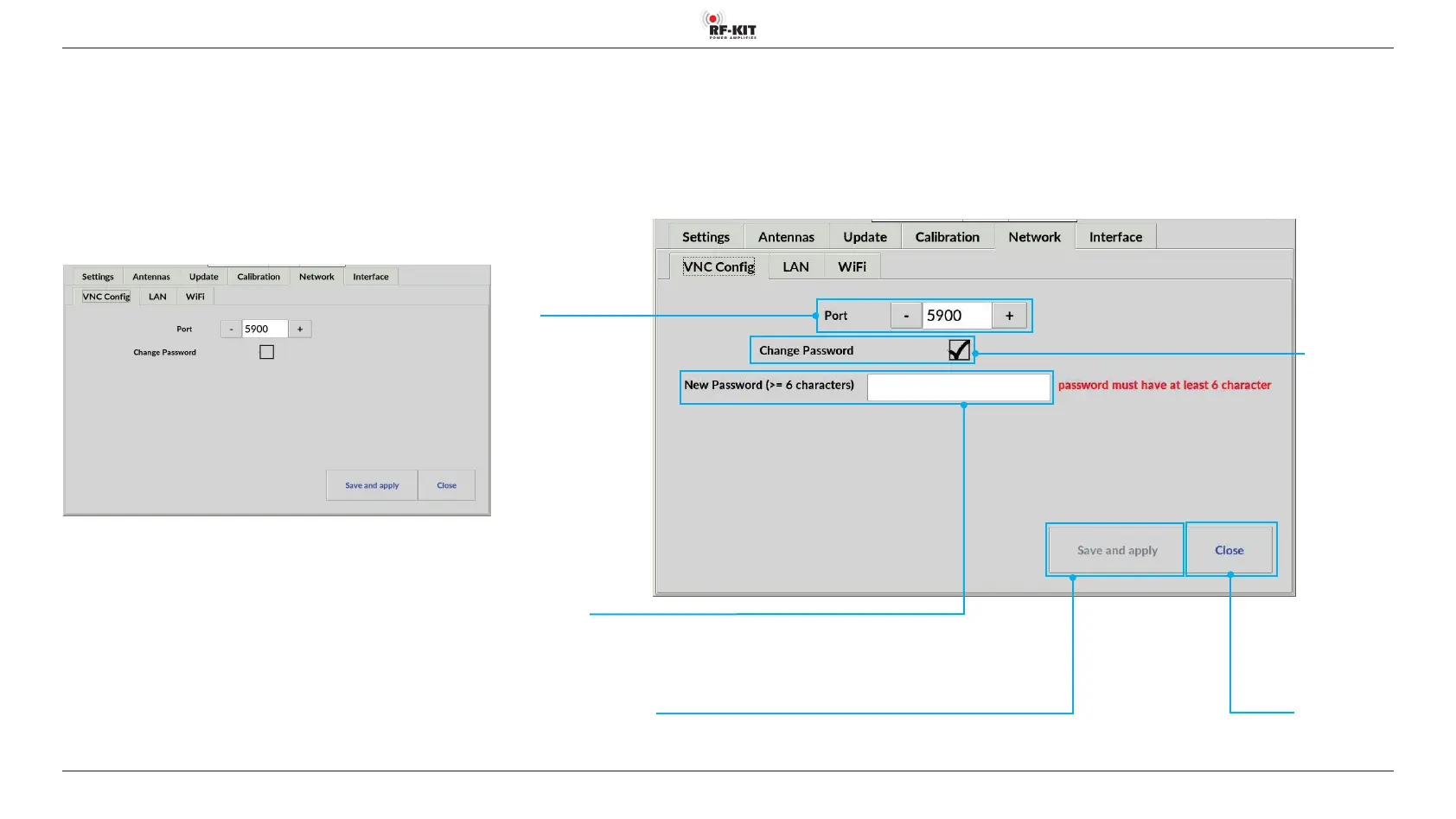
5.2.5.1 VNC Cong
With a VNC connection, the device can be remotely controlled and ope
-
rated from any PC, tablet PC or smartphone connected to the Internet or
local network using VNC software (remote operation).
- Indication area resp. setting of Port (default setting is port 5900.)
► Use the „-“ or „+“ buttons in indication area Port display to set a
desired VNC port address.
Alternatively, you can enter a desired VNC port address directly:
Input eld
New Password
Switching area
Change Password
Switching area Save and apply
Saving the established VNC connection
Indication area /
Input eld
Port
Setting the
desired
VNC port address



 To Next Page