28
User manual RF-KIT Power Amplifier RF2K-S
When changing bands the last antenna connector used on
that band will be selected by default.
Depending on the currently selected antenna connector, only settings
stored for this connector are then taken into account during operation.
During a frequency change, the antenna tuner continuously checks for
the presence of a suitable, already stored setting for the currently selected
antenna.
When changing frequencies, the antenna tuner always selects the settings
applicable to the last antenna used on that band.
If an alternative antenna is to be used for the tuned frequency, a corre
-
sponding antenna must be selected with the switching area Currently
Selected Antenna.
Antenna(connections) available for the selected band are displayed with
white labeling.
The antenna currently connected to the PA is displayed with green label.
Dark grayed out buttons cannot be selected.
Hence for each tuning segment a large number of different settings may
be stored dependent upon the number of different antennas available for
use in that segment.
6.2 Input Power for tuning
For an automatic tuning to take place the RF power level must be in the
range 4 W to 39 W.
Outside this power range, the
switching area
Tune button is not activated
and remains dark blue (= tuner inactive)).
6.3 Manual tuning
To manually detect and save a tuner configuration and settings for a given
antenna / frequency combination, proceed as follows:
► Tap at switching area Tuner Mode, until “MAN“ is displayed in
red
.
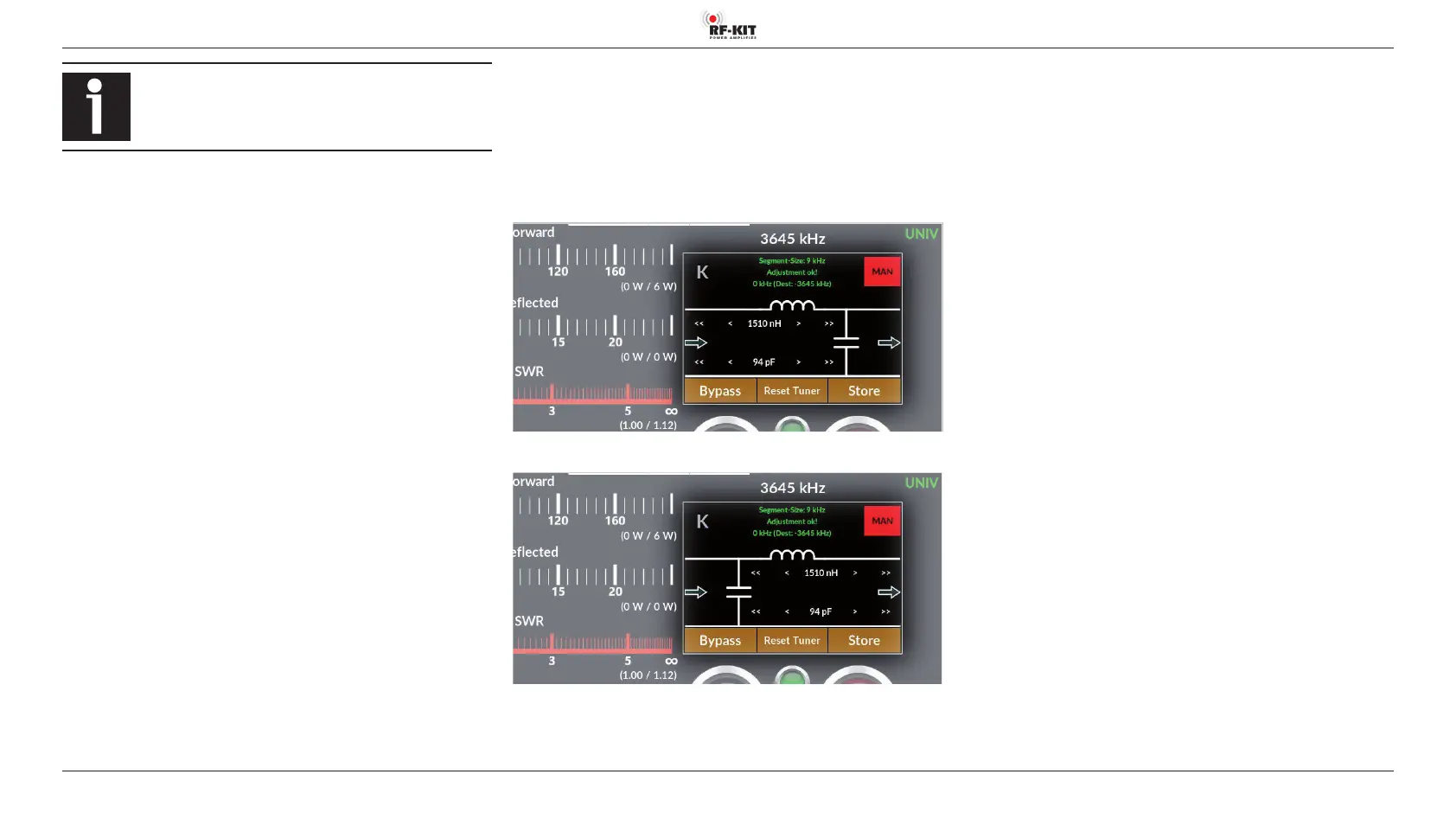
At the start of manual tuning the antenna tuner can be configured with
leading C or leading L.
► Tap (repeated) switching area K to congure with leading L:
► Tap (repeated) switching area K to congure with leading C:
► Adjust exciter power between 4 W and 39 W.
► Select exciter mode to CW or FM mode.
► Commence transmission.
► Tap at switching area Tuner Reset, to reset values for L and C
to “zero“.
► Tuning of L by tapping at switching areas
> Increase value ne (+0,08 uH)
>> Increase value coarse (+0,80 uH)
< Decrease value ne (-0,08 uH)
<< Decrease value coarse (-0,80 uH)
► Tuning of C by tapping at switching areas
> Increase value ne (+5 pF)
>> Increase value coarse (+50 pF)
< Decrease value ne (-5 pF)
<< Decrease value coarse (-50 pF)
The results of the tuning can be seen by the value for SWR displayed in
indication area SWR.
Finish manual tuning process:
► Terminate transmission.
► Tap at switching area Store to save the settings for the current
antenna / frequency combination.
Switching area Store ashes 2x to conrm the settings have been stored.



 To Next Page