19
User manual RF-KIT Power Amplifier RF2K-S
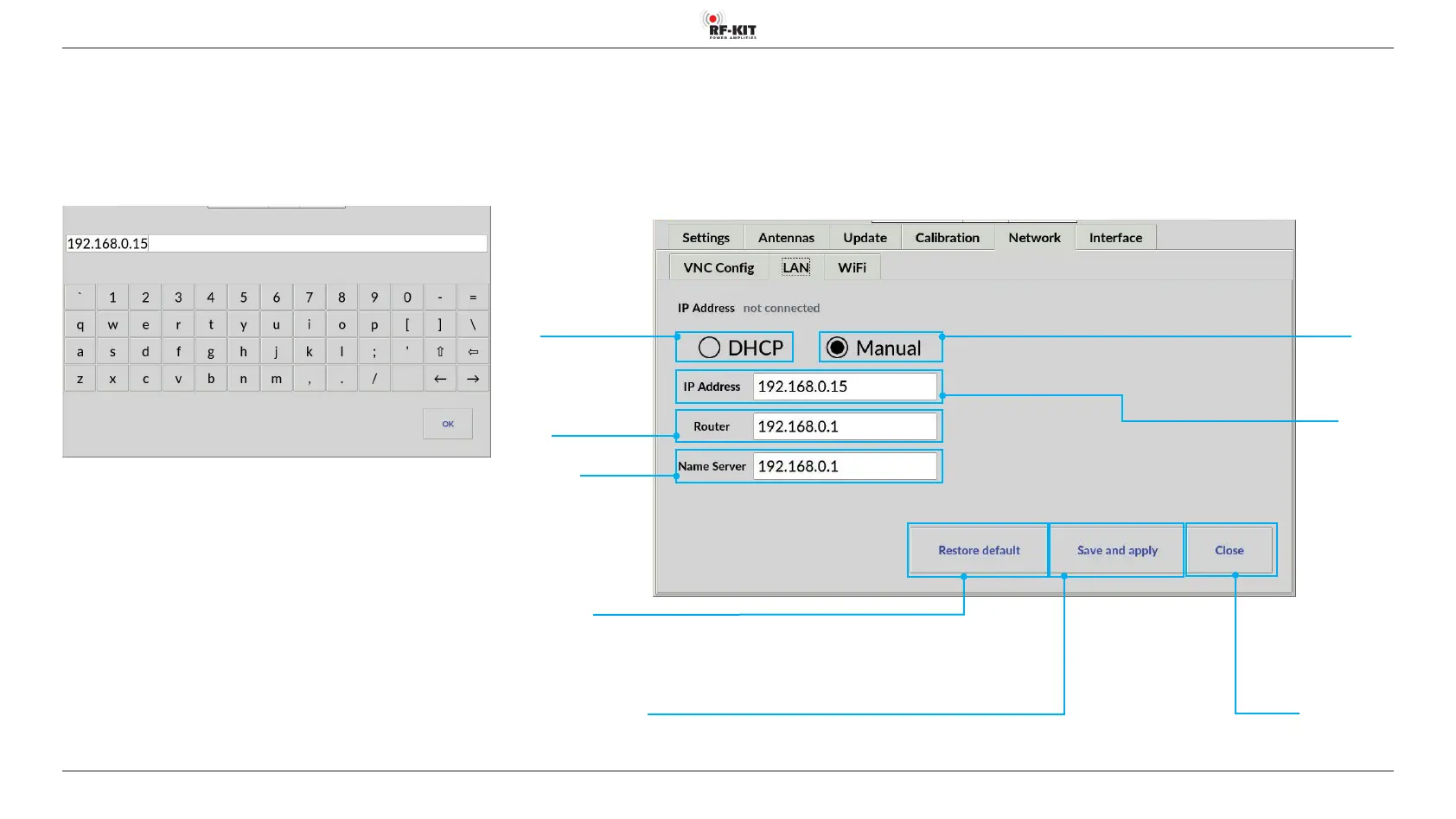
Switching area Close
Touching this switching area closes the user menu;
subsequently the main screen will be displayed
5.2.5.2 LAN
Set up LAN connection with xed IP address:
► Tap the switching area Manual.
► Tap the input field IP-Address (Router / Name Server).
A virtual keyboard appears:
The IP addresses are entered in the Router or Name Server input fields in
the same way.
► Finish the entry by tapping switching area OK.
The LAN screen is then displayed again.
► Tap the switching area Save and apply to save and apply the LAN
settings.
Switching area
DHCP
for LAN connection with
dynamic IP address
Switching area
Restore default
Resetting the LAN settings to the delivery state
Switching area
Manual
for LAN connection
with xed IP address
Switching area Save and apply
Saving the established LAN connection
Input eld IP address
Router
Input eld IP address
Name Server
Input eld
IP Address



 To Next Page