2) Send the pressure sensors to a lab that has the capability to calibrate them independent of
the CGS-240.
a. The lab must be able to power them and communicate with them over RS-485.
b. The lab must be able to perform absolute pressure calibration, read data via RS-485,
compute calibration coefficients, and store these calibration coefficients in the
transducer’s memory.
Sensor Parameters: The sensors are Mensor CPT6020, with a required supply voltage
of 12VDC, and communicating via RS-485 at 9600/8-N-1. Sensor P
L
is on Address 0, P
H
is
on Address 1, and the units are in Pascal (Pa).
IMPORTANT: If the lab changes any of the parameters during calibration, the sensors
should be returned to the above sensor parameters by the calibration lab prior to
return and subsequent re-installation.
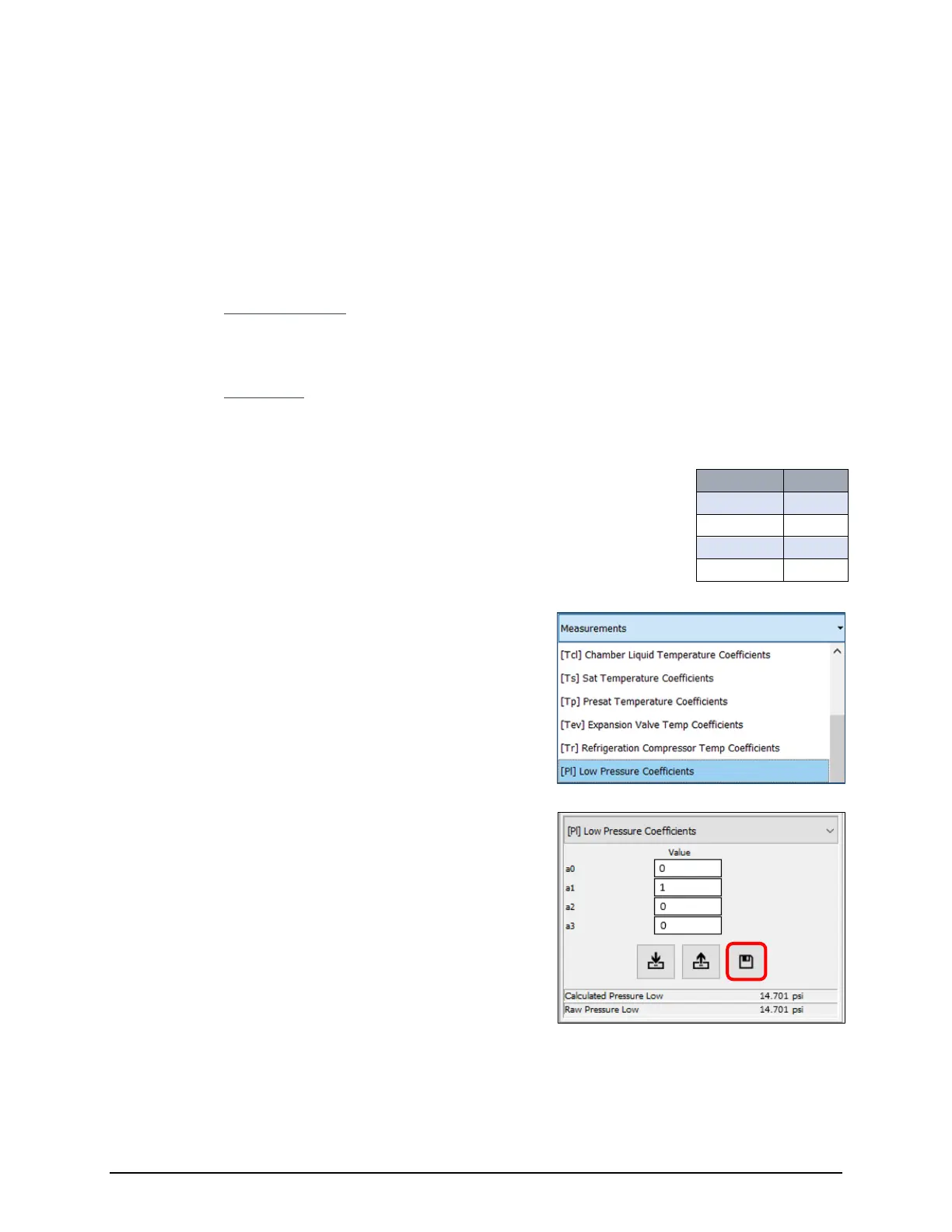
3) Upon return of the fully calibrated sensors, the CGS-240 must have
Default Coefficients entered. The use of default coefficients ensures
that the instrument will not perform any post-measurement
corrections to the newly calibrate pressure sensor data.
5) Enter the default coefficients a0, a1, a2 and a3 (as
shown), then click the Save button.
Repeat steps 5 and 6 for [PH] High Pressure Coefficient.
Refer to Section 5.1.3 Pressure Sensor Reinstallation.


 To Next Page