20136866
34
Start-up, calibration and operation of the burner
6.8 Programming menu
6.8.1 General notes
The programming menu can be accessed via the integrated reset
button, or by remote reset during OPERATION and in STAND-
BY.
If in page menu the reset or remote reset button is not pressed
within 10 seconds the page will be automatically be exited and
there will be a green LED blinking for the time set.
If the number of presses on the reset or remote reset button ex-
ceeds the maximum allowable, the value that stays in memory
will be the maximum one.
If the reset or remote reset button is pressed for more than 60
seconds, a button error will be displayed and the control box will
restart.
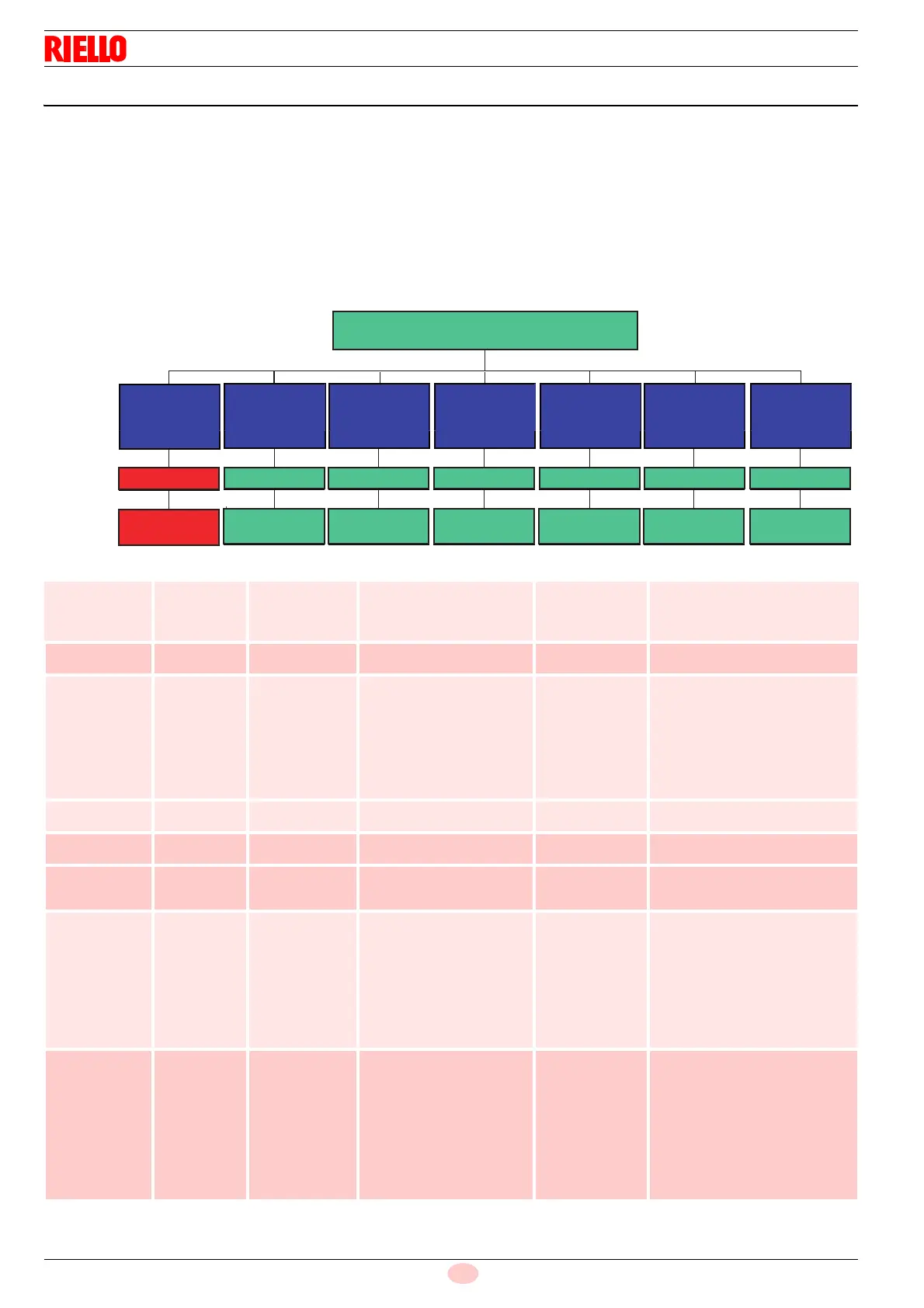
6.8.2 Block diagram for entering the menu
Tab. O
Fig. 27
TYPE OF
FUNCTION
NUMBER OF
OUTLET
BLINKS
RELEASE
TIME
BUTTON
BURNER STATE
OPERATION (WITH FLAME) AND STAND-BY
SWITCHING OFF
TEST
5 SEC.
2 RED
OUTLET
AUTOMATIC
POST-PURGING/
CONTINUOUS
PURGING
10 SEC.
1 GREEN
10 SEC. AFTER
RELEASE
INTERMITTENT
OPERATION
20 SEC.
3 GREEN
LONG PRE-PURG-
ING
30 SEC.
DISPLAYING
LOCKOUT
LOGS
35 SEC.
PROGRAMMING
MENU PARAME-
TER RESET
40 SEC.
5 GREEN 6 GREEN 7 GREEN
2 GREEN
S9640
NOT
AVAILABLE
15 SEC.
10 SEC. AFTER
RELEASE
10 SEC. AFTER
RELEASE
10 SEC. AFTER
RELEASE
10 SEC. AFTER
RELEASE
10 SEC. AFTER
RELEASE
Function
Button
release time
No. of blinks of
the LED per
menu page
No. of pressings
of the reset button
No. of blinks of
the LED (green)
Quitting the menu
Switching off
test
5s ≤ t < 10s 2 blinks
RED
/ none / none Automatic, at the
end of the blink
Post-purging/
Continuous
purging
10s ≤ t < 15s 1 GREEN blink 1 = 1 minute
2 = 2 minutes
3 = 3 minutes
4 = 4 minutes
5 = 5 minutes
6 = 6 minutes
7 = continuous purging
8 = 0 m (deactivated)
(default)
1 blink
2 blinks
3 blinks
4 blinks
5 blinks
6 blinks
7 blinks
8 blinks
10 sec. after the release of the
button
Not available 15s ≤ t < 20s 2 blinks
GREEN
/ / /
Intermittent
operation
20s ≤ t < 25s 3 blinks
GREEN
1 = 1 hour
2 = 24 hours (default)
1 blink
2 blinks
10 sec. after the release of the
button
Long
pre-purging
30s ≤ t < 35s 5 blinks
GREEN
1 = activated
2 = deactivated
(default)
1 blink
2 blinks
10 sec. after the release of the
button
Display
lockout logs
35s ≤ t < 40s 6 blinks
GREEN
1 = last lockout
2 = 9th lockout
3 = 8th lockout
4 = 7th lockout
5 = 6th lockout
6 = 5th lockout
7 = 4th lockout
8 = 3rd lockout
9 = 2nd lockout
10 = less recent lockout
Displaying the
type of lockout
according to
Tab. L
10 sec after the release of the
button (if at level 1).
When at level 2, 10 sec after the
display of the type of lockout or
else pressing the button again
before 10 sec you return to level
1 from where, 10 seconds after
nothing has been done to the
buttons, you exit the menu
Parameter
reset
programming
menu
40s ≤ t < 45s 7 blinks
GREEN
1 = reset of the
lockout logs
2 = reset of the no. of
lockouts
3 = reset of hours of
operation
4 = reset of the no. of
heat requests
5 = restoration of
default values of the
menu parameters
/ 10 sec. after the release of the
button





 To Next Page