15
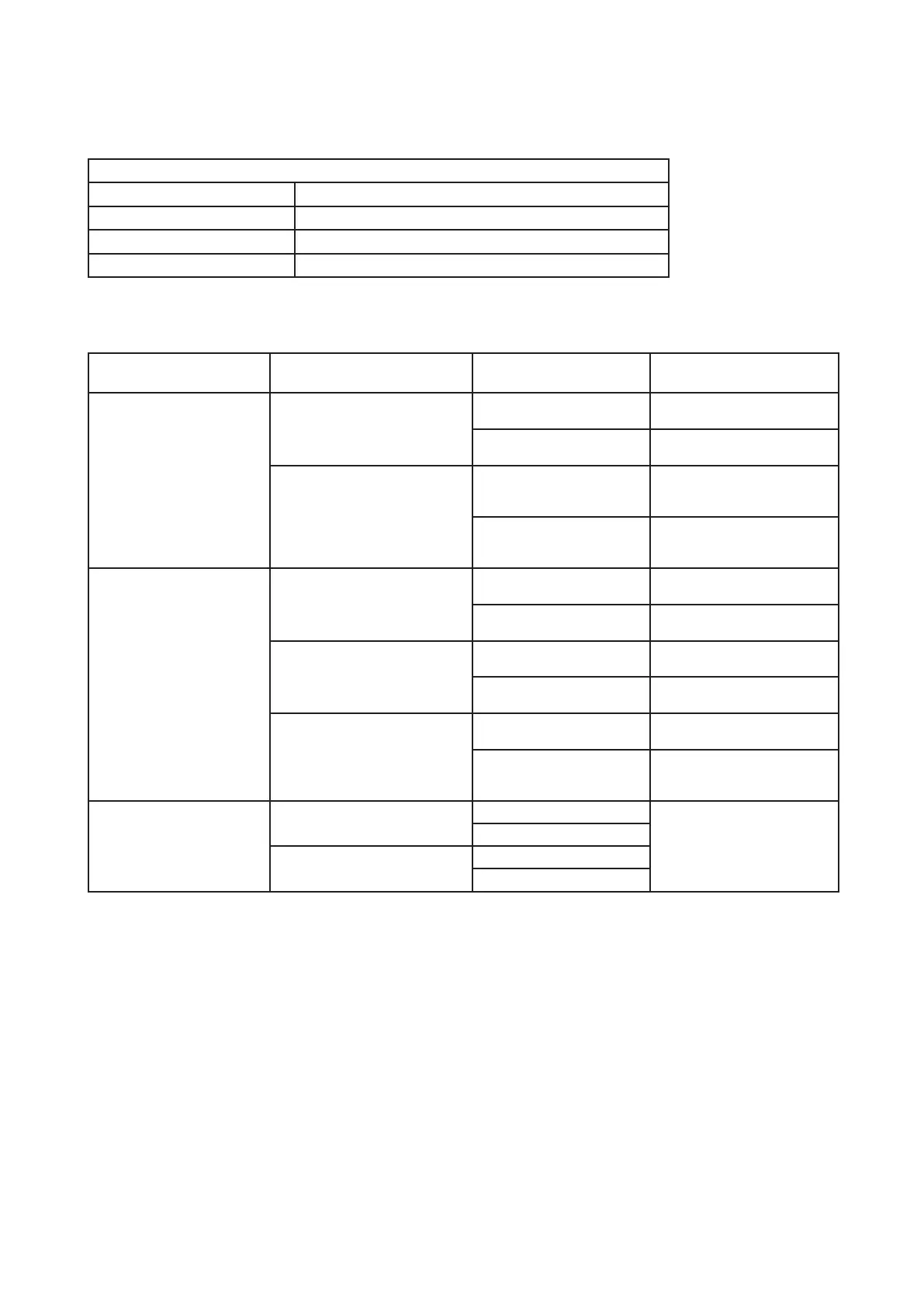
The Power/Special Functions channel of supported xtures oers three control modes of the RoboSpot. You
can use a full control of the RoboSpot, fully disable the RoboSpot or disable the RoboSpot excepting two faders
and manual pan/tilt.
Example for the Robin BMFL FollowSpot:
Channel Power/Special Functions (channel 6)
DMX values Function
240-244 RoboSpot enabled
245-249 RoboSpot disabled - except handle faders and pan/tilt
250-255 RoboSpot fully disabled
Zoom and focus of xtures used in the MDC (Multi Device Control) are inuenced by setting of the channel
Power/Special Functions, mapping of zoom/focus on the FollowSpot Controller and setting of MDC.
Inuence of the settings describes the following table:
Channel Power/Special
Functions
FollowSpot Controller menu MDC
(Multi Device Control)
Behaviour of Zoom/Focus
RoboSpot Enabled
Zoom/Focus are not mapped
Auto Zoom/Foc.= On
MDC takes control over zoom
and focus (oset set to 50%)
Auto Zoom/Foc.= O
Zoom and focus are controlled
by a desk
Zoom/Focus are mapped
Auto Zoom/Foc.= On
MDC takes control over zoom
and focus by Jog-wheels or
faders (oset)
Auto Zoom/Foc.= O
Jog-wheels or faders allow
control of zoom and focus (real
values)
RoboSpot disabled
(except handle faders and
manual pan/tilt)
Zoom/Focus are not mapped
Auto Zoom/Foc.= On
MDC takes control over zoom
and focus (oset set to 50%)
Auto Zoom/Foc.= O
Zoom and focus are controlled
by a desk
Zoom/Focus are mapped on
Jog-wheels
Auto Zoom/Foc.= On
MDC takes control over zoom
and focus (oset set to 50%)
Auto Zoom/Foc.= O
Zoom and focus are controlled
by a desk
Zoom/Focus are mapped on
faders
Auto Zoom/Foc.= On
MDC takes control over zoom
and focus by faders (oset)
Auto Zoom/Foc.= O
Faders allow
control of zoom and focus (real
values)
RoboSpot fully disabled
Zoom/Focus are not mapped
Auto Zoom/Foc.= On
Zoom and focus are controlled
by a desk
Auto Zoom/Foc.= O
Zoom/Focus are mapped
Auto Zoom/Foc.= On
Auto Zoom/Foc.= O















 To Next Page