41
5.8 Intensity maps
The RoboSpot allows you to set a light intensity in dierent points in the area intended for the follow spot
operation. The light intensity can be set separately for each xture used in MDC operation.
Setup
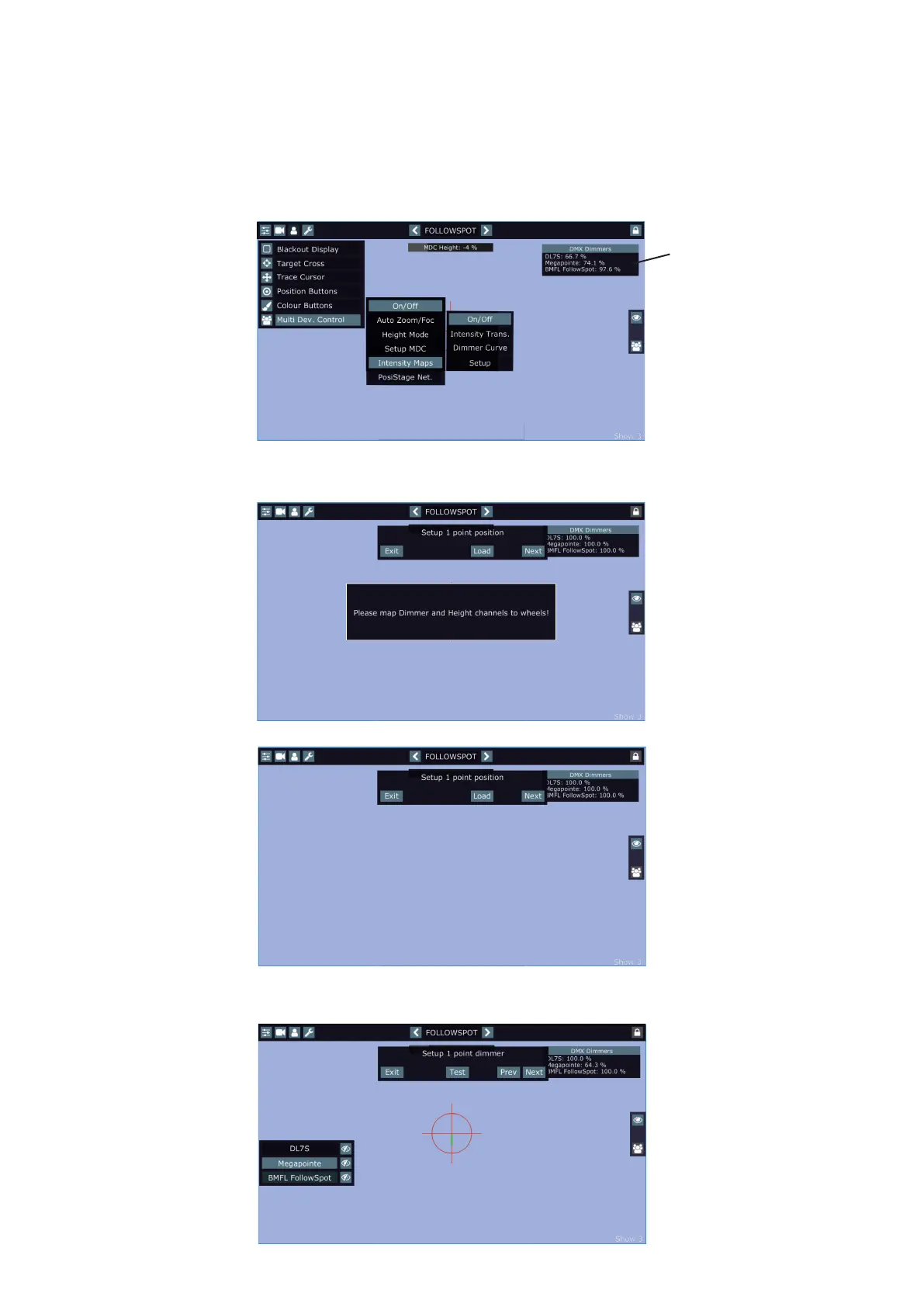
Before doing Intensity maps, map height and dimmer channels to jog-wheels (not to faders!)
Go to the menu "Intensity Maps" and select the option "Setup".
The message "Please map Dimmer and Height channels to wheels" reminds you a need of mapping of dimmer
and height channels to the jog-wheels.
By touching the screen, the message" Please map Dimmer and Height channels to wheels" will disappear.
Use the RoboSpot´s handles to aim the light beam to desired rst position point (position points in the Inten-
sity Maps Setup may be dierent from position points used in MDC setup) and touch the "Next" button. The
following screen will appear.
The window shows current
values of xture´s dimmers
(item DMX Dimmers in the
menu Service has to be
active).
Load button - loads position
from last Intensity
Maps Setup.
Test button - activates
dimmer setting which you
have made in the rst step.
Prev button - moves one
step back.















 To Next Page