9
4. RoboSpot connection
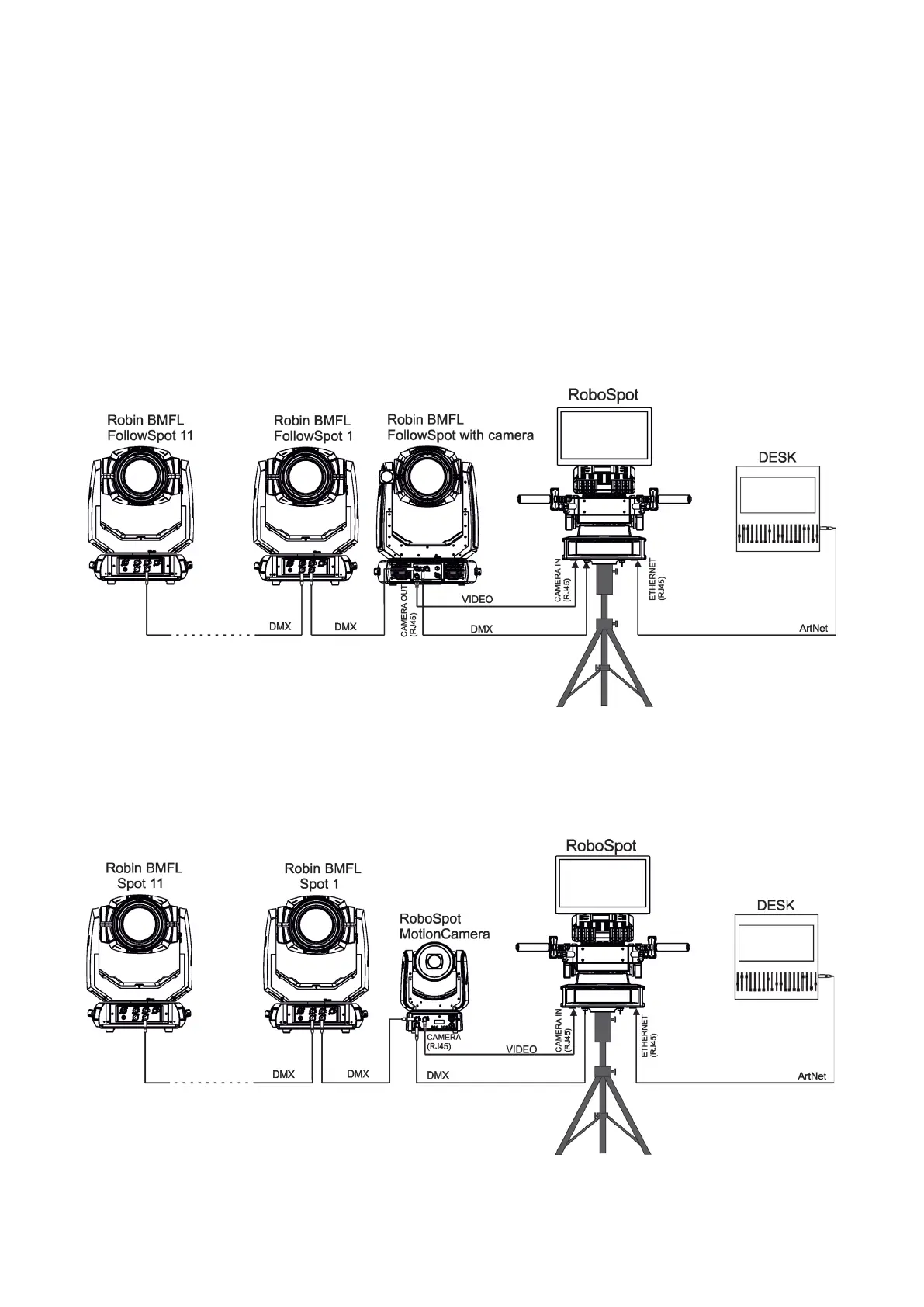
After installing the RoboSpot, connect it with the ROBIN BMFL FollowSpot with camera (or the RoboSpot Mo-
tionCamera), with another supported ROBIN xtures and a control desk.
The RoboSpot has to be connected with a desk by means of Ethernet cable and xtures intended for
the followspot operation have to be connected by means of DMX cable.
You do not need to patch the RoboSpot, but xtures connected to the RoboSpot have to be patched.
Note: Fixtures connected to the RoboSpot and not supported by the RoboSpot will be ignored by the
RoboSpot.
The desk is holding master intensity for the xtures. You must open up a dimmer on the desk in order to con-
trol the light intensity from the RoboSpot. If you for example set a dimmer intensity at 50% on your desk, the
RoboSpot operator will have full range of the fader to go from 0-50% of the light intensity.
Example 1. Connection with the ROBIN BMFL FollowSpot with camera
Up to 11 ROBIN BMFL FollowSpots can be connected to the ROBIN BMFL FollowSpot with camera.
Example 2. Connection with the RoboSpot MotionCamera
Up to 11 supported ROBIN xtures can be connected to the RoboSpot MotionCamera. The xtures should be
of the same type.
Max. length of ethernet cable between the RoboSpot MotionCamera and the RoboSpot should not exceed
70 m (if some active component is not used).
Note. In case of operating the RoboSpot system in interfered environment, Ethernet switches are
recommended in video line (one at the RoboSpot and one at the Robin BMFL FollowSpot or RoboSpot Mo-
tionCamera).
Max. length of ethernet cable between the FollowSpot with camera and the RoboSpot should not exceed
70 m (if some active component is not used).















 To Next Page