37
Treble control
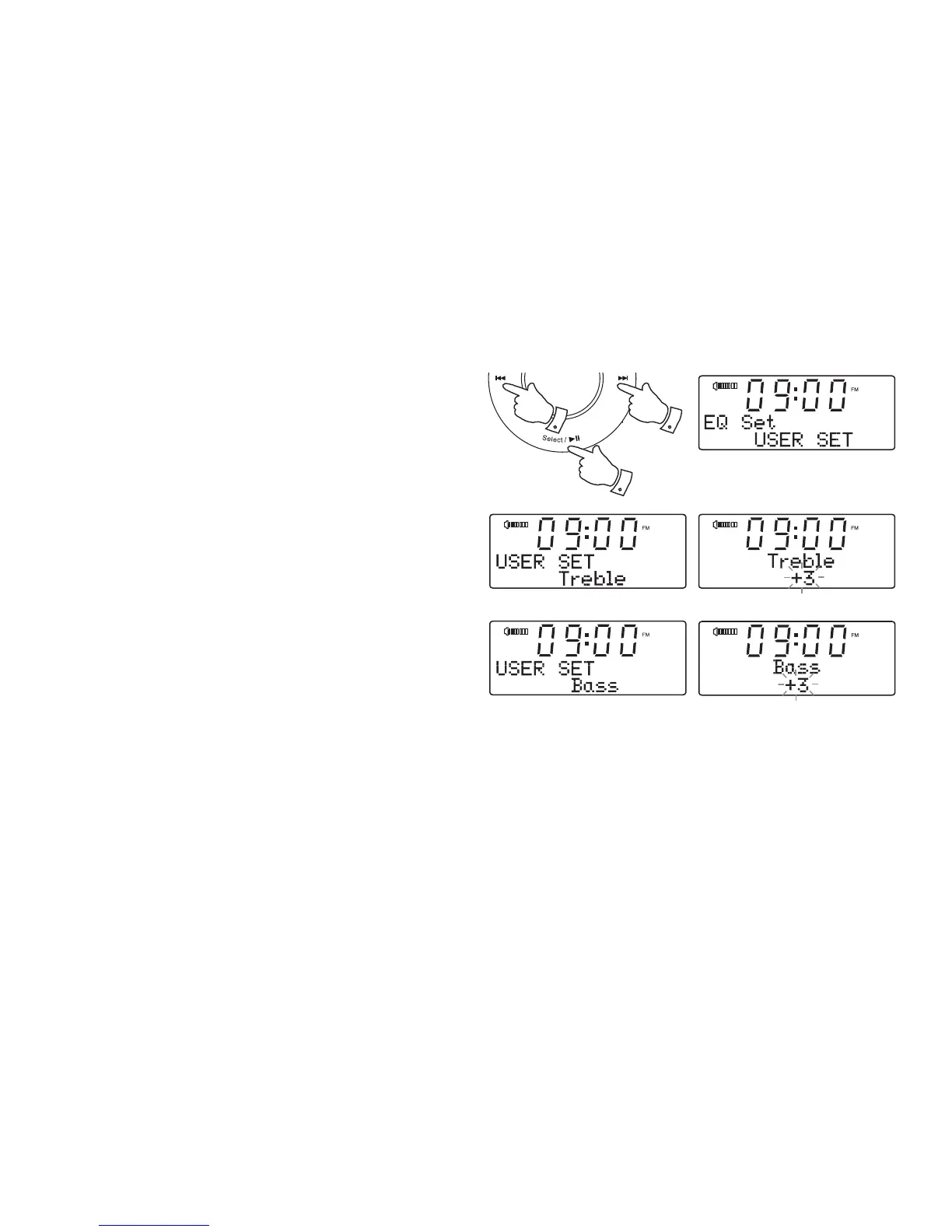
1. Follow steps 1-4 on the proceding page to enter the EQ setup menu.
2. Press the Tuning Up or Down buttons to cycle through the options
until 'USER SET' appears on the display.
3. Press and release the Select button. Press and release the Tuning
Up or Down buttons until 'Treble' shows on the display.
4. Press and release the Select button. The current treble setting will
show on the display.
5. To adjust the Treble setting press and release the Tuning Up or Down
buttons until the desired level is displayed.
6. Press and release the Select button to confi rm the setting.
Bass control
7. To set the Bass setting follow steps 1 - 3 above and press the Tuning
Up or Down buttons until 'Bass' shows on the display.
8. Press and release the Select button. The current Bass setting will
show on the display.
9. To adjust the Bass setting press and release the Tuning Up or Down
buttons until the desired level is displayed.
10. Press and release the Select button to confi rm the setting.
2-9
3-10
2-9
*
• To quickly cancel the effect of the treble or bass settings press the
Tuning Up or Down buttons until 'Normal' appears on the display.
The treble or bass settings will be remembered for the next time that
you wish to adjust them.
*













 To Next Page