38
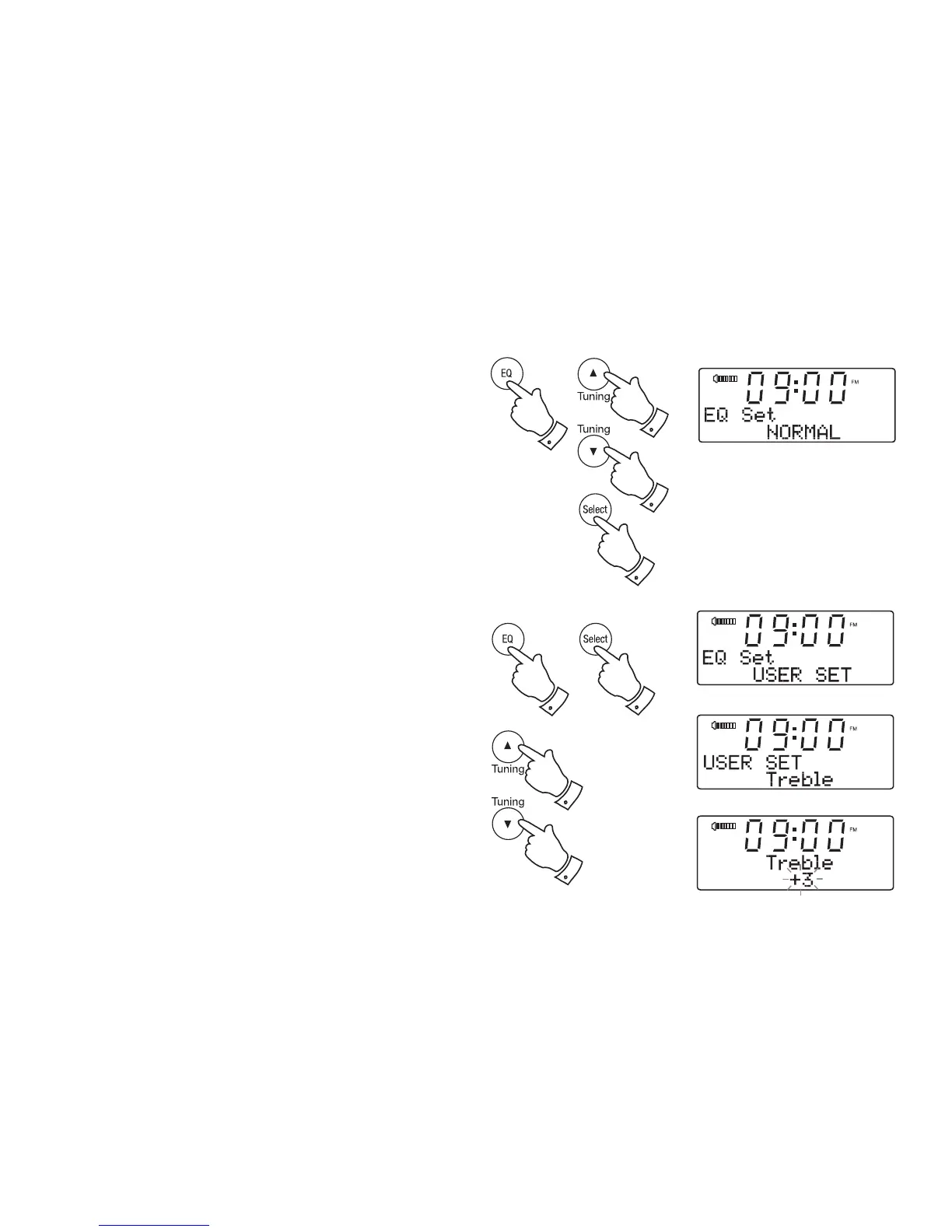
Equalizer function using the remote control
1. Press and release the Equalizer button and press and release the
Tuning Up or Down buttons to cycle through the various options.
Press and release the Select button to confi rm the setting.
a. Normal - no tone modifi cation is applied
b. Jazz
c. Rock
d. Pop
e. Classic
f. News
g. Treble - tone setting may be adjusted
h. Bass - tone setting may be adjusted
Treble control
1. Press the Equalizer button and then the Tuning Up or Down buttons
to cycle through the options until 'USER SET' appears on the display.
2. Press and release the Select button. Press and release the Tuning
Up or Down buttons until 'Treble' shows on the display.
3. Press and release the Select button.The current Treble setting will be
shown on the display.
4. To adjust the Treble setting press and release the Tuning Up or Down
buttons until the desired level is displayed.
5. Press and release the Select button to confi rm the setting.
1
2-5
1
1-4
1-4












 To Next Page