67
Playingaudiotoagroup
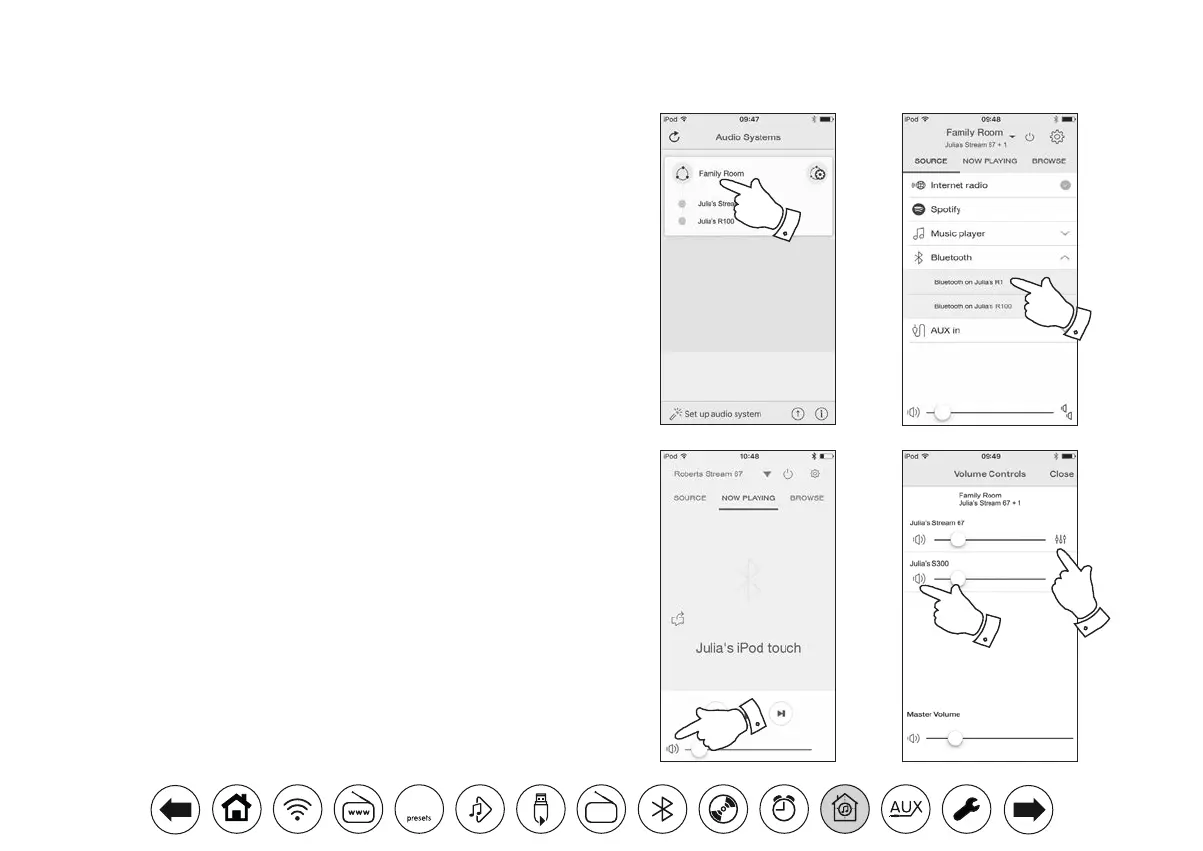
The process of choosing the audio source and content for a group of
products is almost the same as for a single product.
1. Select the desired group (or individual product if not in a group).
2. Select the desired source. If more than one product offers the same
source type, e.g. Bluetooth then each will be shown in the source
menu.
3. Select 'Now Playing' or 'Browse' as needed to access content for the
selected source.
VolumecontrolusingUNDOK
UNDOK allows you to control the volume of a group of products and the
volume of individual products within the group.
1. Use the multiple products icon to access the individual volume controls.
2. You may also mute either the group, or products within the group using
the speaker icon.
3. The equaliser for products in a group can also be accessed from the
group's volume control.
1
2
3
1
2
DAB
30



 To Next Page