71
Addproductstothecurrentgroup
You can add other connected multi-room products to the current group
using your Stream 67 audio system.
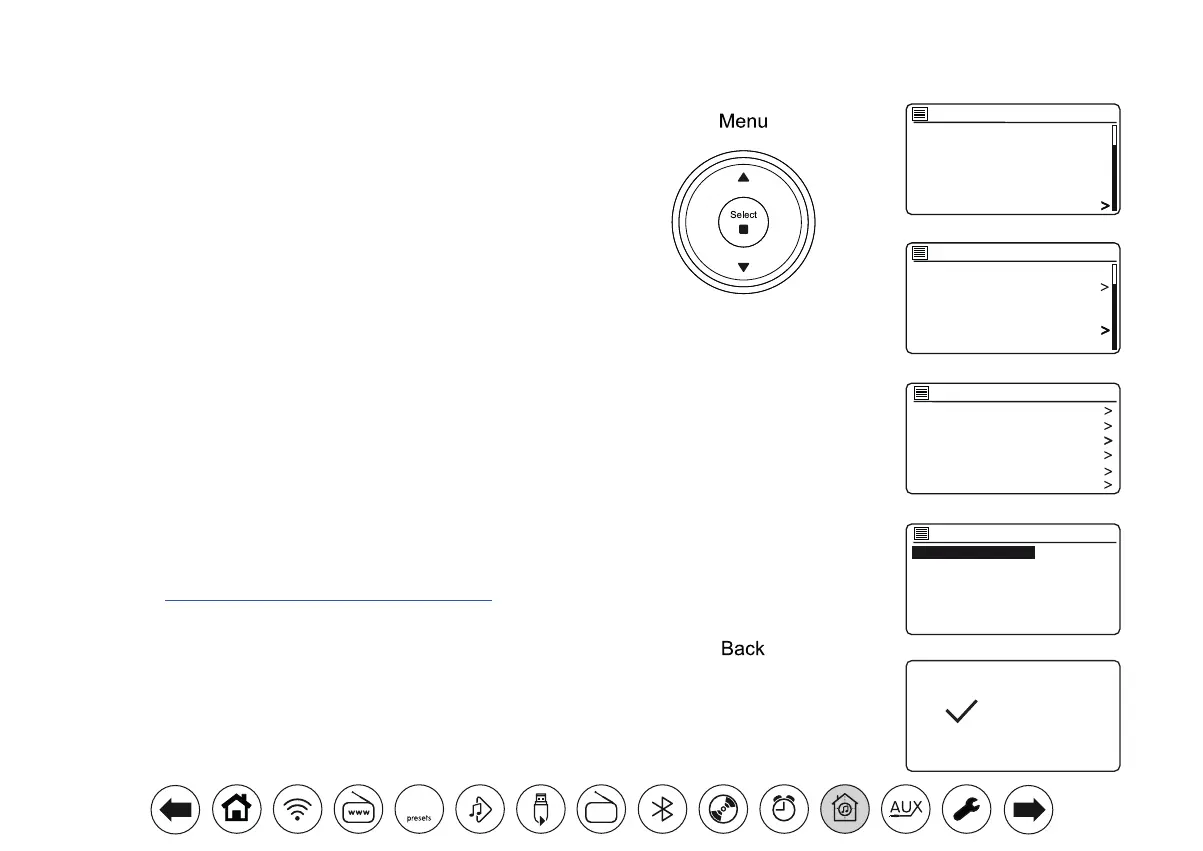
1. Access the menu for the current mode, press Menu.
2. Press Menu Up or Down until 'System settings' is highlighted on the
display.
3. Press Select to enter the settings menu.
4. Press Menu Up or Down until 'Multi-room' is highlighted on the display.
Press Select.
5. Press Menu Up or Down until 'Add to group' is highlighted on the
display. Press Select.
6. If you wish to add a product from the list to the current group, highlight
the product using the Menu Up or Down buttons and press the Select
button to conrm. The screen will show 'Added'. Products already
added to the group are marked with an asterisk. If the adding process
displays 'Failed' it is usually because the Stream 67 is not yet controlling
a group (see Creating new multi-room group page 70).
7. If you do not wish to add another product to the current group press
the Back button to exit.
Add to group
R100 002261e80894
R1 002261e80895
Added
CD
Bluetooth
Aux in
Sleep
Alarms
System settings
Main menu
Factory Reset
Software update
Setup wizard
Info
Multi-room
Subwoofer
System settings
View details
Create new group
Add to group
List current clients
Leave group
Dissolve group
Multi-room
DAB
30



 To Next Page