Starting up the machine
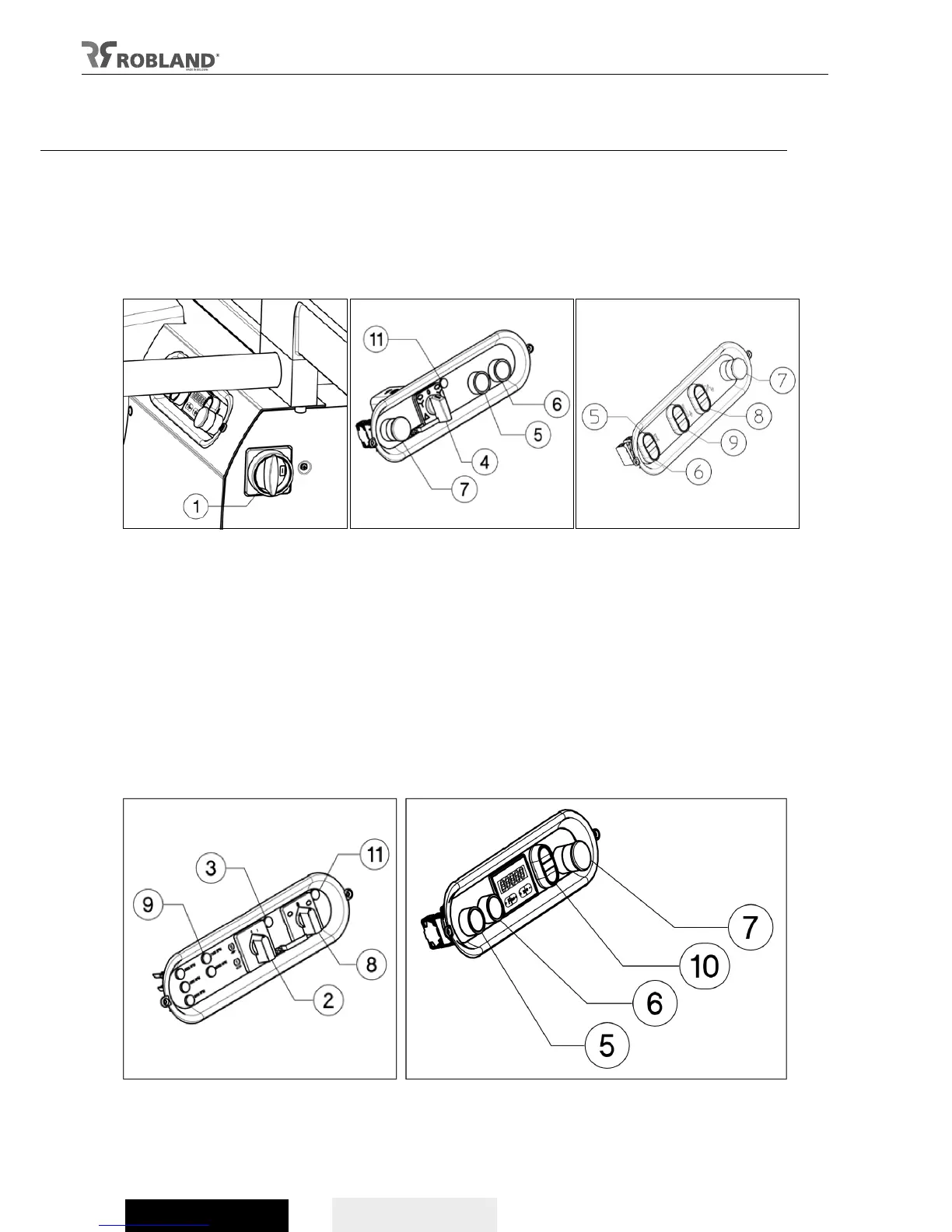
- Turn on the main switch (fig 4.1), which can be padlocked, on “1” to put the machine under tension.
- Make sure the brake release switch (fig 7.2) is in position ”0”.
- When the yellow indicator lights up (fig 7.3) the machine cannot be started up.
- Put the star-delta switch (fig 5.4) on “star” and push the start button (fig 5.5). The motor starts up in
“star”, but must be switched to “delta” after about 10 seconds.
- The motor can be switched off by the “stop” button (fig 5.6 / fig 6.6 / fig 8.6) or by the “emergency
stop” button (fig 5.7 / fig 6.7 / fig 8.7).
Fig.4 Fig.5 Fig.6 (T110i)
Attention
- When the machine is stopped, the motor automatically brakes.
- It is not possible to start the machine while the access door is opened or when the brake release
switch (fig 7.2) is on “1” and the yellow indicator (fig 7.3) lights up.
- The control lights (fig 7.9) indicate the speed of the spindle.
- The switches (fig.6.9 / fig.8.10) determines electric up or down movement of the spindle (option) and
functions only when the main motor is switched off.
- Switches (fig 6.8) move the spindle under angle.
- When using automatic star delta (fig 7.8) the direction of the rotation is determined by the switch
(fig.6,5/fig.8,5).
- To prevent the machine from turning the wrong direction there is an additional security feature:
should the machine turn in the opposite direction a yellow indicator lights up (fig 5.11 / fig 7.11).
Fig.7 Fig.8 (T120)


 To Next Page