Spindle arbor lock
It is mandatory to wait until the spindle has come to a complete halt before locking the spindle arbor
(see warning on the machine).
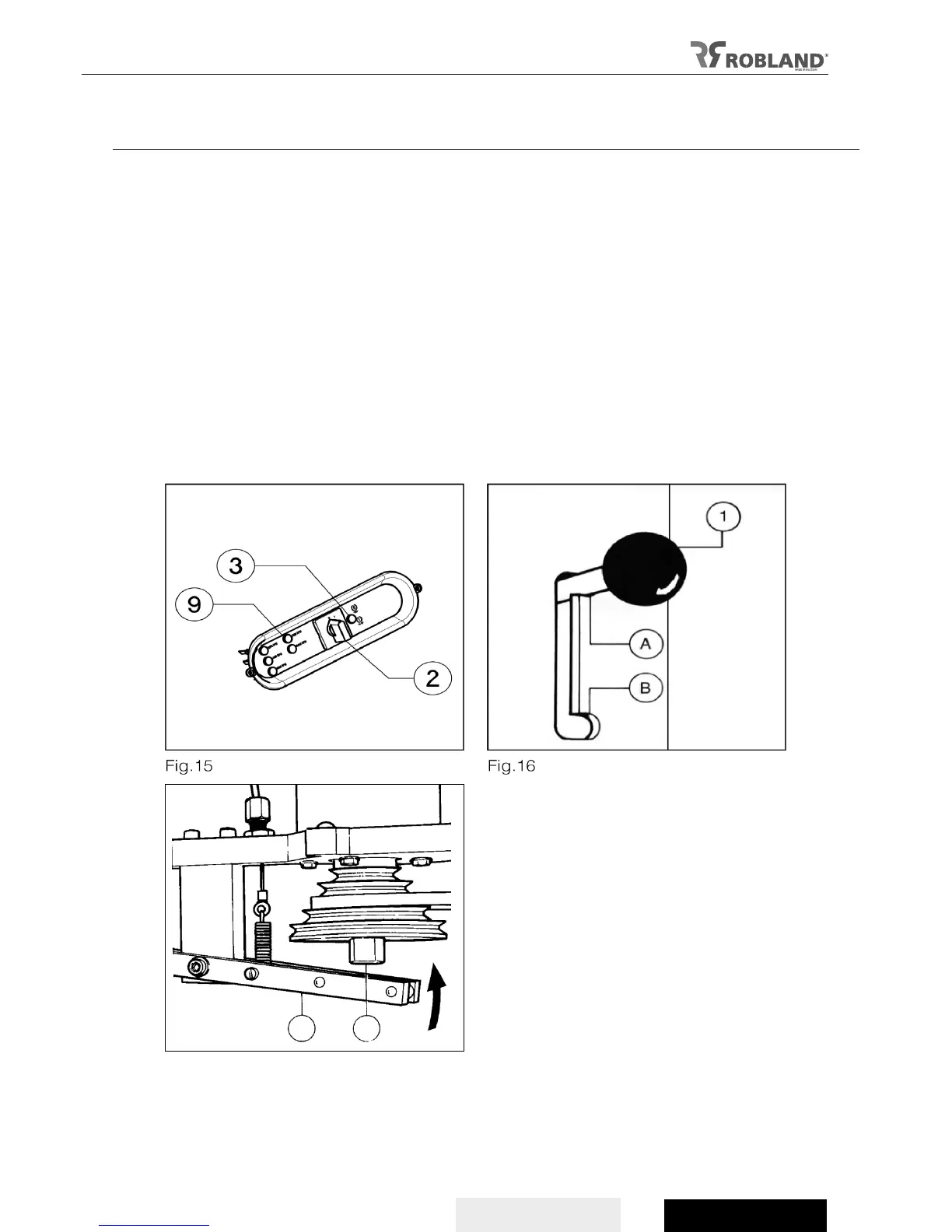
- Put the brake release switch (fig 15.2) on “1” to release the spindle arbor from the brake motor.
- Then the handle must be pushed downward into the stop groove on the frame (B).
- Turn the spindle manually to bring the spindle in locking position (fig 17. A-B).
- Two electrical contacts prevent the motor from being started when the spindle or another tool is
being replaced.
- To get the machine ready for use, it is important to check if the handle is pointing up (fig 16. A) and
the brake release switch is on “0” (fig 15.2).
-The braking motor on the machine is automatically put into action when the emergency stop (fig 5.7 /
fig 7.7) or the stop button (fig 5.6 / fig7.6) is pushed.
Installation of a feeder
The feeder can be used as protection when tenoning and is often the best protection on the machines.
Feeders can easily be adjusted to the size of pieces to be machined.
An electrical connection for the feeder can be delivered in option. It is a thermo-magnet which can be
installed inside the electrical panel, with a CEE connection on the outside.
The feeder must be connected to the power supply. When the tool-holder is stopped, at the same time
the feeder is automatically stopped.


 To Next Page