Robustel M1200 User Guide
RT_UG_M1200_v.1.0.2 9 Apr., 2018 47/78
ON-OFF: DI interface support ON and OFF mode (high or low level
electrical) trigger DI alarm. The mode default to ON, and OFF mode is
available only when enabling the inversion feature
ON—Under this mode, DI alarm status will be triggered to ON when DI
interface open from GND or input a high level electrical (logic 1), on the
contrary DI alarm status will be trigged to OFF when DI interface connect
to GND or input a low level electrical (logic 0)
OFF—Under this mode, DI alarm status will be triggered to ON when DI
interface connect to GND or input a low level electrical (logic 0), on the
contrary DI alarm status will be trigged to OFF when DI interface open
from GND or input a high level electrical (logic 1)
Counter: Event counter mode
Set the threshold vale. It will trigger alarm when event counter reaches this
figure. After triggering alarm, DI will keep counting but not trigger alarm
again. Enter 0 to 65535 digits. (0=will not trigger alarm)
Note: It defaults as high alarm, while turns to low alarm after enabling the “Inversion” button.
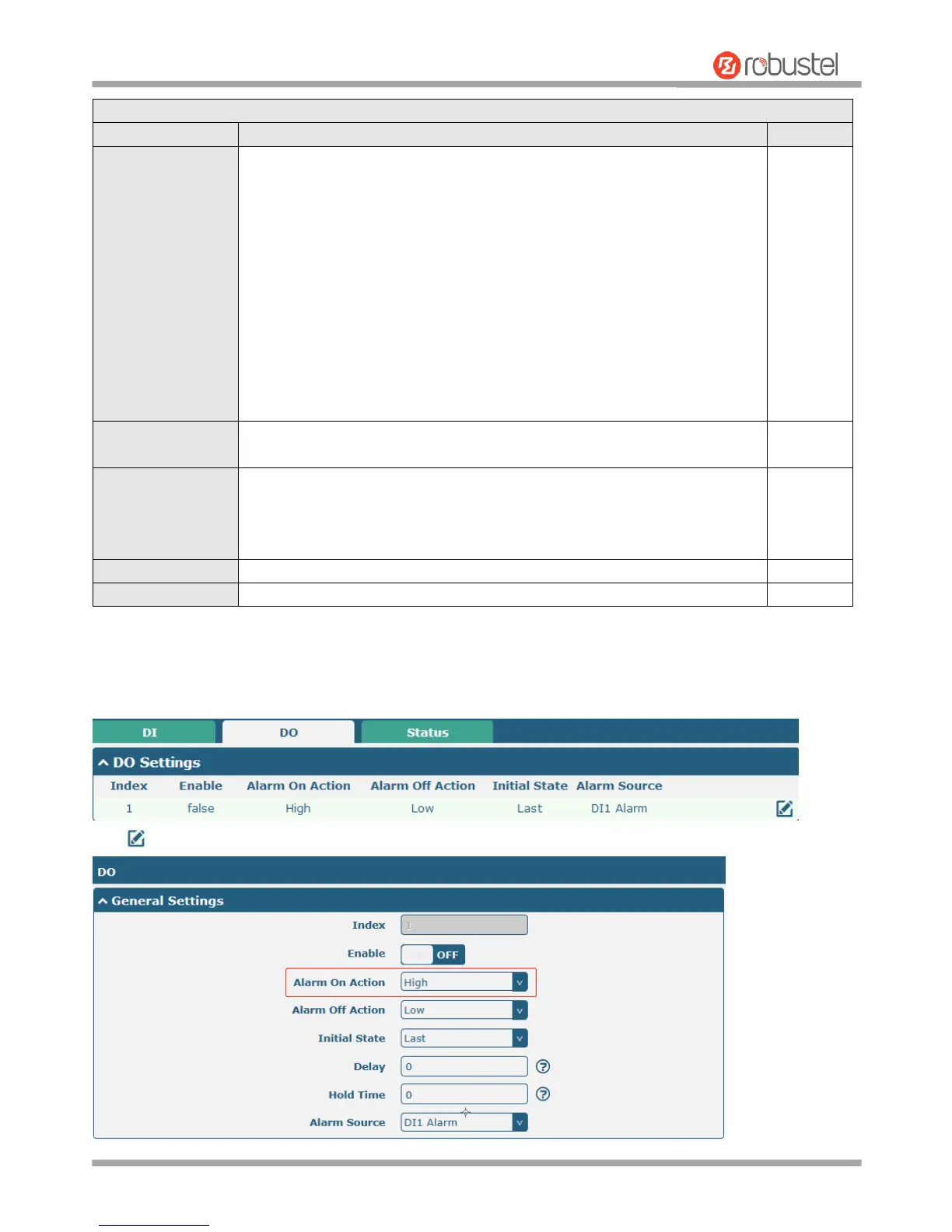
DO
Click to enter the DO configuration window.


 To Next Page