EasyManua.ls Logo

Robustel M1200 - Page 48

Robustel M1200
78 pages
Print Icon
To Next Page IconTo Next Page
To Previous Page IconTo Previous Page
Loading...
Robustel M1200 User Guide
RT_UG_M1200_v.1.0.2 9 Apr., 2018 48/78
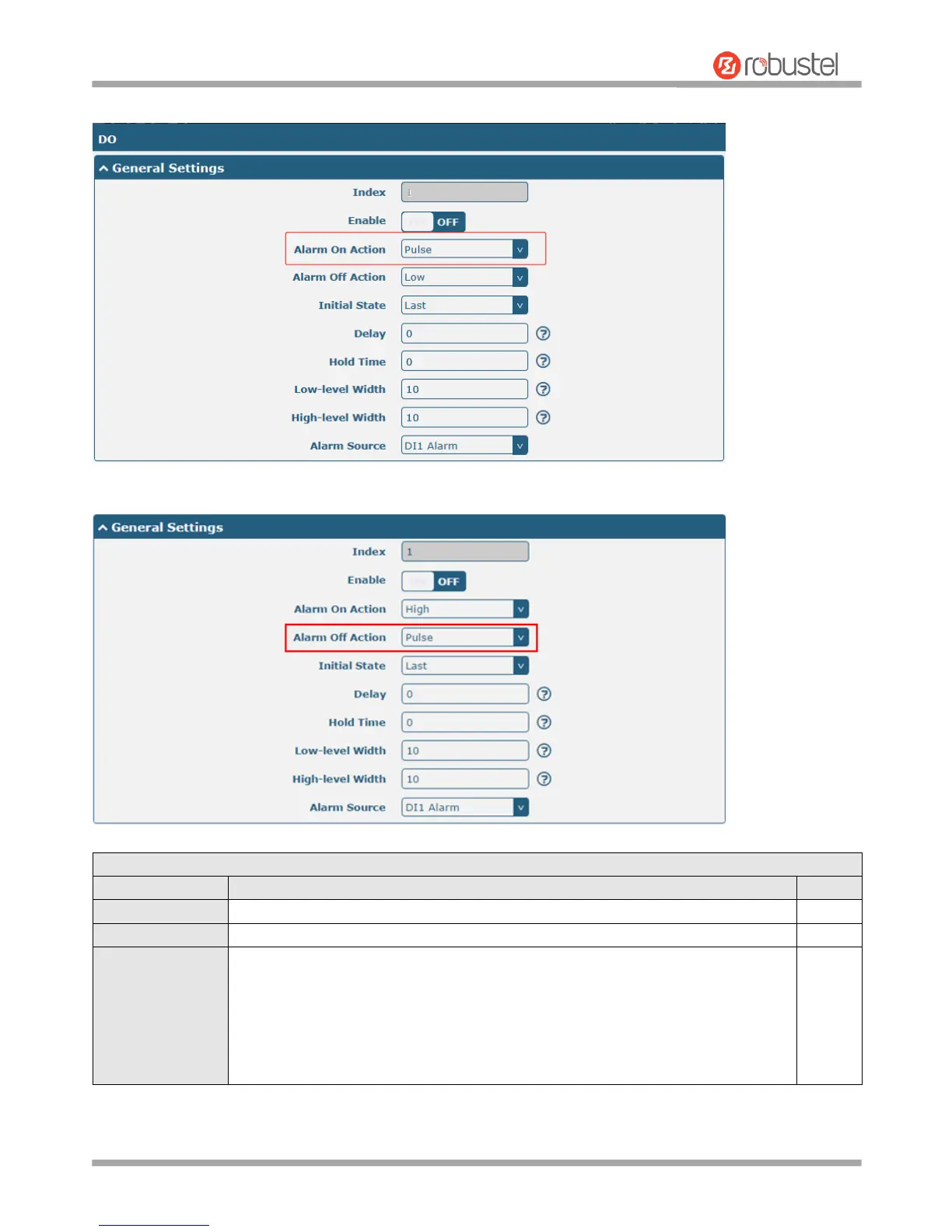
The window is displayed as below when choosing “Pulse” as the alarm on action.
The window is displayed as below when choosing “Pulse” as the alarm off action.
General Settings @ DO
Item
Description
Default
Index
Indicate the ordinal of the list.
--
Enable
Click the toggle button to enable/disable this DO.
OFF
Alarm On Action
Digital Output initiates when there is an alarm. Selected from “High, “Low or
“Pulse”.
High: a high electrical level output
Low: a low electrical level output
Pulse: Generates a square wave as specified in the pulse mode parameters
when triggered
High

Related product manuals