3-24 Programming and Parameters
SPEED COMMAND (File C)
Speed Trim
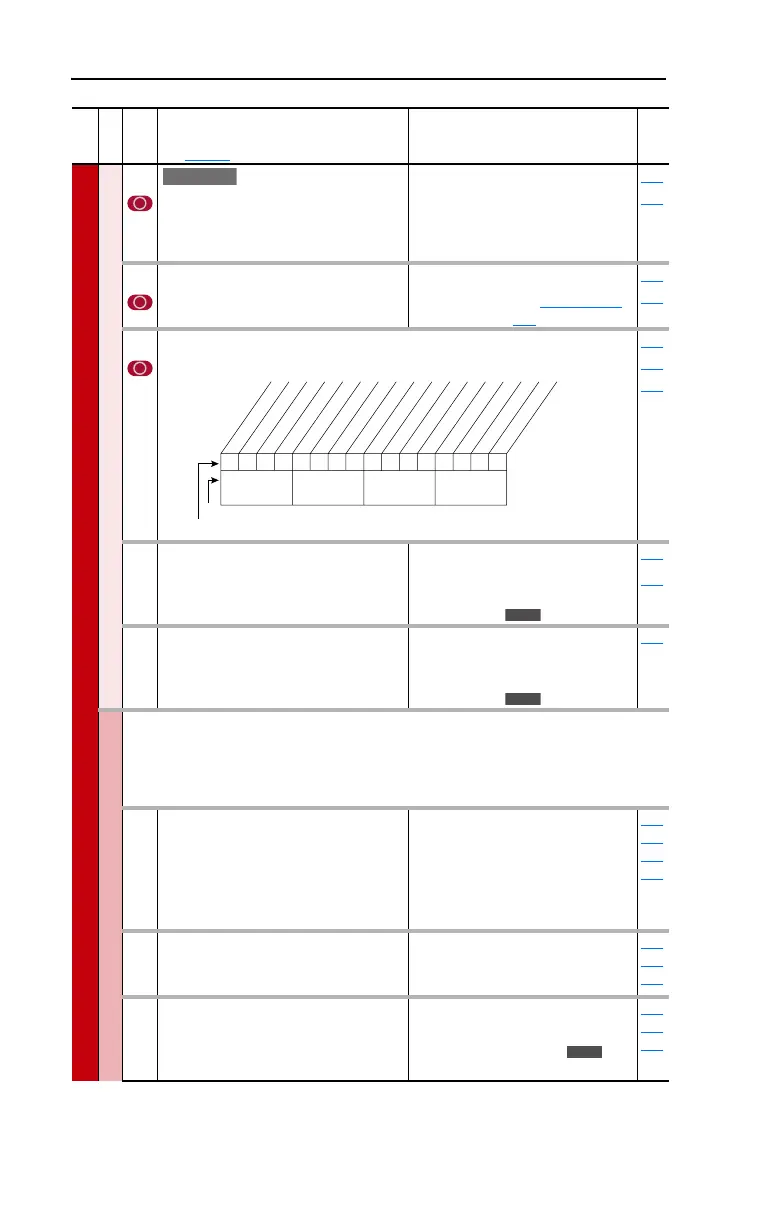
116 [Trim % Setpoint]
Adds or subtracts a percentage of the
speed reference or maximum speed.
Dependent on the setting of [Trim Out
Select], parameter 118.
Default:
Min/Max:
Units:
0.00%
–/+200.00%
0.01%
090
093
117 [Trim In Select]
Specifies which analog input signal is
being used as a trim input.
Default:
Options:
2 “Analog In 2”
See [Speed Ref A
Sel]
090
093
118 [Trim Out Select]
Specifies which speed references are to be trimmed.
117
119
120
119 [Trim Hi]
Scales the upper value of the [Trim In
Select] selection when the source is an
analog input.
Default:
Min/Max:
Units:
60.0 Hz
–/+[Maximum Speed]
0.1 Hz
1 %
082
117
120 [Trim Lo]
Scales the lower value of the [Trim In
Select] selection when the source is an
analog input.
Default:
Min/Max:
Units:
0.0 Hz
–/+[Maximum Speed]
0.1 Hz
1 %
117
Slip Comp
Important: Parameters in the Slip Comp Group are used to enable and tune the
Slip Compensation Regulator. In order to allow the Slip Compensation Regulator
to control drive operation, parameter 080 must be set to 1 “Slip Comp”.
121 [Slip RPM @ FLA]
Sets the amount of compensation to drive
output at motor FLA.
If the value of parameter 061 [Autotune] =
3 “Calculate” changes made to this
parameter will not be accepted.
Default:
Min/Max:
Units:
Based on [Motor NP RPM]
0.0/1200.0 RPM
0.1 RPM
061
080
122
123
122 [Slip Comp Gain]
Sets the response time of slip
compensation.
Default:
Min/Max:
Units:
40.0
1.0/100.0
0.1
080
121
122
123 [Slip RPM Meter]
Displays the present amount of
adjustment being applied as slip
compensation.
Default:
Min/Max:
Units:
Read Only
0.0/300.0 RPM
–/+300.0 RPM
0.1 RPM
080
121
122
File C
Group
No.
Parameter Name and Description
See page 3-2 for symbol descriptions
Values
Related
E C
00x 0xxxxxxxxxxxx
10 01234567891112131415
1 =Trimmed
0 =Not Trimmed
x =Reserved
Bit #
* Enhanced Control Option Only.Factory Default Bit Values
Trim Ref A
Trim Ref B
Add or % *
Nibble 1Nibble 2Nibble 3Nibble 4
E C
E C
E C



 To Next Page