Programming and Parameters 3-25
SPEED COMMAND (File C)
Process PI
Important: Parameters in the Process PI Group are used to enable and tune the
PI Loop.
To allow the PI Loop to control drive operation, parameter 080 must be
set to 2 “Process PI”.
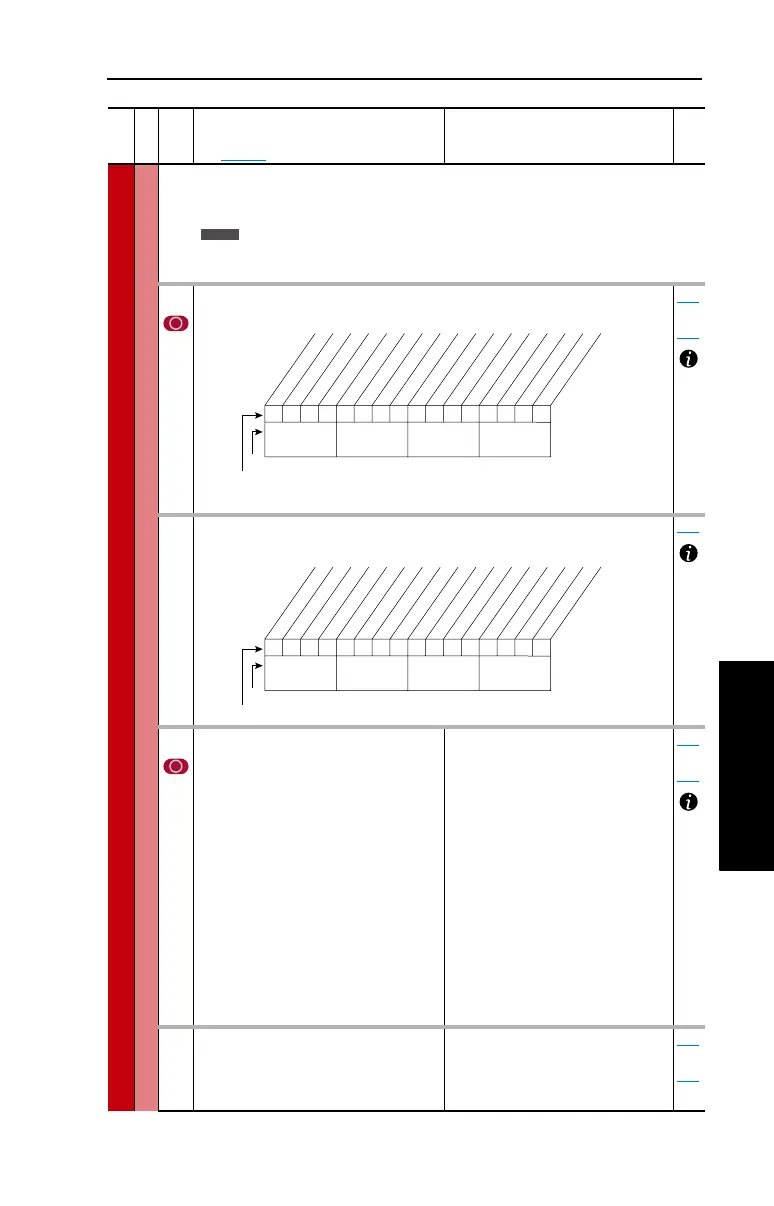
124 [PI Configuration]
Sets configuration of the PI regulator.
124
thru
138
125 [PI Control]
Controls the PI regulator.
080
126 [PI Reference Sel]
Selects the source of the PI reference.
(1)
Enhanced Control Drives Only.
Default:
Options:
0
0
1
2
3-7
8
9
10
11-
17
18-
20
21
22
23-29
30
“PI Setpoint”
“PI Setpoint”
“Analog In 1”
“Analog In 2”
“Reserved”
“Encoder”
“MOP Level”
“Master Ref”
“Preset Spd1-7”
“DPI Port 1-3”
“Reserved”
“DPI Port 5”
“Reserved”
“HighRes Ref”
(1)
124
thru
138
127 [PI Setpoint]
Provides an internal fixed value for
process setpoint when [PI Reference Sel]
is set to “PI Setpoint.”
Default:
Min/Max:
Units:
50.00%
–/+100.00% of Maximum
Process Value
0.01%
124
thru
138
File C
Group
No.
Parameter Name and Description
See page 3-2 for symbol descriptions
Values
Related
Standard
0000000000xxxxxx
10 01234567891112131415
1 =Enabled
0 =Disabled
x =Reserved
Bit #
Factory Default Bit Values
Excl Mode
Invert Error
Preload Mode
Ramp Ref
Zero Clamp
Feedbak Sqrt
Stop Mode
(1)
Anti-Wind Up
(1)
Torque Trim
(2)
% of Ref
(2)
Nibble 1Nibble 2Nibble 3Nibble 4
(1)
Enhanced firmware 1.001 & later.
(2)
Enhanced firmware 2.001 & later.
00x 0xxxxxxxxxxxx
10 01234567891112131415
1 =Enabled
0 =Disabled
x =Reserved
Bit #
Factory Default Bit Values
PI Enable
PI Hold
PI Reset
Nibble 1Nibble 2Nibble 3Nibble 4



 To Next Page