Programming and Parameters 3-27
SPEED COMMAND (File C)
Process PI
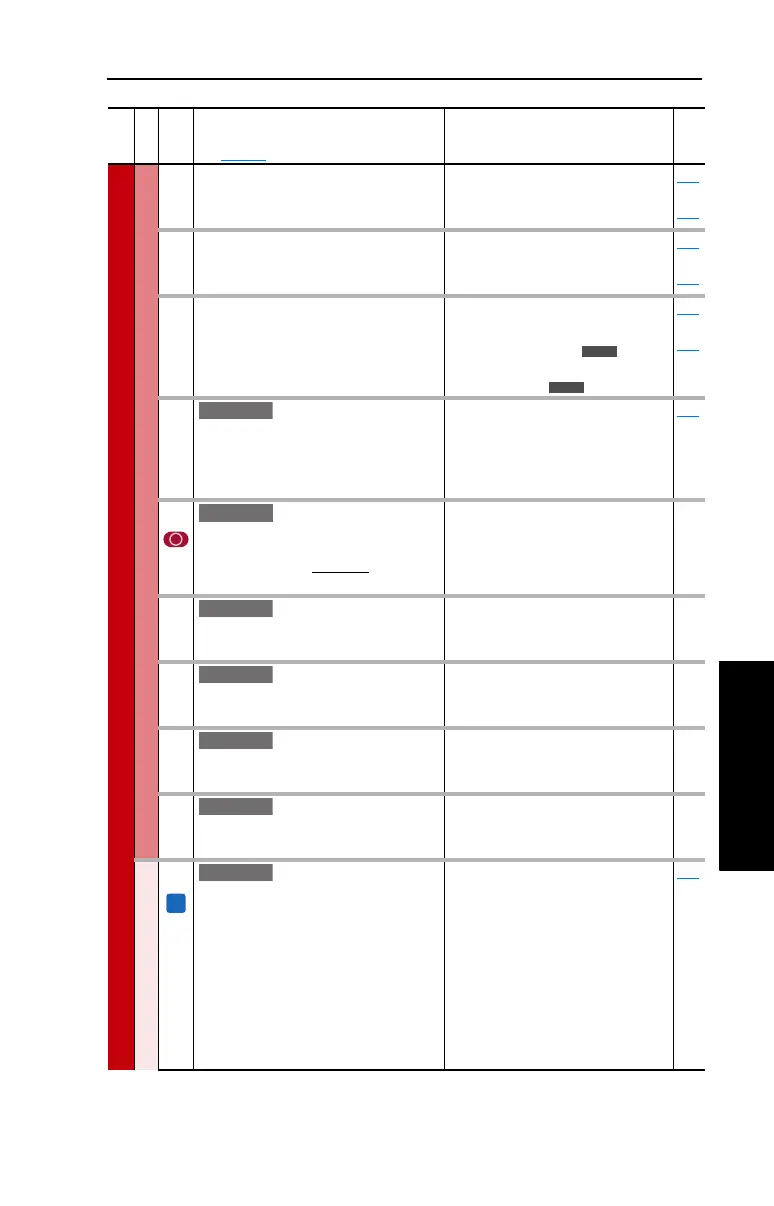
136 [PI Fdback Meter]
Present value of the PI feedback signal.
Default:
Min/Max:
Units:
Read Only
–/+100.00%
0.01%
124
thru
138
137 [PI Error Meter]
Present value of the PI error.
Default:
Min/Max:
Units:
Read Only
–/+100.00%
0.01%
124
thru
138
138 [PI Output Meter]
Present value of the PI output.
Default:
Min/Max:
Units:
Read Only
–/+100.0 Hz
–/+800.0%
0.1 Hz
0.1%
124
thru
138
139 [PI BW Filter]
Firmware 2.001 & later – Provides filter for
Process PI error signal. The output of this
filter is displayed in [PI Error Meter]. Zero
will disable the filter.
Default:
Min/Max:
Units:
0.0 R/s
0.0/240.0 R/s
0.1 R/s
137
459 [PI Deriv Time]
Refer to formula below:
Default:
Min/Max:
Units:
0.00 Secs
0.00/100.00 Secs
0.01 Secs
460 [PI Reference Hi]
Scales the upper value of [PI Reference
Sel] of the source.
Default:
Min/Max:
Units:
100.0%
–/+100.0%
0.1%
461 [PI Reference Lo]
Scales the lower value of [PI Reference
Sel] of the source.
Default:
Min/Max:
Units:
–100.0%
–/+100.0%
0.1%
462 [PI Feedback Hi]
Scales the upper value of [PI Feedback]
of the source.
Default:
Min/Max:
Units:
100.0%
–/+100.0%
0.1%
463 [PI Feedback Lo]
Scales the lower value of [PI Feedback] of
the source.
Default:
Min/Max:
Units:
0.0%
–/+100.0%
0.1%
Speed Regulator
445 [Ki Speed Loop]
Controls the integral error gain of the
speed regulator. The drive automatically
adjusts [Ki Speed Loop] when a non-zero
value is entered for [Speed Desired BW]
or an autotune is performed. Typically,
manual adjustment of this parameter is
needed only if system inertia cannot be
determined through an autotune. [Speed
Desired BW] is set to “0” when a manual
adjustment is made to this parameter.
Default:
Min/Max:
Units:
7.8
0.0/4000.0
0.1
053
File C
Group
No.
Parameter Name and Description
See page 3-2 for symbol descriptions
Values
Related
E C
E C
E C v2
E C v2
d
PI Error
(%)
d
t
(Sec)
PI
Out
= KD (Sec) x
E C
E C
E C
E C
FV
E C v2



 To Next Page