3-42 Programming and Parameters
UTILITY (File E)
Diagnostics
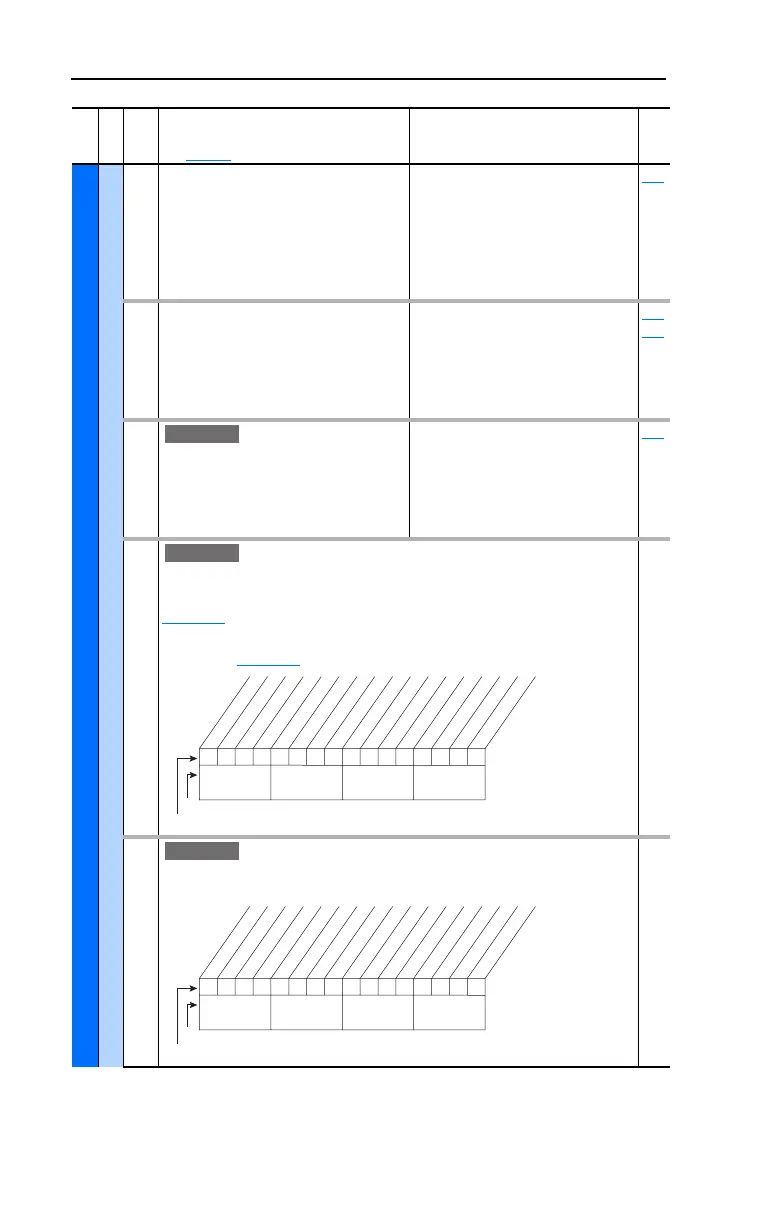
219 [Drive OL Count]
Accumulated percentage of drive
overload. Continuously operating the
drive over 100% of its rating will increase
this value to 100% and cause a drive fault
or foldback depending on the setting of
[Drive OL Mode].
Default:
Min/Max:
Units:
Read Only
0.0/100.0%
0.1%
150
220 [Motor OL Count]
Accumulated percentage of motor
overload. Continuously operating the
motor over 100% of the motor overload
setting will increase this value to 100%
and cause a drive fault.
Default:
Min/Max:
Units:
Read Only
0.0/100.0%
0.1%
047
048
221 [Mtr OL Trip Time]
Amount of time before a drive Overload
fault(F64) occurs if the load condition
remains constant. A value of 99999
means that the drive is operating under
the overload level.
Default:
Min/Max:
Units:
Read Only
0/99999
1
220
222 [Drive Status 3]
Present operating condition of the drive.
Manual Mode - See Manual Speed Sources on
page 1-19
.
Fast Braking - Fast Braking is active, see [Stop/Brk
Mode A] on page 3-30
.
Read Only
223 [Status 3 @ Fault]
Captures and displays [Drive Status 3] bit pattern at
the time of the last fault.
Read Only
File E
Group
No.
Parameter Name and Description
See page 3-2 for symbol descriptions
Values
Related
E C v3
E C v3
0xx 0xxxxxxxxxxxx
10 01234567891112131415
1 = Condition True
0 = Condition False
x = Reserved
Bit #
Factory Default Bit Values
Manual Mode
Fast Braking
Nibble 1Nibble 2Nibble 3Nibble 4
E C v3
0xx 0xxxxxxxxxxxx
10 01234567891112131415
1 = Condition True
0 = Condition False
x = Reserved
Bit #
Factory Default Bit Values
Manual Mode
Fast Braking
Nibble 1Nibble 2Nibble 3Nibble 4



 To Next Page