EasyManua.ls Logo

ROHO AGILITY - User Manual

ROHO AGILITY
22 pages
Print Icon
To Next Page IconTo Next Page
Loading...
ROHO
®
AGILITY
Back Systems
OPERATION MANUAL
SUPPLIER: This manual must be given to the user of this product.
USER: Before using this product, read instructions and save for
future reference.
shape fitting technology
®
Visit www.therohogroup.com to view the contents of this document in additional languages.
ESPAÑOL: Visite www.therohogroup.com para ver el contenido de este documento en otros idiomas.
FRANÇAIS: Visitez le www.therohogroup.com pour voir le contenu de ce document dans différentes langues.
DEUTSCH: Besuchen Sie www.therohogroup.com, um den Inhalt dieses Dokuments in weiteren Sprachen anzuzeigen.
ITALIANO: Visitare www.therohogroup.com per visualizzare i contenuti del presente documento nelle altre lingue.
NEDERLANDS: Ga naar www.therohogroup.com om de inhoud van dit document in andere talen te bekijken.
DANSK: Besøg www.therohogroup.com for at se indholdet af dette dokument på andre sprog.
SVENSKA: Besök www.therohogroup.com för att visa innehållet i detta dokument i ytterligare språk.
NORSK: Besøk www.therohogroup.com for å se innholdet i dette dokumentet på flere språk.
SUOMI: Käy osoitteessa www.therohogroup.com nähdäksesi tämän asiakirjan sisällön muilla kielillä.
PORTUGUÊS: Visite www.therohogroup.com para exibir o conteúdo deste documento em outros idiomas.

Questions and Answers

  • N
    nicoleduranJul 27, 2025
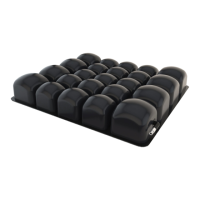
    What to do if ROHO AGILITY Wheelchair air insert is not holding air?
    • S
      sextonlisaJul 27, 2025
      If the air insert in your ROHO Wheelchair is not holding air, ensure the valve is tightly closed by turning it clockwise. If it still leaks, check for holes. If you find any small, 'pin-hole' sized holes, dry the insert completely and use the repair kit that came with the product, following the kit instructions.
  • D
    Dr. Jessica Collier DDSAug 1, 2025
    How to make ROHO AGILITY air insert more comfortable?
    • C
      Christopher ThomasAug 1, 2025
      If the air insert in your ROHO Wheelchair is not comfortable, try adding or removing air to adjust it to your preferred comfort level. Also, ensure that the air cells are facing the front of the wheelchair and the cover is correctly positioned. If the air insert slides inside the cover, make sure it is properly positioned and the fabric back is secured to the fastener strip in the cutout area of the foam pad.
  • G
    Gregory BradyAug 13, 2025
    Why ROHO AGILITY Wheelchair latches will not close?
    • M
      Mark CruzAug 14, 2025
      If the latches on your ROHO Wheelchair will not close, check to see if the safety locks are in the LOCKED position.
  • J
    Jasmin AlvarezAug 20, 2025
    What to do if ROHO AGILITY triangle bracket will not slide?
    • C
      Catherine HoldenAug 20, 2025
      If the triangle bracket on your ROHO Wheelchair will not slide, make sure the slider nut is not in a position to interfere.
  • J
    Jacqueline BartlettNov 7, 2025
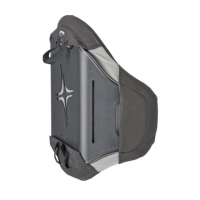
    How to install or adjust AGILITY on ROHO Wheelchair?
    • L
      Lisa TurnerNov 7, 2025
      When installing or adjusting the AGILITY feature on your ROHO Wheelchair, ensure the left and right back cane brackets align with the wheelchair frame and aren't twisted. Verify that the heights of both back cane brackets are equal using a tape measure if needed. The back cane brackets are normally installed on the back side of the back canes, but if a rigidizer bar interferes, they can be installed on the front side. Make sure the width is appropriately set for the chair, as back cane widths may vary. If latches won't close, check if safety locks are in the LOCKED position; they should be UNLOCKED to install AGILITY and then LOCKED before seating the individual. Also, confirm the left and right back shell hardware are on the correct sides and that the width and height adjustment bolts are...

Summary

Intended Use

General Safety Warnings

General Safety Cautions

Motor Vehicle Transportation Safety

Back Cane Hardware Installation

AGILITY Installation

Width Adjustment

Height Adjustment

Depth and Angle Adjustment

Accessories

Lumbar Support Pad Installation

Instructions for installing the lumbar support pad into the AGILITY cover.

Headrest Installation

Guidance on installing a third-party headrest compatible with AGILITY.

Cleaning and Disinfecting

Maintenance

Troubleshooting

Back Cane Hardware Installation Issues

Guides for resolving installation problems with back cane hardware.

AGILITY Installation Issues

Troubleshooting steps for AGILITY installation problems.

Width and Height Adjustment Issues

Resolving problems encountered during width and height adjustments.

Depth and Angle Adjustment Issues

Guides for fixing depth and angle adjustment problems.

Air Insert Problems

Solutions for issues related to the AGILITY air insert.

ROHO AGILITY Specifications

General IconGeneral
AdjustabilityYes
Mounting HardwareIncluded
Seat Depth16 inches
Frame MaterialAluminum
Seat Width16, 18, 20 inches

Related product manuals