F1
F2 F3 F4
F1
F2 F3 F4
3-3
MODEL 54 C SECTION 3
PROGRAMING THE ANALYZER
Level 2 Program. To access the program level from
the main menu, place the cursor over “Program” using
the down arrow key, and press Enter (F4). From the
program level menu, changes can be made to the
alarm setpoints and the output setpoints.
Level 3 Configure. To access the configure level from
the main menu place cursor over “Program”, press
Enter (F4), then place cursor over “Configure” and
again press Enter (F4). This level contains more
advanced options.
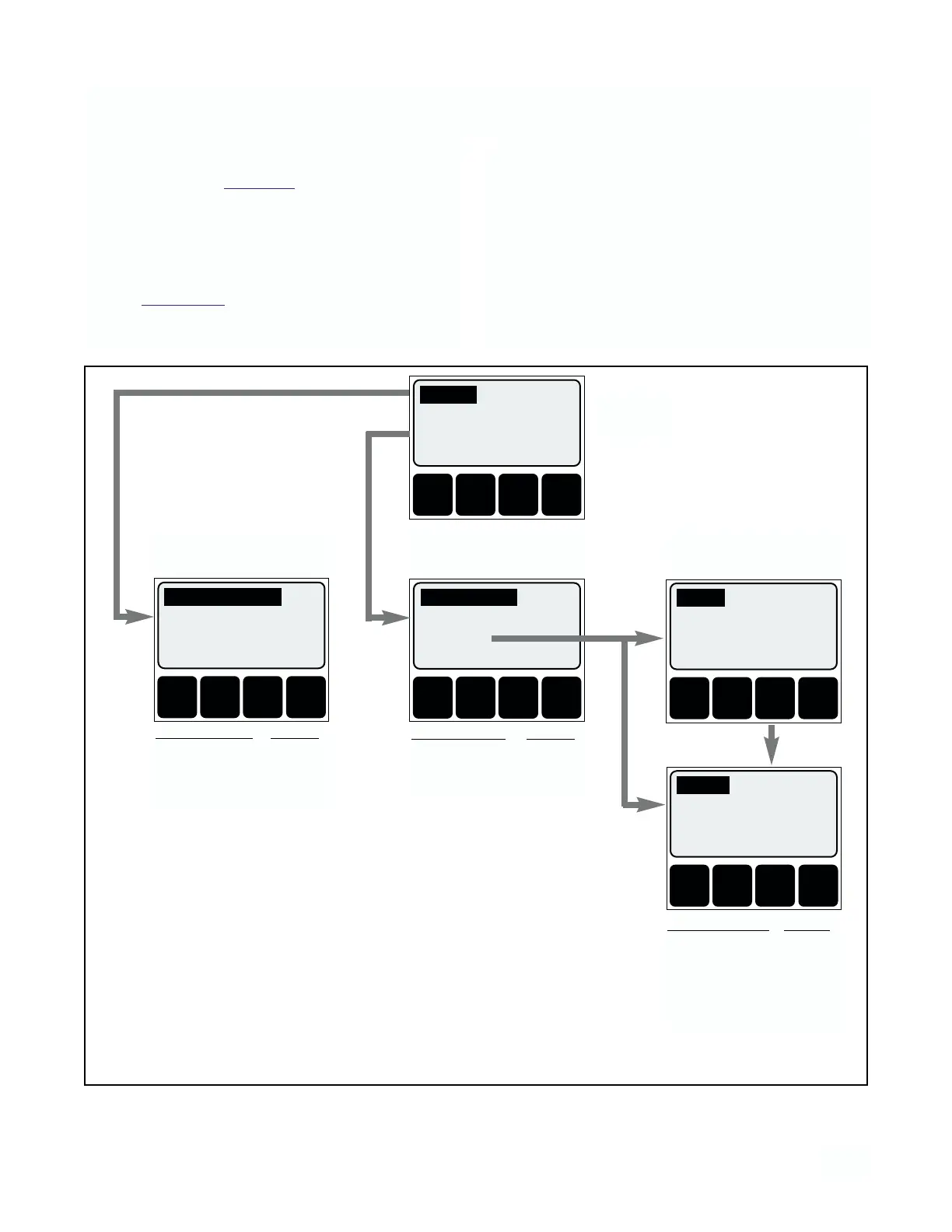
Accessing Calibrate, Program and Configure
Menus Operating configuration changes are made at
the levels shown in Figure 3-1. Press any key from the
operating display to access the main menu.
Level 1 Calibrate. To access calibration selections
from the main menu, press Enter (F4) with the cursor
on “Calibrate”. Standardize conductivity, Initial setup,
and temperature adjustments are made at this level
(refer to Section 4.0 for these procedures).
LEVEL 1
CALIBRATE
F1
F2 F3 F4
LEVEL 3
CONFIGURATION
F1
F2 F3 F4
F1
F2 F3 F4
LEVEL 2
PROGRAM
MAIN
MENU
PRESS
MORE (F3)
Calibrate
Diagnostic variables
Program
Exit Enter
Alarm setpoints
Rerange outputs
Configure
Exit Enter
Display
Outputs
Alarms
Exit More Enter
PROGRAM MENU SECTION
Alarm Setpoints 3.1
Output Reranging 3.2
CALIBRATE MENU SECTION
Initial Setup 4.3
Standardize Cond 4.4
Adjust Temperature 4.1
CONFIGURATION MENU
SECTION
Display 3.3
Outputs 3.4
Alarms 3.5
Security 3.6
Temp Sensor 3.7
Security
Temperature sensor
Exit More Enter
Standardize Cond.
Initial setup
Adjust temperature
Exit Enter
FIGURE 3-1. Outline of Menu Levels


 To Next Page