Wireless N Adapter RNX-N150PCx User Manual
Chapter 5 Utility Detailed Definition Guide
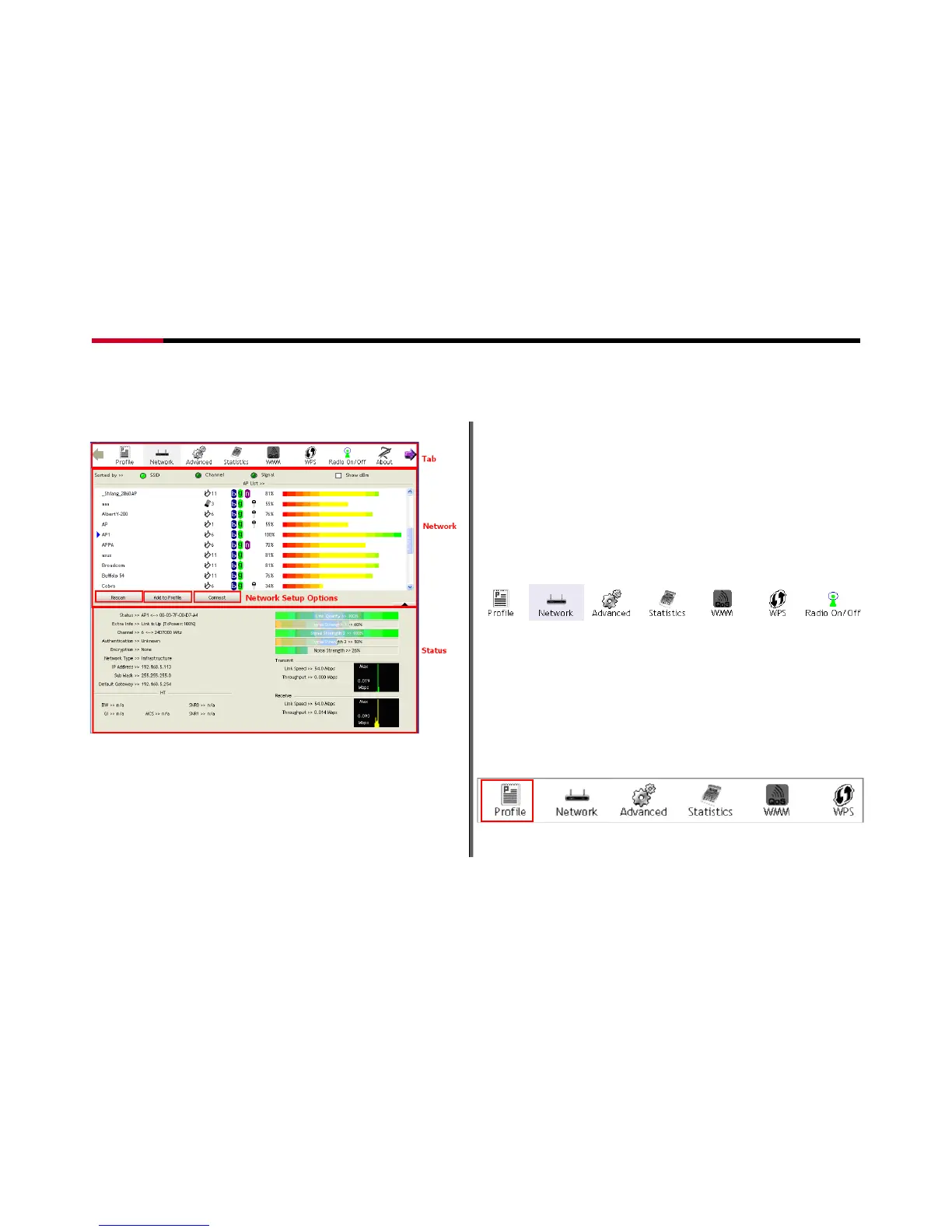
The Rosewill Utility consisted of three parts:
Figure 5-1
1 Tab Section: on top of the window. You can click each button to
access each configuration windows includes Profile page,
Network Page, Advanced Page, Statistics Page, WMM Page,
WPS Page, Radio On/Off function, and About
2 Network Section: Provides you with information on the wireless
signals around you. You have options to setup wireless network
here with “Rescan”, “Add to Profile”, and “Connect”
3 Status Section: bottom of the utility window. It shows the
connection status and system information.
5.1 Tab Section Details
Figure 5-2
Tab Section provides you with the option to utilize RNX-N150PCx.
5.1.1 Profile
The Profile List keeps a record of your favorite wireless
settings at home, office, and other public hot-spots. You can
save multiple profiles, and activate the correct one at your
preference. Figure 5-4 shows the basic profile section.
Figure 5-3
- 25 -




 To Next Page