Wireless N Adapter RNX-N150PCx User Manual
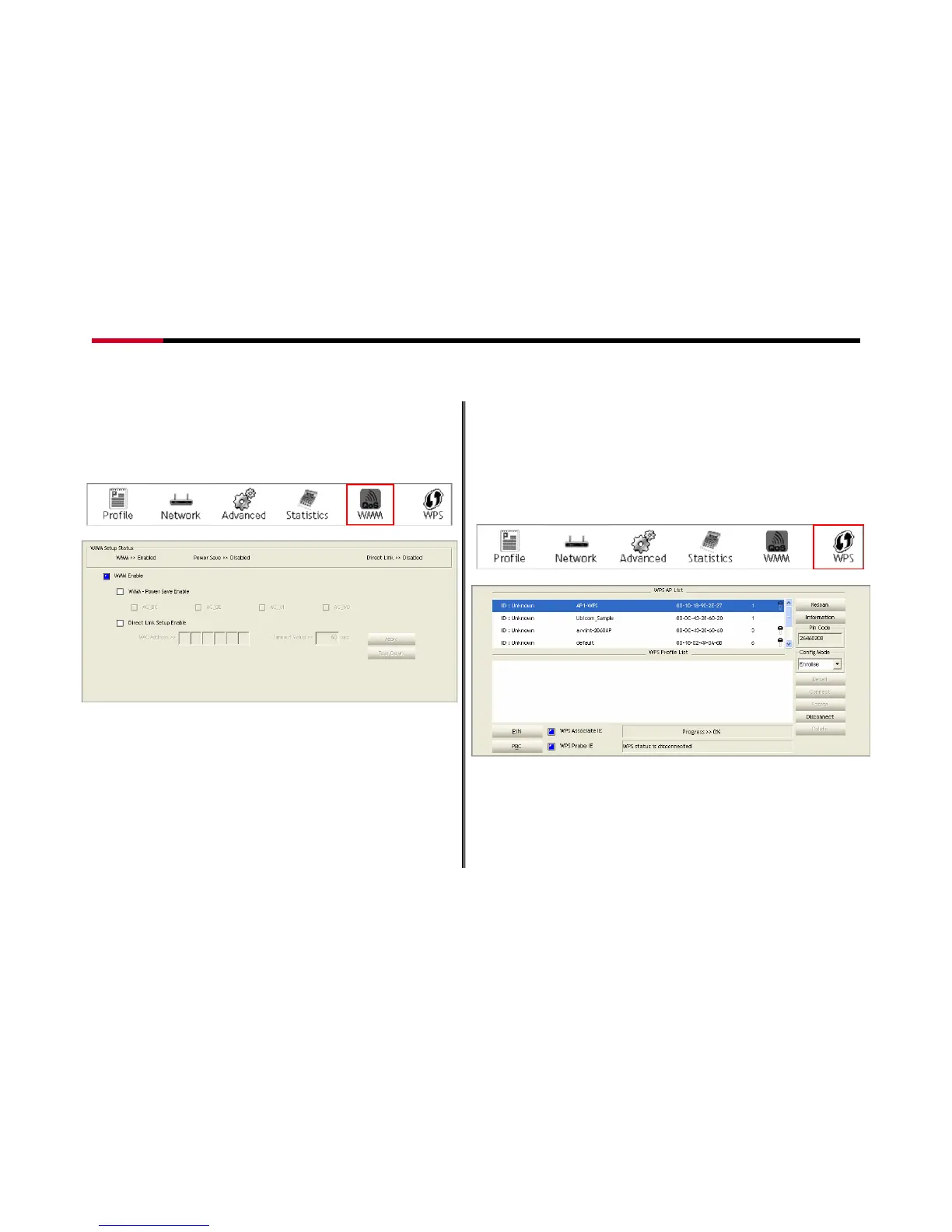
5.1.5 WMM
This function allows users to activate the WMM function for
this device. Please note that this function only works while
connecting to a WMM compatible device.
Figure 5-12
Figure 5-13
Definition of Each Fields in WMM:
WMM Enable: Enable Wi-Fi Multi-Media.
WMM - Power Save Enable: Enable WMM Power Save.
Please enable WMM before configuring this function.
Direct Link Setup Enable: Enable DLS (Direct Link Setup).
Please enable WMM before configuring this function.
5.1.6 WPS
The primary goal of Wi-Fi Protected Setup (Wi-Fi Simple
Configuration) is to simplify the security setup and management
of Wi-Fi networks. This adapter supports the configuration
setup using PIN configuration method or PBC configuration
method through an internal or external Registrar.
Figure 5-14
Figure 5-15
Definition of Each Fields in WPS:
WPS AP List: Display the information of surrounding APs with WPS
IE from last scan result. List information includes SSID, BSSID,
Channel, ID (Device Password ID), Security-Enabled.
- 29 -




 To Next Page