Wireless N Adapter RNX-N150PCx User Manual
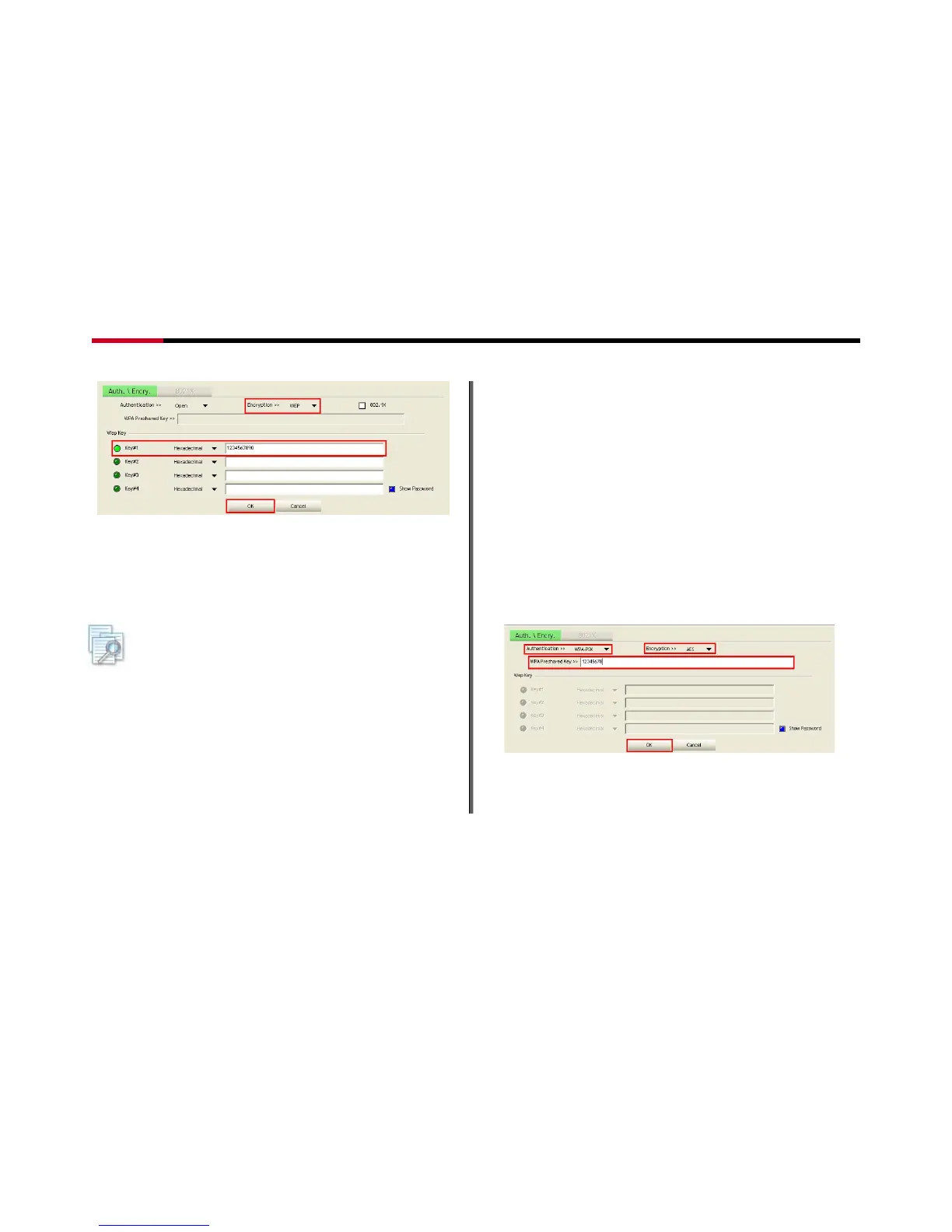
Figure 7-19
3. Enter your password in the Key#1 Hexadecimal
field. This value is same as your intended AP's
setting. Click “OK”, then this process will be
complete.
Note: if the WPA Pre-Shared Key entered is not correct, you
won’t be able to exchange any data frames, even though the AP can
be connected.
7.3.2 Example to Configure Connection with
WPA-PSK
1. Select an AP with WPA-PSK authentication mode
and click "Connect".
2. The Auth.\Encry. function will appear as below
select WPA-PSK as the Authentication Type, then
select TKIP or AES for encryption. Enter the WPA
Pre-Shared Key. The WPA Pre-Shared Key here is
use your intended AP’s setting. (12345678 here is
just a reference, please use a more complex
password for better protect of your wireless
network).
Figure 7-20
3. Click “OK”, then the process is complete.
- 44 -




 To Next Page